Sharp MX-B201D Specifikace Strana 84: ACCOUNT NUMBER CONTROL
 1
 2
 3
 4
 5
 6
 7
 8
 9
 10
 11
 12
 13
 14
 15
 16
 17
 18
 19
 20
 21
 22
 23
 24
 25
 26
 27
 28
 29
 30
 31
 32
 33
 34
 35
 36
 37
 38
 39
 40
 41
 42
 43
 44
 45
 46
 47
 48
 49
 50
 51
 52
 53
 54
 55
 56
 57
 58
 59
 60
 61
 62
 63
 64
 65
 66
 67
 68
 69
 70
 71
 72
 73
 74
 75
 76
 77
 78
 79
 80
 81
 82
 83
 84
 85
 86
 87
 88
 89
 90
 91
 92
 93
 94
 95
 96
 97
 98
 99
 100
 101
 102
 103
 104
 105
 106
 107
 108
 109
 110
 111
 112
 113
 114
 115
 116
 117
83
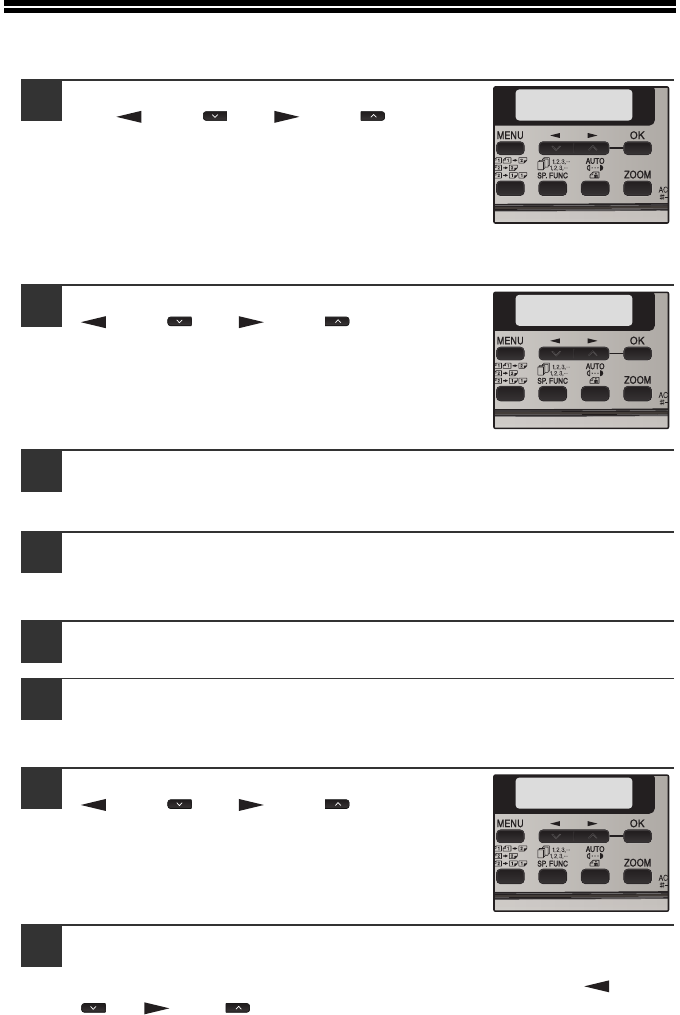
ACCOUNT NUMBER CONTROL
This program is used to enter, delete and change account numbers.
1
After step 1, 2 and 4 on page 81 - 82, press
the [
] key (
) or [
] key (
) until
[4: ACC. # CONTROL] appears and then
press the [OK] key.
2
3
4
5
Entering an account number
1
Select "1. ENTER ACCOUNT #" with the
[
] key (
) or [
] key (
) and then
press the [OK] key.
2
If 15 accounts have already been programmed, a
warning message appears. Delete any unneeded
accounts and then program the new account.
2
Use the numeric keys to enter a five-digit account number
(00000 to 99999).
3
The key operator code cannot be used a an account number.
3
Press the [OK] key.
If you enter an account number that has already been programmed in step
2, a warning message will appear and you will return to step 2. Enter a
different number.
4
If you wish to program another account number, repeat steps 2
and 3.
5
To exit, press the [C] key repeatedly.
Deleting an account number
1
Select "2. DELETE ACCOUNT #" with the
[
] key (
) or [
] key (
) and then
press the [OK] key.
2
3
4
2
If you wish to delete all account numbers, select "1. DELETE
ALL ACCOUNT" and then press the [OK] key.
3
When the message "DELETE?" appears, select "YES" with the [
] key
(
) or [
] key (
) to delete all accounts and press the [OK] key. If you
do not wish to delete all account numbers, select "NO" and press the [OK]
key.
ACC. CONTROL SET
4:ACC.# CONTROL
ACC.# CONTROL
1: ENTER ACCOUNT #
ACC.# CONTROL
2:DELETE ACCOUNT #
Soubor PDF · ·
Otázky k Sharp MX-B201D
K tomuto návodu zatím nejsou žádné otázky. Položte první.
Související produkty a manuály pro Tisk a skenování Sharp MX-B201D
- Tisk a skenování Sharp MX-M350U Průvodce nastavením
 (91 stránek)
- Tisk a skenování Sharp AR-208S Uživatelský manuál
 (104 stránek)
- Tisk a skenování Sharp M450U Průvodce nastavením
(93 stránek)
- Tisk a skenování Sharp MX-6200N Uživatelský manuál
 (12 stránek)
- Tisk a skenování Sharp AR-FX5 Uživatelský manuál
(6 stránek)
- Tisk a skenování Sharp MX-B201D Uživatelský manuál
(4 stránky)
- Tisk a skenování Sharp AR-M351U Uživatelský manuál
(12 stránek)
- Tisk a skenování Sharp AR-M455 Operation Specifikace
(183 stránek)
- Tisk a skenování Sharp MX-C300PL Uživatelský manuál

 (108 stránek)
- Tisk a skenování Sharp AJ-5030 Uživatelský manuál
(148 stránek)
- Tisk a skenování Sharp DX-B450P Instalační manuál
(28 stránek)
- Tisk a skenování Sharp MX-M350 Specifikace
(110 stránek)
- Tisk a skenování Sharp SF-2014 Uživatelský manuál
(6 stránek)
- Tisk a skenování Sharp AR-M450 Uživatelský manuál
(8 stránek)
- Tisk a skenování Sharp AR-M455 Operation Uživatelský manuál
(18 stránek)
- Tisk a skenování Sharp Z-845 Uživatelská příručka
(44 stránek)
- Tisk a skenování Sharp AR-RB1 Uživatelský manuál
(4 stránky)
- Tisk a skenování Sharp AL-2020 Uživatelský manuál
(42 stránek)
- Tisk a skenování Sharp MX-2700G Uživatelský manuál
(12 stránek)
- Tisk a skenování Sharp AR-M351U Uživatelský manuál
(7 stránek)