Sharp MX-B201D Specifikace Strana 23: REDUCTION/ENLARGEMENT/ZOOM
 1
 2
 3
 4
 5
 6
 7
 8
 9
 10
 11
 12
 13
 14
 15
 16
 17
 18
 19
 20
 21
 22
 23
 24
 25
 26
 27
 28
 29
 30
 31
 32
 33
 34
 35
 36
 37
 38
 39
 40
 41
 42
 43
 44
 45
 46
 47
 48
 49
 50
 51
 52
 53
 54
 55
 56
 57
 58
 59
 60
 61
 62
 63
 64
 65
 66
 67
 68
 69
 70
 71
 72
 73
 74
 75
 76
 77
 78
 79
 80
 81
 82
 83
 84
 85
 86
 87
 88
 89
 90
 91
 92
 93
 94
 95
 96
 97
 98
 99
 100
 101
 102
 103
 104
 105
 106
 107
 108
 109
 110
 111
 112
 113
 114
 115
 116
 117
22
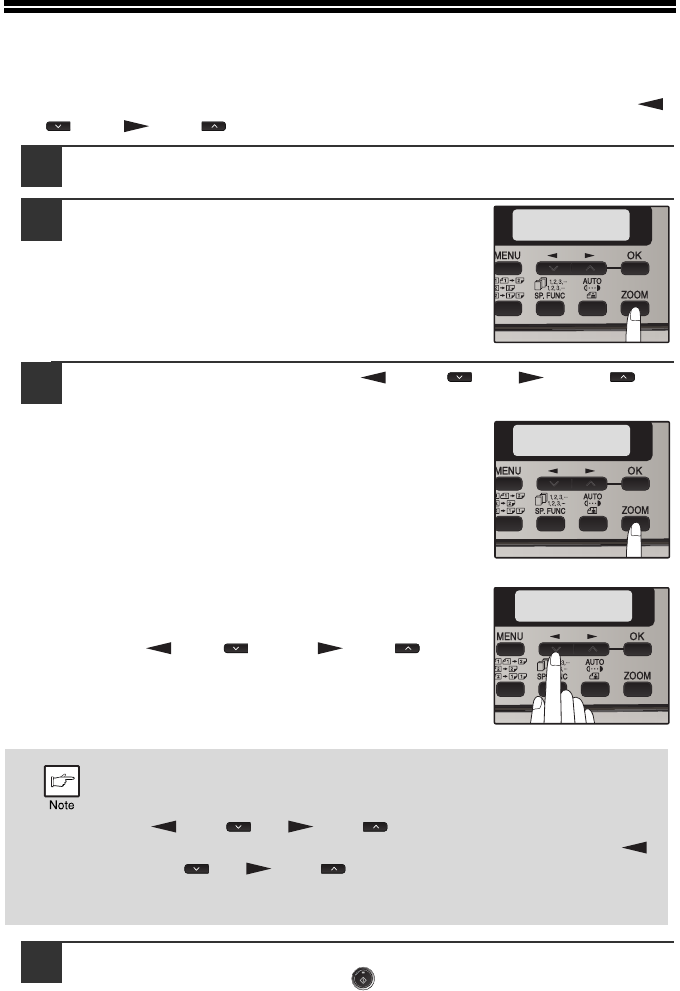
REDUCTION/ENLARGEMENT/ZOOM
Copies can be reduced down to 25% or enlarged up to 400%. (When the RSPF is
being used, the zoom copy ratio range is 50% to 200%.) The [ZOOM] key can be
pressed to quickly select a ratio from among eight preset ratios. In addition, the [
]
key (
) and [
] key (
) can be pressed to select the ratio in increments of 1%.
1
Check the original and paper size, and place the original(s).
2
Press the [ZOOM] key.
3
Press the [ZOOM] key and/or [
] key (
) or [
] key (
) to
select the desired copy ratio and then press the [OK] key.
Selecting a preset ratio
The preset ratios change as follows each time the
[ZOOM] key is pressed:
"100%"
→
"86%"
→
"70%"
→
"50%"
→
"25%"
→
"400%"
→
"200%"
→
"141%"
Fine adjustment of the ratio
The ratio can be adjusted from 25% to 400% in
increments of 1%.
Use the [
] key (
) or the [
] key (
) for
fine adjustment.
4
Select the number of copies and any other copy settings, and
then press the [START] key (
).
The copy will be delivered to the paper output tray.
• To return the ratio to 100%, press the [ZOOM] key until 100%
appears.
• Press the [ZOOM] key to set the approximate ratio, then press the
[
] key (
) or [
] key (
).
• To decrease or increase the zoom ratio rapidly, hold down the [
]
key (
) or [
] key (
).
The ratio will stop changing at each of the preset ratios. To continue
changing the ratio, release the key and then hold it down again.
COPY RATIO
-
100%
+
A4 TO B5
-
86%
+
ZOOM
-
99%
+
Soubor PDF · ·
Otázky k Sharp MX-B201D
K tomuto návodu zatím nejsou žádné otázky. Položte první.
Související produkty a manuály pro Tisk a skenování Sharp MX-B201D
- Tisk a skenování Sharp MX-M350U Průvodce nastavením
 (91 stránek)
- Tisk a skenování Sharp AR-208S Uživatelský manuál
 (104 stránek)
- Tisk a skenování Sharp M450U Průvodce nastavením
(93 stránek)
- Tisk a skenování Sharp MX-6200N Uživatelský manuál
 (12 stránek)
- Tisk a skenování Sharp AR-FX5 Uživatelský manuál
(6 stránek)
- Tisk a skenování Sharp MX-B201D Uživatelský manuál
(4 stránky)
- Tisk a skenování Sharp AR-M351U Uživatelský manuál
(12 stránek)
- Tisk a skenování Sharp AR-M455 Operation Specifikace
(183 stránek)
- Tisk a skenování Sharp MX-C300PL Uživatelský manuál

 (108 stránek)
- Tisk a skenování Sharp AJ-5030 Uživatelský manuál
(148 stránek)
- Tisk a skenování Sharp DX-B450P Instalační manuál
(28 stránek)
- Tisk a skenování Sharp MX-M350 Specifikace
(110 stránek)
- Tisk a skenování Sharp SF-2014 Uživatelský manuál
(6 stránek)
- Tisk a skenování Sharp AR-M450 Uživatelský manuál
(8 stránek)
- Tisk a skenování Sharp AR-M455 Operation Uživatelský manuál
(18 stránek)
- Tisk a skenování Sharp Z-845 Uživatelská příručka
(44 stránek)
- Tisk a skenování Sharp AR-RB1 Uživatelský manuál
(4 stránky)
- Tisk a skenování Sharp AL-2020 Uživatelský manuál
(42 stránek)
- Tisk a skenování Sharp MX-2700G Uživatelský manuál
(12 stránek)
- Tisk a skenování Sharp AR-M351U Uživatelský manuál
(7 stránek)