Sharp MX-B201D Specifikace Strana 28: SORT COPY
 1
 2
 3
 4
 5
 6
 7
 8
 9
 10
 11
 12
 13
 14
 15
 16
 17
 18
 19
 20
 21
 22
 23
 24
 25
 26
 27
 28
 29
 30
 31
 32
 33
 34
 35
 36
 37
 38
 39
 40
 41
 42
 43
 44
 45
 46
 47
 48
 49
 50
 51
 52
 53
 54
 55
 56
 57
 58
 59
 60
 61
 62
 63
 64
 65
 66
 67
 68
 69
 70
 71
 72
 73
 74
 75
 76
 77
 78
 79
 80
 81
 82
 83
 84
 85
 86
 87
 88
 89
 90
 91
 92
 93
 94
 95
 96
 97
 98
 99
 100
 101
 102
 103
 104
 105
 106
 107
 108
 109
 110
 111
 112
 113
 114
 115
 116
 117
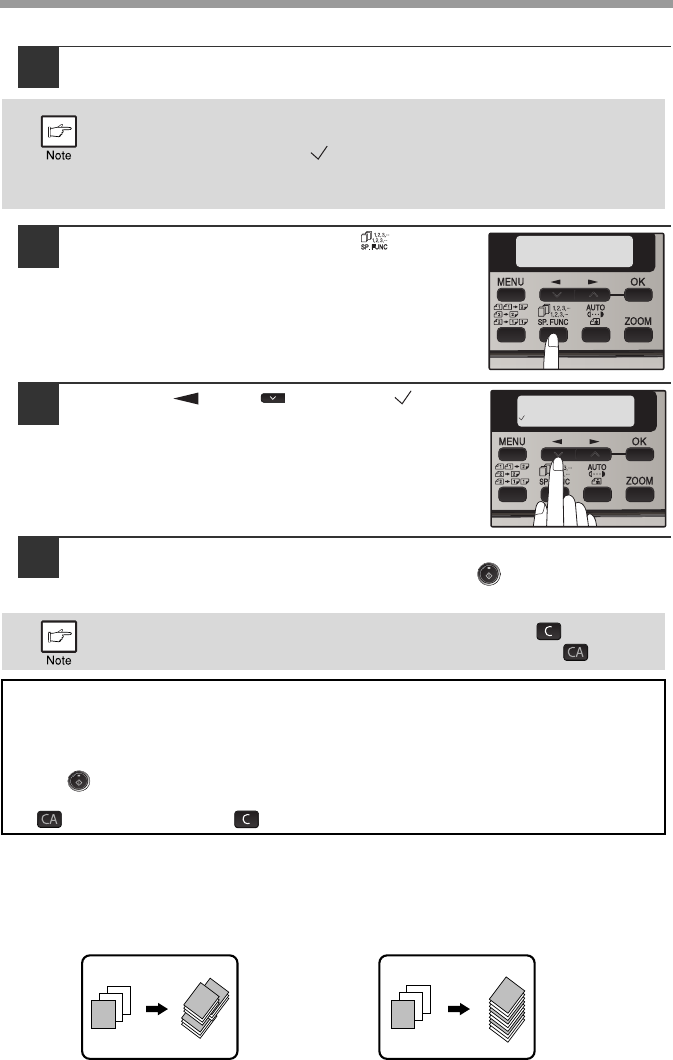
CONVENIENT COPY FUNCTIONS
27
Using the RSPF
1
Place the originals. (p.18)
2
Press the [E-SORT/SP.FUNC (
)] key
until "SORT" appears and then press the
[OK] key.
3
Press the [
] key (
) to move "
" to
the "ON" position and then the [OK] key.
4
Select the number of copies and any other
settings, and then press the [START] key (
).
The copies are delivered to the paper output tray.
Offset function during sort copy
The offset function shifts the position of each set of copies in the paper output tray
for easy separation.
The offset function can be changed with "OFFSET FUNCTION" in the user
programs. (p.75)
• If "SORT AUTO SELECT" is enabled in the user programs, the default output
mode for copying from the RSPF is sort mode (p.77). In this case go directly
to step 4. A checkmark "
" will automatically appear in the display (p.8).
• If "SORT AUTO SELECT" is disabled, the default output mode will be non-
sort mode. Follow the steps below to select sort mode.
• To cancel the sort copy job, press the [CLEAR] key (
).
• To cancel sort copy mode, press the [CLEAR ALL] key (
).
If the memory becomes full
• If the memory becomes full while scanning the originals, "MEMORY FULL, PRESS
START TO RESUME" will appear in the display, and the machine will stop copying.
• To copy the originals that have been scanned up to that point, press the [START]
key (
).
• To clear the data that has been scanned into memory, press the [CLEAR ALL] key
(
) or the [CLEAR] key (
).
SPECIAL FUNCTION
SORT
SORT
ON
OFF
1
1
1
2 3
1
1
2 3
Offset function
When offset function is disabled
Soubor PDF · ·
Otázky k Sharp MX-B201D
K tomuto návodu zatím nejsou žádné otázky. Položte první.
Související produkty a manuály pro Tisk a skenování Sharp MX-B201D
- Tisk a skenování Sharp MX-M350U Průvodce nastavením
 (91 stránek)
- Tisk a skenování Sharp AR-208S Uživatelský manuál
 (104 stránek)
- Tisk a skenování Sharp M450U Průvodce nastavením
(93 stránek)
- Tisk a skenování Sharp MX-6200N Uživatelský manuál
 (12 stránek)
- Tisk a skenování Sharp AR-FX5 Uživatelský manuál
(6 stránek)
- Tisk a skenování Sharp MX-B201D Uživatelský manuál
(4 stránky)
- Tisk a skenování Sharp AR-M351U Uživatelský manuál
(12 stránek)
- Tisk a skenování Sharp AR-M455 Operation Specifikace
(183 stránek)
- Tisk a skenování Sharp MX-C300PL Uživatelský manuál

 (108 stránek)
- Tisk a skenování Sharp AJ-5030 Uživatelský manuál
(148 stránek)
- Tisk a skenování Sharp DX-B450P Instalační manuál
(28 stránek)
- Tisk a skenování Sharp MX-M350 Specifikace
(110 stránek)
- Tisk a skenování Sharp SF-2014 Uživatelský manuál
(6 stránek)
- Tisk a skenování Sharp AR-M450 Uživatelský manuál
(8 stránek)
- Tisk a skenování Sharp AR-M455 Operation Uživatelský manuál
(18 stránek)
- Tisk a skenování Sharp Z-845 Uživatelská příručka
(44 stránek)
- Tisk a skenování Sharp AR-RB1 Uživatelský manuál
(4 stránky)
- Tisk a skenování Sharp AL-2020 Uživatelský manuál
(42 stránek)
- Tisk a skenování Sharp MX-2700G Uživatelský manuál
(12 stránek)
- Tisk a skenování Sharp AR-M351U Uživatelský manuál
(7 stránek)