Sharp MX-B201D Specifikace Strana 22: Normal originals
 1
 2
 3
 4
 5
 6
 7
 8
 9
 10
 11
 12
 13
 14
 15
 16
 17
 18
 19
 20
 21
 22
 23
 24
 25
 26
 27
 28
 29
 30
 31
 32
 33
 34
 35
 36
 37
 38
 39
 40
 41
 42
 43
 44
 45
 46
 47
 48
 49
 50
 51
 52
 53
 54
 55
 56
 57
 58
 59
 60
 61
 62
 63
 64
 65
 66
 67
 68
 69
 70
 71
 72
 73
 74
 75
 76
 77
 78
 79
 80
 81
 82
 83
 84
 85
 86
 87
 88
 89
 90
 91
 92
 93
 94
 95
 96
 97
 98
 99
 100
 101
 102
 103
 104
 105
 106
 107
 108
 109
 110
 111
 112
 113
 114
 115
 116
 117
21
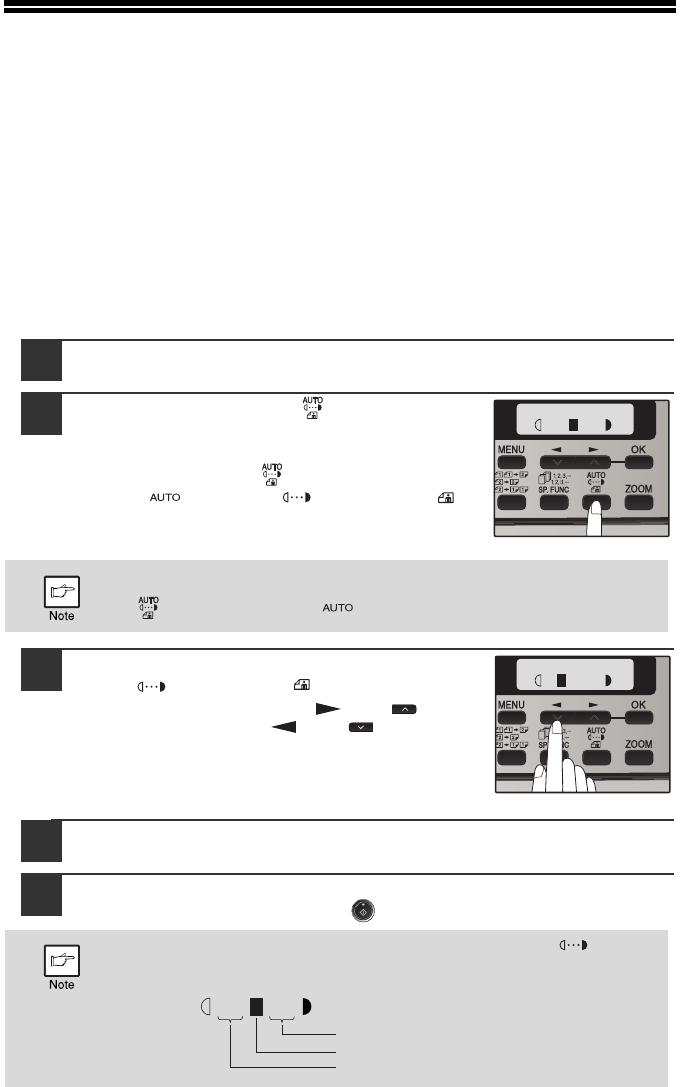
MAKING A COPY DARKER OR LIGHTER
Automatic exposure adjustment is initially enabled. This function automatically
adjusts the copy image according to the original being copied. If you wish to select
the exposure level yourself, follow the steps below. (Select from two original types
and five exposure levels for each original type.) The exposure level used in
automatic exposure adjustment can also be changed with "AE LEVEL ADJUST" in
the user programs (p.76).
Original types
●
AUTO ......Automatic exposure adjustment is enabled and the exposure is
automatically adjusted according to the original being copied. The
exposure is lowered for coloured areas and background shadows.
●
TEXT.......The exposure is raised for light areas and lowered for dark
backgrounds to make text easier to read.
●
PHOTO ...Halftones in the photo are reproduced with greater clarity.
1
Check the original and place the original(s).
2
Press the [EXPOSURE (
)] key to select
the original type.
The original image type changes as follows each
time the [EXPOSURE (
)] key is pressed:
"AUTO" (
)
→
"TEXT" (
)
→
"PHOTO" (
).
3
If needed, adjust the exposure level for
TEXT (
) or PHOTO (
).
For a darker image, press the [
] key (
). For a
lighter image, press the [
] key (
).
4
Press the [OK] key.
5
Select the number of copies and any other copy settings, and
then press the [START] key (
).
To return to auto exposure adjustment, press the [EXPOSURE
(
)] key until "AUTO" (
) appears.
Exposure value guidelines (When in "TEXT" (
)
setting)
TEXT
| | | | |
TEXT
| | | | |
Normal originals
Coloured text or text written in pencil
Dark originals like newspapers
| | | | |
Soubor PDF · ·
Otázky k Sharp MX-B201D
K tomuto návodu zatím nejsou žádné otázky. Položte první.
Související produkty a manuály pro Tisk a skenování Sharp MX-B201D
- Tisk a skenování Sharp MX-M350U Průvodce nastavením
 (91 stránek)
- Tisk a skenování Sharp AR-208S Uživatelský manuál
 (104 stránek)
- Tisk a skenování Sharp M450U Průvodce nastavením
(93 stránek)
- Tisk a skenování Sharp MX-6200N Uživatelský manuál
 (12 stránek)
- Tisk a skenování Sharp AR-FX5 Uživatelský manuál
(6 stránek)
- Tisk a skenování Sharp MX-B201D Uživatelský manuál
(4 stránky)
- Tisk a skenování Sharp AR-M351U Uživatelský manuál
(12 stránek)
- Tisk a skenování Sharp AR-M455 Operation Specifikace
(183 stránek)
- Tisk a skenování Sharp MX-C300PL Uživatelský manuál

 (108 stránek)
- Tisk a skenování Sharp AJ-5030 Uživatelský manuál
(148 stránek)
- Tisk a skenování Sharp DX-B450P Instalační manuál
(28 stránek)
- Tisk a skenování Sharp MX-M350 Specifikace
(110 stránek)
- Tisk a skenování Sharp SF-2014 Uživatelský manuál
(6 stránek)
- Tisk a skenování Sharp AR-M450 Uživatelský manuál
(8 stránek)
- Tisk a skenování Sharp AR-M455 Operation Uživatelský manuál
(18 stránek)
- Tisk a skenování Sharp Z-845 Uživatelská příručka
(44 stránek)
- Tisk a skenování Sharp AR-RB1 Uživatelský manuál
(4 stránky)
- Tisk a skenování Sharp AL-2020 Uživatelský manuál
(42 stránek)
- Tisk a skenování Sharp MX-2700G Uživatelský manuál
(12 stránek)
- Tisk a skenování Sharp AR-M351U Uživatelský manuál
(7 stránek)