Sharp MX-B201D Specifikace Strana 10: POWER ON AND OFF
 1
 2
 3
 4
 5
 6
 7
 8
 9
 10
 11
 12
 13
 14
 15
 16
 17
 18
 19
 20
 21
 22
 23
 24
 25
 26
 27
 28
 29
 30
 31
 32
 33
 34
 35
 36
 37
 38
 39
 40
 41
 42
 43
 44
 45
 46
 47
 48
 49
 50
 51
 52
 53
 54
 55
 56
 57
 58
 59
 60
 61
 62
 63
 64
 65
 66
 67
 68
 69
 70
 71
 72
 73
 74
 75
 76
 77
 78
 79
 80
 81
 82
 83
 84
 85
 86
 87
 88
 89
 90
 91
 92
 93
 94
 95
 96
 97
 98
 99
 100
 101
 102
 103
 104
 105
 106
 107
 108
 109
 110
 111
 112
 113
 114
 115
 116
 117
9
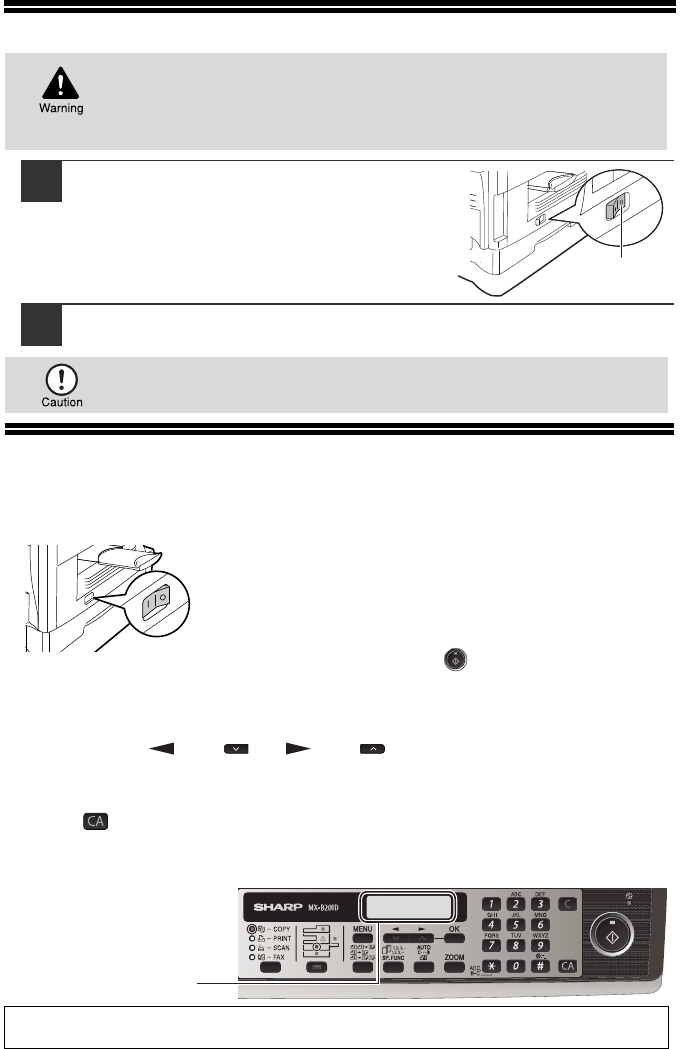
CONNECTING THE POWER CORD
1
Ensure that the power switch of the
unit is in the OFF position.
2
Plug the power cord into the nearest outlet.
POWER ON AND OFF
The power switch is located on the left side of the machine.
Power on
Turn the power switch to the "ON" position.
The ready indicator will light up and other indicators
which show the initial settings of the display will also
light up to indicate the ready condition. For the initial
settings, see the "Initial settings" (below).
You can select copy settings and press the [START] key (
) after the power switch is
turned on. Copying will start automatically.
Language setting
The first time the power is turned on after shipment from the factory, a message will
appear in English in the display prompting you to select the language. Select the
language with the [
] key (
) or [
] key (
) and then press the [OK] key. The
language can also be changed in the user programs (p.77).
Initial settings
The machine reverts to the initial settings when it is first turned on, when the [CLEAR
ALL] key (
) is pressed, or when no keys are pressed for the preset "AUTO CLEAR"
time following the end of a copy job. When the machine reverts to the initial settings, all
settings and functions selected to that point are cancelled. The "AUTO CLEAR" can be
changed in the user programs. (p.74)
Scanning unit (scan head)
When the machine is able to copy or scan (the ready indicator is on), the scanning unit is lit.
If you use the machine in a country other than the country where
the machine was purchased, you will need to make sure that your
local power supply is compatible with your model. If you plug the
machine into an incompatible power supply, irreparable damage
to the machine will result.
• Only insert the power cord into a properly grounded wall socket.
• Do not use extension cords or power strips.
Copy ratio:
100%,
Exposure:
Automatic
Copy quantity:
0,
All special copier modes:
Off
OFF
The main screen of
copy mode appears.
READY TO COPY.
100%
A4
0
When in the copy mode
Soubor PDF · ·
Otázky k Sharp MX-B201D
K tomuto návodu zatím nejsou žádné otázky. Položte první.
Související produkty a manuály pro Tisk a skenování Sharp MX-B201D
- Tisk a skenování Sharp MX-M350U Průvodce nastavením
 (91 stránek)
- Tisk a skenování Sharp AR-208S Uživatelský manuál
 (104 stránek)
- Tisk a skenování Sharp M450U Průvodce nastavením
(93 stránek)
- Tisk a skenování Sharp MX-6200N Uživatelský manuál
 (12 stránek)
- Tisk a skenování Sharp AR-FX5 Uživatelský manuál
(6 stránek)
- Tisk a skenování Sharp MX-B201D Uživatelský manuál
(4 stránky)
- Tisk a skenování Sharp AR-M351U Uživatelský manuál
(12 stránek)
- Tisk a skenování Sharp AR-M455 Operation Specifikace
(183 stránek)
- Tisk a skenování Sharp MX-C300PL Uživatelský manuál

 (108 stránek)
- Tisk a skenování Sharp AJ-5030 Uživatelský manuál
(148 stránek)
- Tisk a skenování Sharp DX-B450P Instalační manuál
(28 stránek)
- Tisk a skenování Sharp MX-M350 Specifikace
(110 stránek)
- Tisk a skenování Sharp SF-2014 Uživatelský manuál
(6 stránek)
- Tisk a skenování Sharp AR-M450 Uživatelský manuál
(8 stránek)
- Tisk a skenování Sharp AR-M455 Operation Uživatelský manuál
(18 stránek)
- Tisk a skenování Sharp Z-845 Uživatelská příručka
(44 stránek)
- Tisk a skenování Sharp AR-RB1 Uživatelský manuál
(4 stránky)
- Tisk a skenování Sharp AL-2020 Uživatelský manuál
(42 stránek)
- Tisk a skenování Sharp MX-2700G Uživatelský manuál
(12 stránek)
- Tisk a skenování Sharp AR-M351U Uživatelský manuál
(7 stránek)