Sharp AL-2021 Specifikace Strana 81: Removing the software
 1
 2
 3
 4
 5
 6
 7
 8
 9
 10
 11
 12
 13
 14
 15
 16
 17
 18
 19
 20
 21
 22
 23
 24
 25
 26
 27
 28
 29
 30
 31
 32
 33
 34
 35
 36
 37
 38
 39
 40
 41
 42
 43
 44
 45
 46
 47
 48
 49
 50
 51
 52
 53
 54
 55
 56
 57
 58
 59
 60
 61
 62
 63
 64
 65
 66
 67
 68
 69
 70
 71
 72
 73
 74
 75
 76
 77
 78
 79
 80
 81
 82
 83
 84
 85
 86
 87
 88
 89
 90
 91
9
81
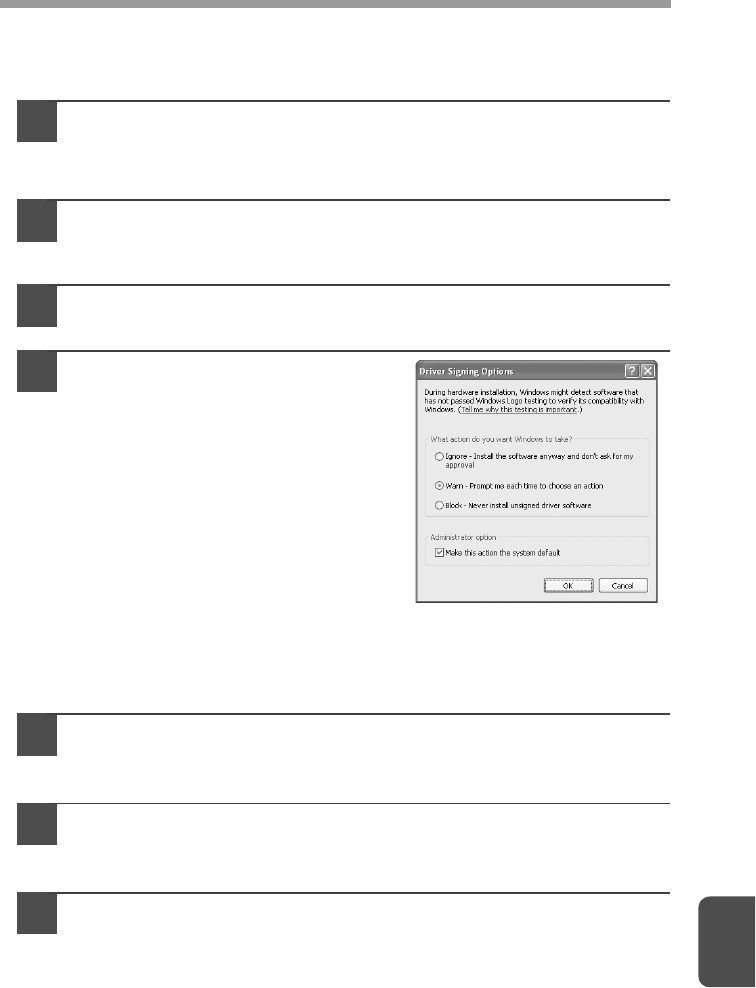
MFP driver cannot be installed (Windows 2000/XP)
If the MFP driver cannot be installed in Windows 2000/XP, follow these steps to
check your computer's settings.
1
Click the "start" button and then click "Control Panel".
In Windows 2000, click the "Start" button, select "Settings", and then click
"Control Panel".
2
Click "Performance and Maintenance", and then click
"System".
In Windows 2000, double-click the "System" icon.
3
Click the "Hardware" tab and then click the "Driver Signing"
button.
4
Check "What action do you want
Windows to take?" ("File
signature verification" in
Windows 2000).
If "Block" has been selected, it will not be
possible to install the MFP driver. Select
"Warn" and then install the MFP driver
as explained in "INSTALLING THE
SOFTWARE" (p.16).
Removing the software
If you need to remove the software, follow these steps.
1
Click the "Start" button, and then click "Control Panel".
In Windows 2000, click the "Start" button, select "Settings", and then click
"Control Panel".
2
Click "Uninstall a program".
• In Windows XP, click "Add or Remove Programs".
• In Windows 2000, double-click the "Add/Remove Programs" icon.
3
Select "SHARP AL-xxxx Series MFP Driver", Sharpdesk, and
Button Manager from the list, and remove them.
For more information, refer to your operating manual or to the help files for
your operating system.
Soubor PDF · ·
Otázky k Sharp AL-2021
K tomuto návodu zatím nejsou žádné otázky. Položte první.
Související produkty a manuály pro Multifunkční zařízení Sharp AL-2021
- Multifunkční zařízení Sharp MX-B402 Uživatelský manuál
 (50 stránek)
- Multifunkční zařízení Sharp FO-155 Specifikace

 (165 stránek)
- Multifunkční zařízení Sharp MX-4140N Instalační manuál
(19 stránek)
- Multifunkční zařízení Sharp JW-50FL Uživatelský manuál
(201 stránek)
- Multifunkční zařízení Sharp MX-4140N Uživatelský manuál
(12 stránek)
- Multifunkční zařízení Sharp CPD-3830 Uživatelský manuál
(12 stránek)
- Multifunkční zařízení Sharp CD600 - B/W - Fax Uživatelský manuál
(23 stránek)
- Multifunkční zařízení Sharp AR-810 Manuál s instrukcemi
(178 stránek)
- Multifunkční zařízení Sharp AL-1566 Specifikace
(116 stránek)
- Multifunkční zařízení Sharp AM-400 Specifikace
(162 stránek)
- Multifunkční zařízení Sharp AL-2051 Specifikace
(173 stránek)
- Multifunkční zařízení Sharp MX-5111N Uživatelský manuál
(12 stránek)
- Multifunkční zařízení Sharp AL-2021 Uživatelský manuál
(91 stránek)
- Multifunkční zařízení Sharp MX-C250 Instalační manuál
(20 stránek)
- Multifunkční zařízení Sharp AM-300 Specifikace
(167 stránek)
- Multifunkční zařízení Sharp AL-2060 Specifikace
(112 stránek)
- Multifunkční zařízení Sharp AL-1555 Series Uživatelský manuál
 (37 stránek)
- Multifunkční zařízení Sharp AL-2050 Specifikace
(116 stránek)
- Multifunkční zařízení Sharp AL-1552 Uživatelský manuál
(81 stránek)
- Multifunkční zařízení Sharp AR-168N Uživatelský manuál
 (108 stránek)