Sharp AL-2021 Specifikace Strana 71: CLEANING THE UNIT
 1
 2
 3
 4
 5
 6
 7
 8
 9
 10
 11
 12
 13
 14
 15
 16
 17
 18
 19
 20
 21
 22
 23
 24
 25
 26
 27
 28
 29
 30
 31
 32
 33
 34
 35
 36
 37
 38
 39
 40
 41
 42
 43
 44
 45
 46
 47
 48
 49
 50
 51
 52
 53
 54
 55
 56
 57
 58
 59
 60
 61
 62
 63
 64
 65
 66
 67
 68
 69
 70
 71
 72
 73
 74
 75
 76
 77
 78
 79
 80
 81
 82
 83
 84
 85
 86
 87
 88
 89
 90
 91
8
71
4
Gently install the TD cartridge. To install the TD cartridge, see
step 5 in "INSTALLING THE TD CARTRIDGE" in the Start Guide.
5
Close the front cover and then the side cover by pressing the
round projections near the side cover open button. The drum
replacement required (
) indicator will go out and the start (
)
indicator will light up.
CLEANING THE UNIT
Proper care is essential in order to get clean, sharp copies. Be sure to take a few
minutes to regularly clean the unit.
Cabinet
Wipe the cabinet with a soft, clean cloth.
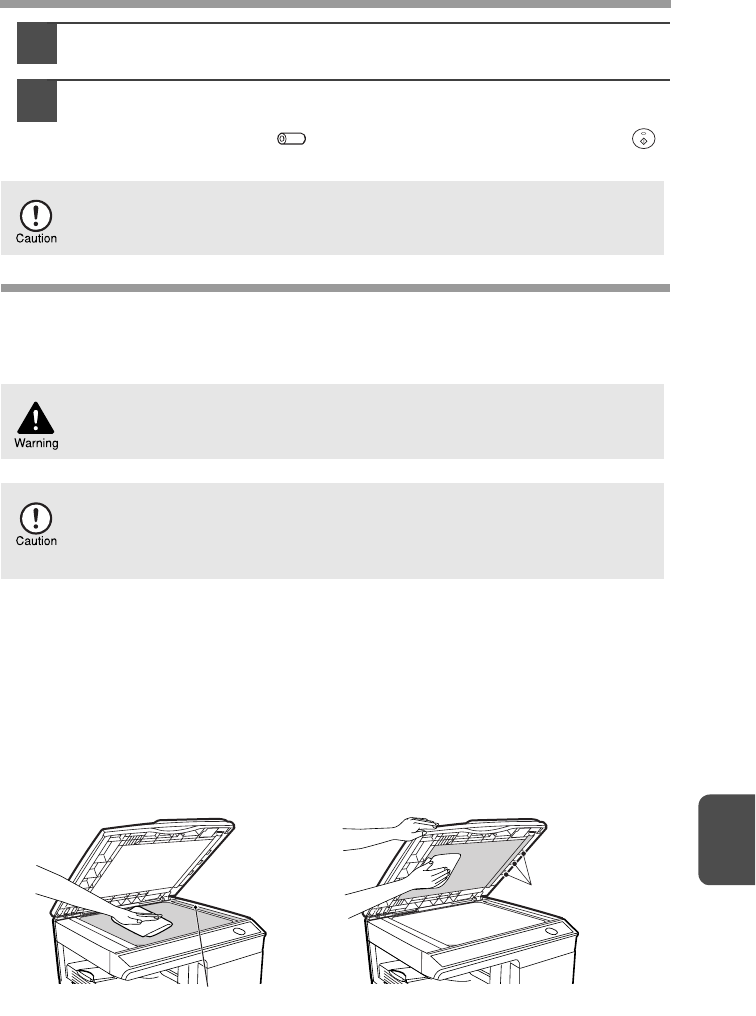
Document glass and the rear side of the original cover/SPF
Stains on the document glass, SPF scanning window, cover or SPF roller will also be
copied. Wipe the document glass, SPF scanning window, cover and SPF roller with
a soft, clean cloth. If necessary, dampen the cloth with a glass cleaner.
When closing the covers, be sure to close the front cover securely and
then close the side cover. If the covers are closed in the wrong order,
the covers may be damaged.
Do not spray flammable cleaner gas. Gas from the spray may come in
contact with the internal electrical components or high-temperature parts
of the fusing unit, creating a risk of fire or electrical shock.
• Before cleaning, be sure to turn the power switch off and remove the
power cord from the outlet.
• Do not use thinner, benzene or other volatile cleaning agents. Doing
so may cause deformation, discoloration, deterioration or malfunction.
Document glass/SPF scanning window
Original cover/SPF
SPF roller
SPF scanning window
Soubor PDF · ·
Otázky k Sharp AL-2021
K tomuto návodu zatím nejsou žádné otázky. Položte první.
Související produkty a manuály pro Multifunkční zařízení Sharp AL-2021
- Multifunkční zařízení Sharp MX-B402 Uživatelský manuál
 (50 stránek)
- Multifunkční zařízení Sharp FO-155 Specifikace

 (165 stránek)
- Multifunkční zařízení Sharp MX-4140N Instalační manuál
(19 stránek)
- Multifunkční zařízení Sharp JW-50FL Uživatelský manuál
(201 stránek)
- Multifunkční zařízení Sharp MX-4140N Uživatelský manuál
(12 stránek)
- Multifunkční zařízení Sharp CPD-3830 Uživatelský manuál
(12 stránek)
- Multifunkční zařízení Sharp CD600 - B/W - Fax Uživatelský manuál
(23 stránek)
- Multifunkční zařízení Sharp AR-810 Manuál s instrukcemi
(178 stránek)
- Multifunkční zařízení Sharp AL-1566 Specifikace
(116 stránek)
- Multifunkční zařízení Sharp AM-400 Specifikace
(162 stránek)
- Multifunkční zařízení Sharp AL-2051 Specifikace
(173 stránek)
- Multifunkční zařízení Sharp MX-5111N Uživatelský manuál
(12 stránek)
- Multifunkční zařízení Sharp AL-2021 Uživatelský manuál
(91 stránek)
- Multifunkční zařízení Sharp MX-C250 Instalační manuál
(20 stránek)
- Multifunkční zařízení Sharp AM-300 Specifikace
(167 stránek)
- Multifunkční zařízení Sharp AL-2060 Specifikace
(112 stránek)
- Multifunkční zařízení Sharp AL-1555 Series Uživatelský manuál
 (37 stránek)
- Multifunkční zařízení Sharp AL-2050 Specifikace
(116 stránek)
- Multifunkční zařízení Sharp AL-1552 Uživatelský manuál
(81 stránek)
- Multifunkční zařízení Sharp AR-168N Uživatelský manuál
 (108 stránek)