Sharp AL-2021 Specifikace Strana 69: MAINTENANCE
 1
 2
 3
 4
 5
 6
 7
 8
 9
 10
 11
 12
 13
 14
 15
 16
 17
 18
 19
 20
 21
 22
 23
 24
 25
 26
 27
 28
 29
 30
 31
 32
 33
 34
 35
 36
 37
 38
 39
 40
 41
 42
 43
 44
 45
 46
 47
 48
 49
 50
 51
 52
 53
 54
 55
 56
 57
 58
 59
 60
 61
 62
 63
 64
 65
 66
 67
 68
 69
 70
 71
 72
 73
 74
 75
 76
 77
 78
 79
 80
 81
 82
 83
 84
 85
 86
 87
 88
 89
 90
 91
8
8
69
This chapter describes how to replace the TD cartridge and drum cartridge and how
to clean the unit.
TD CARTRIDGE REPLACEMENT
The TD cartridge replacement required (
) indicator will light up when toner is needed.
For more information on purchasing the TD cartridge, see "ABOUT SUPPLIES AND
OPTIONS" in the Start Guide. If copying is continued while the indicator is lit, copies will
gradually become lighter until the unit stops and the indicator begins blinking. Replace
the old TD cartridge by following the procedure below.
1
Open the multi-bypass tray, side cover, and front cover, in that
order.
To open the multi-bypass tray, see "The multi-bypass tray" (p.12). To open
the side cover and front cover, see "INSTALLING THE TD CARTRIDGE" in
the Start Guide.
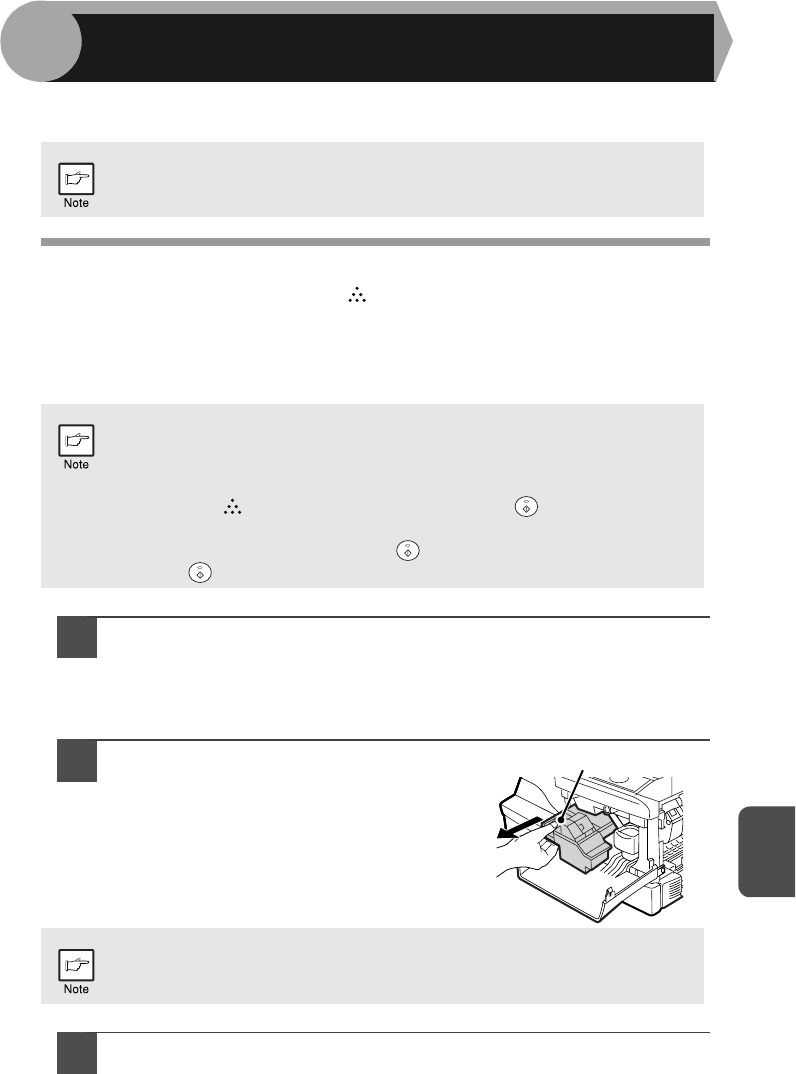
2
Gently pull the TD cartridge out
while pressing the lock release
button.
3
Install a new TD cartridge. To install the new cartridge, see
"INSTALLING THE TD CARTRIDGE" in the Start Guide.
Be sure to use only genuine SHARP parts and supplies.
• After the unit stops, it may be possible to make a few more copies by taking
the TD cartridge out of the unit, shaking it horizontally, then reinstalling it. If
copying is not possible after this operation, replace the TD cartridge.
• During long copy run of a dark original, the TD cartridge replacement
required (
) indicator may light up, the start (
) indicator blink,
and the unit stops, even though toner is left. The unit will feed toner up
to 2 minutes and then the start (
) indicator will light up. Press the
start (
) key to restart copying.
In order to help preserve the global environment, we recycle used TD
cartridges. Please read "COPIER TONER CARTRIDGE RECYCLING
PROGRAM", which is enclosed in the new toner cartridge package.
Lock release button
MAINTENANCE
Soubor PDF · ·
Otázky k Sharp AL-2021
K tomuto návodu zatím nejsou žádné otázky. Položte první.
Související produkty a manuály pro Multifunkční zařízení Sharp AL-2021
- Multifunkční zařízení Sharp MX-B402 Uživatelský manuál
 (50 stránek)
- Multifunkční zařízení Sharp FO-155 Specifikace

 (165 stránek)
- Multifunkční zařízení Sharp MX-4140N Instalační manuál
(19 stránek)
- Multifunkční zařízení Sharp JW-50FL Uživatelský manuál
(201 stránek)
- Multifunkční zařízení Sharp MX-4140N Uživatelský manuál
(12 stránek)
- Multifunkční zařízení Sharp CPD-3830 Uživatelský manuál
(12 stránek)
- Multifunkční zařízení Sharp CD600 - B/W - Fax Uživatelský manuál
(23 stránek)
- Multifunkční zařízení Sharp AR-810 Manuál s instrukcemi
(178 stránek)
- Multifunkční zařízení Sharp AL-1566 Specifikace
(116 stránek)
- Multifunkční zařízení Sharp AM-400 Specifikace
(162 stránek)
- Multifunkční zařízení Sharp AL-2051 Specifikace
(173 stránek)
- Multifunkční zařízení Sharp MX-5111N Uživatelský manuál
(12 stránek)
- Multifunkční zařízení Sharp AL-2021 Uživatelský manuál
(91 stránek)
- Multifunkční zařízení Sharp MX-C250 Instalační manuál
(20 stránek)
- Multifunkční zařízení Sharp AM-300 Specifikace
(167 stránek)
- Multifunkční zařízení Sharp AL-2060 Specifikace
(112 stránek)
- Multifunkční zařízení Sharp AL-1555 Series Uživatelský manuál
 (37 stránek)
- Multifunkční zařízení Sharp AL-2050 Specifikace
(116 stránek)
- Multifunkční zařízení Sharp AL-1552 Uživatelský manuál
(81 stránek)
- Multifunkční zařízení Sharp AR-168N Uživatelský manuál
 (108 stránek)