Sharp AL-2021 Specifikace Strana 10: LOADING THE PAPER TRAY
 1
 2
 3
 4
 5
 6
 7
 8
 9
 10
 11
 12
 13
 14
 15
 16
 17
 18
 19
 20
 21
 22
 23
 24
 25
 26
 27
 28
 29
 30
 31
 32
 33
 34
 35
 36
 37
 38
 39
 40
 41
 42
 43
 44
 45
 46
 47
 48
 49
 50
 51
 52
 53
 54
 55
 56
 57
 58
 59
 60
 61
 62
 63
 64
 65
 66
 67
 68
 69
 70
 71
 72
 73
 74
 75
 76
 77
 78
 79
 80
 81
 82
 83
 84
 85
 86
 87
 88
 89
 90
 91
2
10
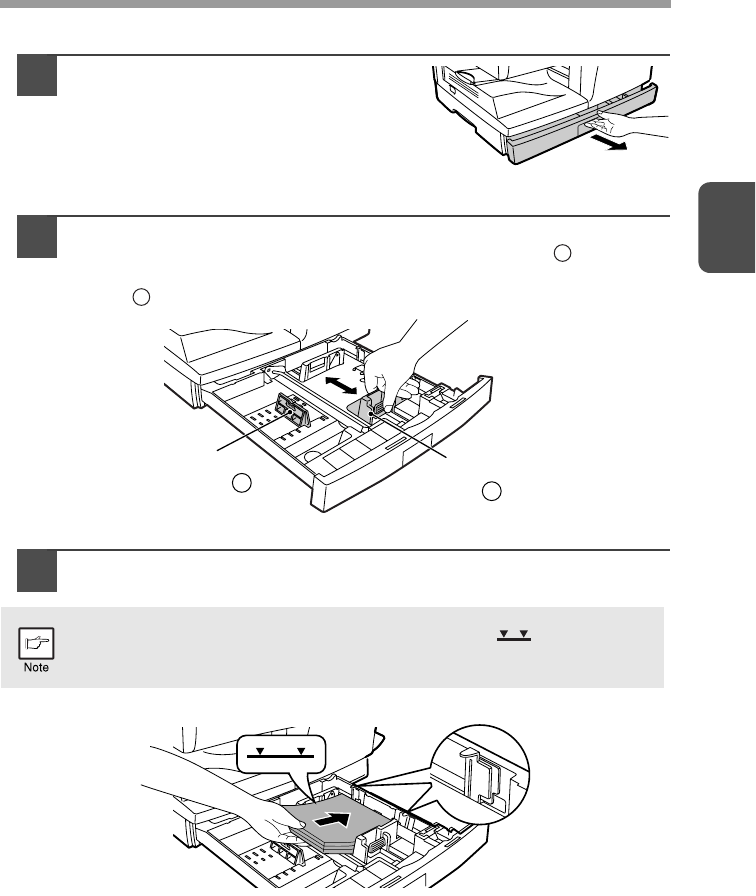
LOADING THE PAPER TRAY
1
Raise the handle of the paper tray
and pull the paper tray out until it
stops.
2
Adjust the paper guides on the paper tray to the copy paper
width and length. Squeeze the lever of paper guide
and slide
the guide to match with the width of the paper. Move paper
guide
to the appropriate slot as marked on the tray.
3
Fan the paper and insert it into the tray. Make sure the edges go
under the corner hooks.
Do not load paper above the maximum height line (
). Exceeding
the line will cause a paper misfeed.
A
B
Paper
guide B
Paper
guide A
Soubor PDF · ·
Otázky k Sharp AL-2021
K tomuto návodu zatím nejsou žádné otázky. Položte první.
Související produkty a manuály pro Multifunkční zařízení Sharp AL-2021
- Multifunkční zařízení Sharp MX-B402 Uživatelský manuál
 (50 stránek)
- Multifunkční zařízení Sharp FO-155 Specifikace

 (165 stránek)
- Multifunkční zařízení Sharp MX-4140N Instalační manuál
(19 stránek)
- Multifunkční zařízení Sharp JW-50FL Uživatelský manuál
(201 stránek)
- Multifunkční zařízení Sharp MX-4140N Uživatelský manuál
(12 stránek)
- Multifunkční zařízení Sharp CPD-3830 Uživatelský manuál
(12 stránek)
- Multifunkční zařízení Sharp CD600 - B/W - Fax Uživatelský manuál
(23 stránek)
- Multifunkční zařízení Sharp AR-810 Manuál s instrukcemi
(178 stránek)
- Multifunkční zařízení Sharp AL-1566 Specifikace
(116 stránek)
- Multifunkční zařízení Sharp AM-400 Specifikace
(162 stránek)
- Multifunkční zařízení Sharp AL-2051 Specifikace
(173 stránek)
- Multifunkční zařízení Sharp MX-5111N Uživatelský manuál
(12 stránek)
- Multifunkční zařízení Sharp AL-2021 Uživatelský manuál
(91 stránek)
- Multifunkční zařízení Sharp MX-C250 Instalační manuál
(20 stránek)
- Multifunkční zařízení Sharp AM-300 Specifikace
(167 stránek)
- Multifunkční zařízení Sharp AL-2060 Specifikace
(112 stránek)
- Multifunkční zařízení Sharp AL-1555 Series Uživatelský manuál
 (37 stránek)
- Multifunkční zařízení Sharp AL-2050 Specifikace
(116 stránek)
- Multifunkční zařízení Sharp AL-1552 Uživatelský manuál
(81 stránek)
- Multifunkční zařízení Sharp AR-168N Uživatelský manuál
 (108 stránek)