Sharp AL-2021 Specifikace Strana 26: ORIGINAL PLACEMENT
 1
 2
 3
 4
 5
 6
 7
 8
 9
 10
 11
 12
 13
 14
 15
 16
 17
 18
 19
 20
 21
 22
 23
 24
 25
 26
 27
 28
 29
 30
 31
 32
 33
 34
 35
 36
 37
 38
 39
 40
 41
 42
 43
 44
 45
 46
 47
 48
 49
 50
 51
 52
 53
 54
 55
 56
 57
 58
 59
 60
 61
 62
 63
 64
 65
 66
 67
 68
 69
 70
 71
 72
 73
 74
 75
 76
 77
 78
 79
 80
 81
 82
 83
 84
 85
 86
 87
 88
 89
 90
 91
4
26
About interrupt copying
If you press the start (
) key to begin a copy job while a print job using the paper
tray or multi-bypass tray is in progress, the copy job will begin automatically after the
print data in the unit's memory is printed (interrupt copying). When this is done, the
print data remaining in the computer is not sent to the unit. When the copy job ends,
press the clear key twice to change the unit to the online state, or wait until the set
auto clear time (p.66) elapses. The remaining print data will be sent to the unit and
printing will resume.
* Interrupt copying during two-sided printing is not possible until the print job is finished.
(AL-2041 only)
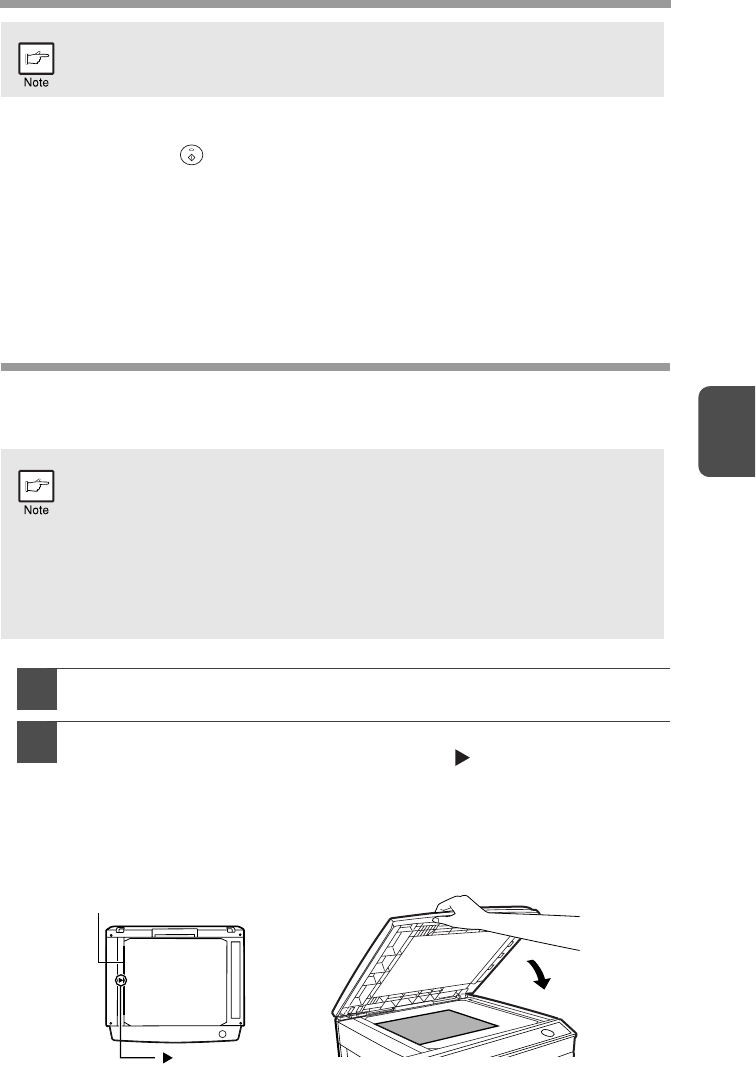
ORIGINAL PLACEMENT
Using the document glass
1
Open the original cover/SPF, and place the original.
2
Place an original face down on the document glass. Align it
with the original scale and the centring (
) mark. Gently close
the original cover/SPF.
After placing the original, be sure to close the original cover/SPF. If left open,
parts outside of the original will be copied black, causing excessive use of
toner. In addition, toner may scatter inside the machine or the drum cartridge
may suffer damage.
•
If you start a print job while a copy job is in progress, the print job will
begin when the copy job is completed.
•
The scanning function cannot be used while a copy job is in progress.
•
The document glass can read up to A4 original.
•
Image loss 4 mm can occur at the leading and trailing edges of the
copies. Also image loss 4.5 mm in total can occur along the other
edges of the copies.
•
When copying a book or an original which has been folded or a crumpled
original, press down the original cover/SPF lightly. If the original cover/
SPF is not securely closed, the copies may be striped or blurred.
•
When using the document glass to scan an original, make sure that an
original is not placed in the SPF.
mark
Original scale
Soubor PDF · ·
Otázky k Sharp AL-2021
K tomuto návodu zatím nejsou žádné otázky. Položte první.
Související produkty a manuály pro Multifunkční zařízení Sharp AL-2021
- Multifunkční zařízení Sharp MX-B402 Uživatelský manuál
 (50 stránek)
- Multifunkční zařízení Sharp FO-155 Specifikace

 (165 stránek)
- Multifunkční zařízení Sharp MX-4140N Instalační manuál
(19 stránek)
- Multifunkční zařízení Sharp JW-50FL Uživatelský manuál
(201 stránek)
- Multifunkční zařízení Sharp MX-4140N Uživatelský manuál
(12 stránek)
- Multifunkční zařízení Sharp CPD-3830 Uživatelský manuál
(12 stránek)
- Multifunkční zařízení Sharp CD600 - B/W - Fax Uživatelský manuál
(23 stránek)
- Multifunkční zařízení Sharp AR-810 Manuál s instrukcemi
(178 stránek)
- Multifunkční zařízení Sharp AL-1566 Specifikace
(116 stránek)
- Multifunkční zařízení Sharp AM-400 Specifikace
(162 stránek)
- Multifunkční zařízení Sharp AL-2051 Specifikace
(173 stránek)
- Multifunkční zařízení Sharp MX-5111N Uživatelský manuál
(12 stránek)
- Multifunkční zařízení Sharp AL-2021 Uživatelský manuál
(91 stránek)
- Multifunkční zařízení Sharp MX-C250 Instalační manuál
(20 stránek)
- Multifunkční zařízení Sharp AM-300 Specifikace
(167 stránek)
- Multifunkční zařízení Sharp AL-2060 Specifikace
(112 stránek)
- Multifunkční zařízení Sharp AL-1555 Series Uživatelský manuál
 (37 stránek)
- Multifunkční zařízení Sharp AL-2050 Specifikace
(116 stránek)
- Multifunkční zařízení Sharp AL-1552 Uživatelský manuál
(81 stránek)
- Multifunkční zařízení Sharp AR-168N Uživatelský manuál
 (108 stránek)