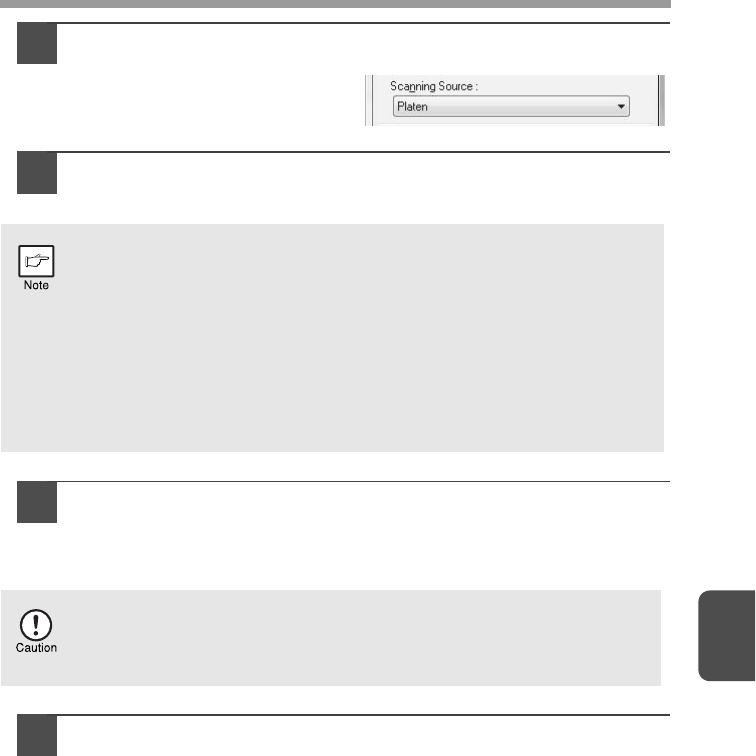
Sharp AL-2021 Specifikace Strana 58: In the "Scanning Source" menu, select the location where you
 1
 2
 3
 4
 5
 6
 7
 8
 9
 10
 11
 12
 13
 14
 15
 16
 17
 18
 19
 20
 21
 22
 23
 24
 25
 26
 27
 28
 29
 30
 31
 32
 33
 34
 35
 36
 37
 38
 39
 40
 41
 42
 43
 44
 45
 46
 47
 48
 49
 50
 51
 52
 53
 54
 55
 56
 57
 58
 59
 60
 61
 62
 63
 64
 65
 66
 67
 68
 69
 70
 71
 72
 73
 74
 75
 76
 77
 78
 79
 80
 81
 82
 83
 84
 85
 86
 87
 88
 89
 90
 91
6
58
5
In the "Scanning Source" menu, select the location where you
placed the original in Step 1.
If you placed a one-sided original
in the SPF, select "SPF".
6
Click the "Preview" button.
The preview image will appear.
7
Specify the scanning area and set the scan preferences.
For information on specifying the scan area and setting the scan
preferences, see scanner driver Help.
"Preview screen" (p.60)
8
When you are ready to begin scanning, click the "Scanning"
button.
To cancel a scanning job after clicking the "Scanning" button, press the
[Esc] key on your keyboard.
•
If the angle of the image is not correct, reset the original, and click the
"Preview" button again.
•
If the preview image is not oriented correctly, click the "Rotate" button
in the preview screen. This rotates the preview image 90 degrees
clockwise, allowing you to correct the orientation without resetting the
original. "Preview screen" (p.60)
•
If you set multiple pages in the SPF, the machine previews only the
top page of the originals, and then sends it to the original exit area.
Return the previewed original to the SPF before starting the scanning
job.
Scanning a large area at high resolution results in a large quantity of
data and a prolonged scanning time. It is recommended that you set
appropriate scanning preferences for the type of original being scanned,
i.e., Monitor, Photo, FAX, or OCR.
Soubor PDF · ·
Otázky k Sharp AL-2021
K tomuto návodu zatím nejsou žádné otázky. Položte první.
Související produkty a manuály pro Multifunkční zařízení Sharp AL-2021
- Multifunkční zařízení Sharp MX-B402 Uživatelský manuál
 (50 stránek)
- Multifunkční zařízení Sharp FO-155 Specifikace

 (165 stránek)
- Multifunkční zařízení Sharp MX-4140N Instalační manuál
(19 stránek)
- Multifunkční zařízení Sharp JW-50FL Uživatelský manuál
(201 stránek)
- Multifunkční zařízení Sharp MX-4140N Uživatelský manuál
(12 stránek)
- Multifunkční zařízení Sharp CPD-3830 Uživatelský manuál
(12 stránek)
- Multifunkční zařízení Sharp CD600 - B/W - Fax Uživatelský manuál
(23 stránek)
- Multifunkční zařízení Sharp AR-810 Manuál s instrukcemi
(178 stránek)
- Multifunkční zařízení Sharp AL-1566 Specifikace
(116 stránek)
- Multifunkční zařízení Sharp AM-400 Specifikace
(162 stránek)
- Multifunkční zařízení Sharp AL-2051 Specifikace
(173 stránek)
- Multifunkční zařízení Sharp MX-5111N Uživatelský manuál
(12 stránek)
- Multifunkční zařízení Sharp AL-2021 Uživatelský manuál
(91 stránek)
- Multifunkční zařízení Sharp MX-C250 Instalační manuál
(20 stránek)
- Multifunkční zařízení Sharp AM-300 Specifikace
(167 stránek)
- Multifunkční zařízení Sharp AL-2060 Specifikace
(112 stránek)
- Multifunkční zařízení Sharp AL-1555 Series Uživatelský manuál
 (37 stránek)
- Multifunkční zařízení Sharp AL-2050 Specifikace
(116 stránek)
- Multifunkční zařízení Sharp AL-1552 Uživatelský manuál
(81 stránek)
- Multifunkční zařízení Sharp AR-168N Uživatelský manuál
 (108 stránek)