Sharp MX-4101N Specifikace Strana 67: SETUP IN A WINDOWS
 1
 2
 3
 4
 5
 6
 7
 8
 9
 10
 11
 12
 13
 14
 15
 16
 17
 18
 19
 20
 21
 22
 23
 24
 25
 26
 27
 28
 29
 30
 31
 32
 33
 34
 35
 36
 37
 38
 39
 40
 41
 42
 43
 44
 45
 46
 47
 48
 49
 50
 51
 52
 53
 54
 55
 56
 57
 58
 59
 60
 61
 62
 63
 64
 65
 66
 67
 68
 69
 70
 71
 72
 73
 74
 75
 76
8
This section explains how to install the software and configure settings so that the printer and scanner function of the
machine can be used with a Windows computer.
OPENING THE SOFTWARE SELECTION
SCREEN (FOR ALL SOFTWARE)
1
Insert the "Software CD-ROM" into your
computer's CD-ROM drive.
• If you are installing the printer driver or printer status
monitor, insert the "Software CD-ROM" that shows
"Disc 1" on the front of the CD-ROM.
• If you are installing the PC-Fax driver or scanner
driver, insert the "Software CD-ROM" that shows
"Disc 2" on the front of the CD-ROM.
2
Click the [Start] button (
), click
[Computer], and then double-click the
[CD-ROM] icon (
).
• In Windows XP/Server 2003, click the [start] button,
click [My Computer], and then double-click the
[CD-ROM] icon.
• In Windows 2000, double-click [My Computer] and
then double-click the [CD-ROM] icon.
3
Double-click the [Setup] icon (
).
4
The "SOFTWARE LICENSE" window will
appear. Make sure that you understand
the contents of the license agreement
and then click the [Yes] button.
5
Read the message in the "Welcome"
window and then click the [Next]
button.
6
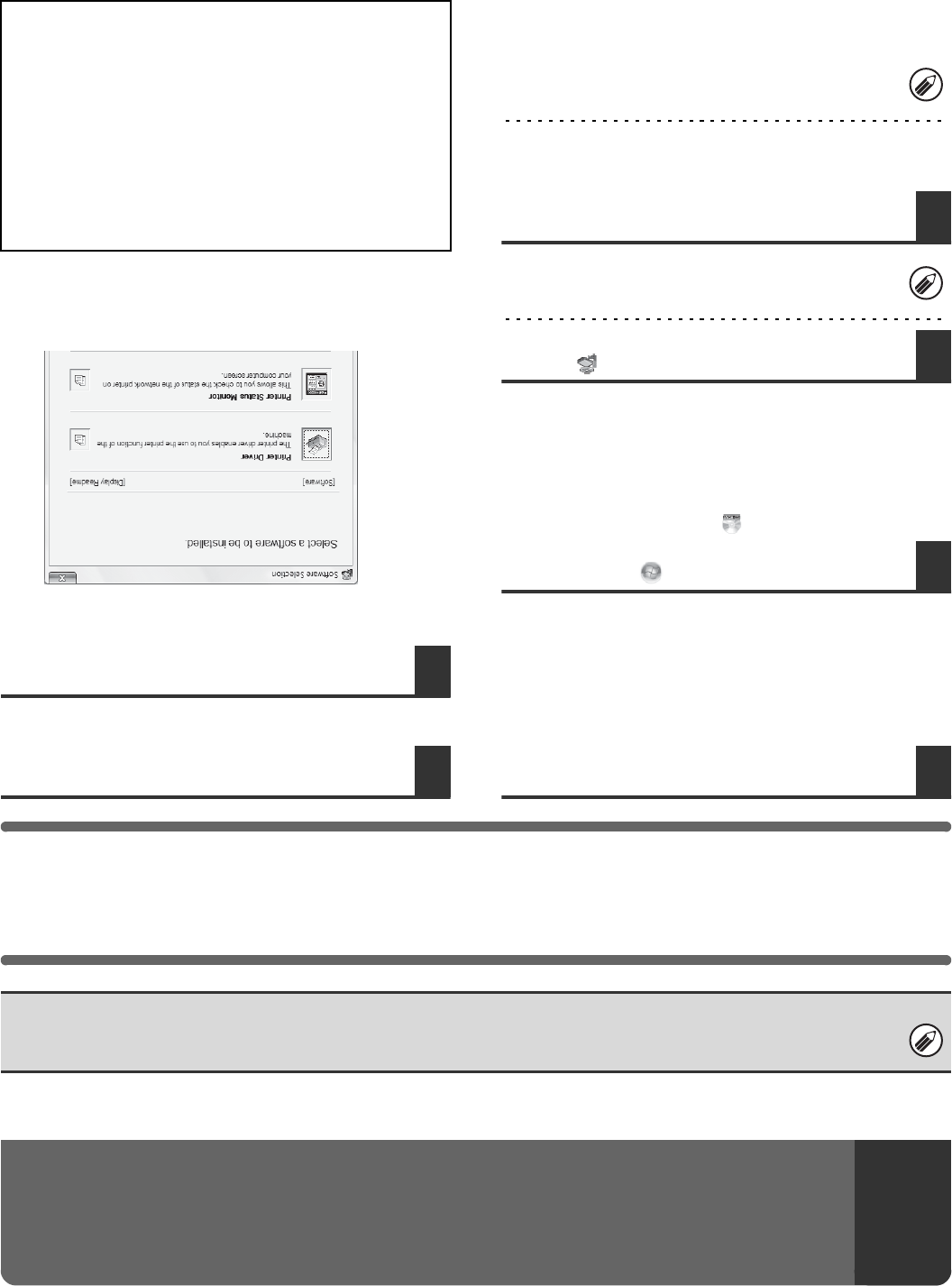
The software selection screen appears.
Before installing the software, be sure to click the
[Display Readme] button and view the detailed
information on the software.
* The above screen appears when using the
"Disc 1" CD-ROM.
For the steps that follow, see the appropriate page below
for the software that you are installing.
2
SETUP IN A WINDOWS
ENVIRONMENT
For users of Windows 98/Me/NT 4.0
The CD-ROM does not include software for Windows 98/Me/NT 4.0.
Contact your dealer or nearest authorised service representative if you want software for Windows 98/Me/NT 4.0.
In Windows Vista/Server 2008, if a message screen
appears asking you for confirmation, click [Allow].
You can show the "SOFTWARE LICENSE" in a
different language by selecting the desired language
from the language menu. To install the software in the
selected language, continue the installation with that
language selected.
INSTALLING THE PRINTER DRIVER / PC-FAX DRIVER
•
WHEN THE MACHINE IS CONNECTED TO A NETWORK
-
Standard installation: page 9
-
Installation by specifying the machine's address:
page 12
-
Printing using the IPP function and the SSL
function: page 14
•
WHEN THE MACHINE WILL BE CONNECTED WITH A
USB CABLE: page 16
•
USING THE MACHINE AS A SHARED PRINTER: page 20
INSTALLING THE PRINTER STATUS MONITOR: page 25
INSTALLING THE SCANNER DRIVER: page 26
Soubor PDF · ·
Otázky k Sharp MX-4101N
K tomuto návodu zatím nejsou žádné otázky. Položte první.
Související produkty a manuály pro Multifunkční zařízení Sharp MX-4101N
- Multifunkční zařízení Sharp JW-20FLT Uživatelský manuál
 (197 stránek)
- Multifunkční zařízení Sharp MX-C381 Specifikace
(148 stránek)
- Multifunkční zařízení Sharp MX-M260 Uživatelský manuál
 (160 stránek)
- Multifunkční zařízení Sharp MX-4101N Specifikace
(12 stránek)
- Multifunkční zařízení Sharp MX-M564N Uživatelský manuál
(8 stránek)
- Multifunkční zařízení Sharp MX-M564N Uživatelský manuál
(8 stránek)
- Multifunkční zařízení Sharp CPD-3830 Uživatelský manuál
(1 stránka)
- Multifunkční zařízení Sharp MX-2010U Uživatelský manuál
(12 stránek)
- Multifunkční zařízení Sharp MX-B381 Uživatelský manuál
(12 stránek)
- Multifunkční zařízení Sharp MX-7500N Uživatelský manuál
(30 stránek)
- Multifunkční zařízení Sharp AL-2021 Specifikace
(91 stránek)
- Multifunkční zařízení Sharp MX-B402 Uživatelský manuál
(50 stránek)
- Multifunkční zařízení Sharp FO-155 Specifikace

 (165 stránek)
- Multifunkční zařízení Sharp MX-4140N Instalační manuál
(19 stránek)
- Multifunkční zařízení Sharp JW-50FL Uživatelský manuál
(201 stránek)
- Multifunkční zařízení Sharp MX-4140N Uživatelský manuál
(12 stránek)
- Multifunkční zařízení Sharp CPD-3830 Uživatelský manuál
(12 stránek)
- Multifunkční zařízení Sharp CD600 - B/W - Fax Uživatelský manuál
(23 stránek)
- Multifunkční zařízení Sharp AR-810 Manuál s instrukcemi
(178 stránek)
- Multifunkční zařízení Sharp AL-1566 Specifikace
(116 stránek)