Sharp MX-4101N Specifikace Strana 55: USING THE MACHINE AS A SHARED PRINTER
 1
 2
 3
 4
 5
 6
 7
 8
 9
 10
 11
 12
 13
 14
 15
 16
 17
 18
 19
 20
 21
 22
 23
 24
 25
 26
 27
 28
 29
 30
 31
 32
 33
 34
 35
 36
 37
 38
 39
 40
 41
 42
 43
 44
 45
 46
 47
 48
 49
 50
 51
 52
 53
 54
 55
 56
 57
 58
 59
 60
 61
 62
 63
 64
 65
 66
 67
 68
 69
 70
 71
 72
 73
 74
 75
 76
20
INSTALLING THE PRINTER DRIVER / PC-FAX DRIVER
USING THE MACHINE AS A SHARED PRINTER
If you are going to use the machine as a shared printer on a Windows network with the printer driver or the PC-Fax driver
installed on a print server, follow the steps below to install the printer driver or the PC-Fax driver on the client computers.
When the software selection screen appears in step 6 of "OPENING THE SOFTWARE SELECTION SCREEN (FOR
ALL SOFTWARE)" (page 8), perform the steps below.
1
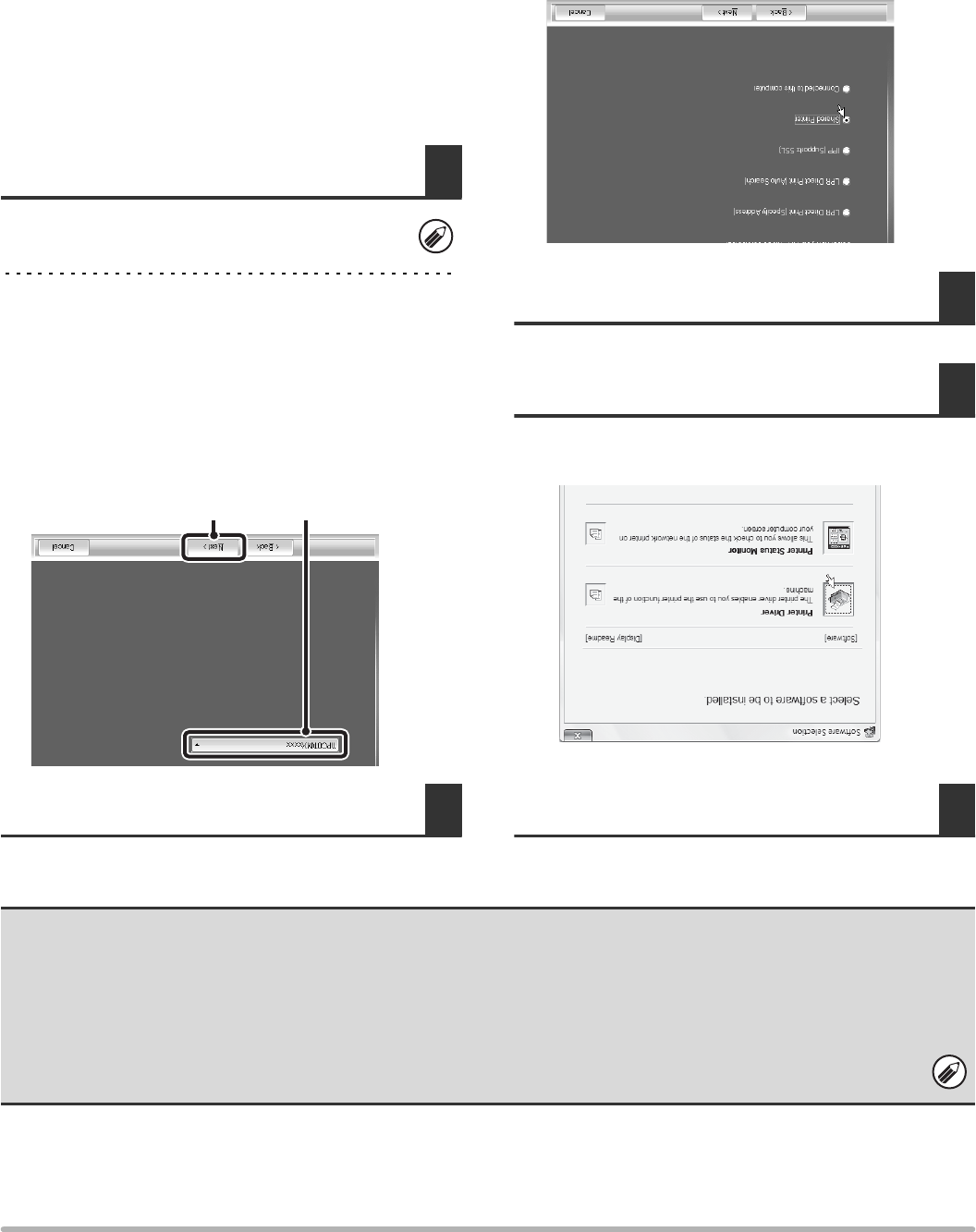
Click the [Printer Driver] button.
To install the PC-Fax driver, click the [PC-Fax Driver]
button on the "Disc 2" CD-ROM.
* The above screen appears when using the
"Disc 1" CD-ROM.
2
Click the [Custom installation] button.
3
Select [Shared Printer] and click the
[Next] button.
4
Select the printer name (configured as a
shared printer).
(1) Select the printer name (configured as
a shared printer on a print server) from
the list.
If you are using Windows 98/Me/NT 4.0/2000/XP/
Server 2003, you can also click the [Add Network
Port] button displayed below the list and select the
printer to be shared by browsing the network in the
window that appears.
(2) Click the [Next] button.
5
Perform steps 5 through 12 on page 13
to continue the installation.
In the printer driver selection screen, be sure to select the
same type of printer driver as the printer driver installed
on the print server.
This completes the installation.
If you installed the PS printer driver or the PPD driver, the PS
display fonts can be installed from the "PRINTER UTILITIES"
CD-ROM that accompanies the PS3 expansion kit. See
"INSTALLING THE PS DISPLAY FONTS" (page 28).
• Ask your network administrator for the server name and printer name of the machine on the network.
• For the procedure for configuring settings on the print server, see the operation manual or the Help file of the operating
system. The "print server" explained here is a computer that is connected directly to the machine, and "clients" are other
computers connected to the same network as the print server.
• Install the same printer driver on client computers as the printer driver that is installed on the print server.
• If the PPD driver is installed on the print server and the client computers are running Windows 98/Me/NT 4.0, see "USING
THE STANDARD WINDOWS PS PRINTER DRIVER (Windows 98/Me/NT 4.0)" (page 21) to install the printer driver using
the Add Printer Wizard.
If the shared printer does not appear in the list, check
the settings on the print server.
(2)
(1)
Soubor PDF · ·
Otázky k Sharp MX-4101N
K tomuto návodu zatím nejsou žádné otázky. Položte první.
Související produkty a manuály pro Multifunkční zařízení Sharp MX-4101N
- Multifunkční zařízení Sharp JW-20FLT Uživatelský manuál
 (197 stránek)
- Multifunkční zařízení Sharp MX-C381 Specifikace
(148 stránek)
- Multifunkční zařízení Sharp MX-M260 Uživatelský manuál
 (160 stránek)
- Multifunkční zařízení Sharp MX-4101N Specifikace
(12 stránek)
- Multifunkční zařízení Sharp MX-M564N Uživatelský manuál
(8 stránek)
- Multifunkční zařízení Sharp MX-M564N Uživatelský manuál
(8 stránek)
- Multifunkční zařízení Sharp CPD-3830 Uživatelský manuál
(1 stránka)
- Multifunkční zařízení Sharp MX-2010U Uživatelský manuál
(12 stránek)
- Multifunkční zařízení Sharp MX-B381 Uživatelský manuál
(12 stránek)
- Multifunkční zařízení Sharp MX-7500N Uživatelský manuál
(30 stránek)
- Multifunkční zařízení Sharp AL-2021 Specifikace
(91 stránek)
- Multifunkční zařízení Sharp MX-B402 Uživatelský manuál
(50 stránek)
- Multifunkční zařízení Sharp FO-155 Specifikace

 (165 stránek)
- Multifunkční zařízení Sharp MX-4140N Instalační manuál
(19 stránek)
- Multifunkční zařízení Sharp JW-50FL Uživatelský manuál
(201 stránek)
- Multifunkční zařízení Sharp MX-4140N Uživatelský manuál
(12 stránek)
- Multifunkční zařízení Sharp CPD-3830 Uživatelský manuál
(12 stránek)
- Multifunkční zařízení Sharp CD600 - B/W - Fax Uživatelský manuál
(23 stránek)
- Multifunkční zařízení Sharp AR-810 Manuál s instrukcemi
(178 stránek)
- Multifunkční zařízení Sharp AL-1566 Specifikace
(116 stránek)