Sharp MX-4101N Specifikace Strana 51: When the PPD driver is installed
 1
 2
 3
 4
 5
 6
 7
 8
 9
 10
 11
 12
 13
 14
 15
 16
 17
 18
 19
 20
 21
 22
 23
 24
 25
 26
 27
 28
 29
 30
 31
 32
 33
 34
 35
 36
 37
 38
 39
 40
 41
 42
 43
 44
 45
 46
 47
 48
 49
 50
 51
 52
 53
 54
 55
 56
 57
 58
 59
 60
 61
 62
 63
 64
 65
 66
 67
 68
 69
 70
 71
 72
 73
 74
 75
 76
24
INSTALLING THE PRINTER DRIVER / PC-FAX DRIVER
�
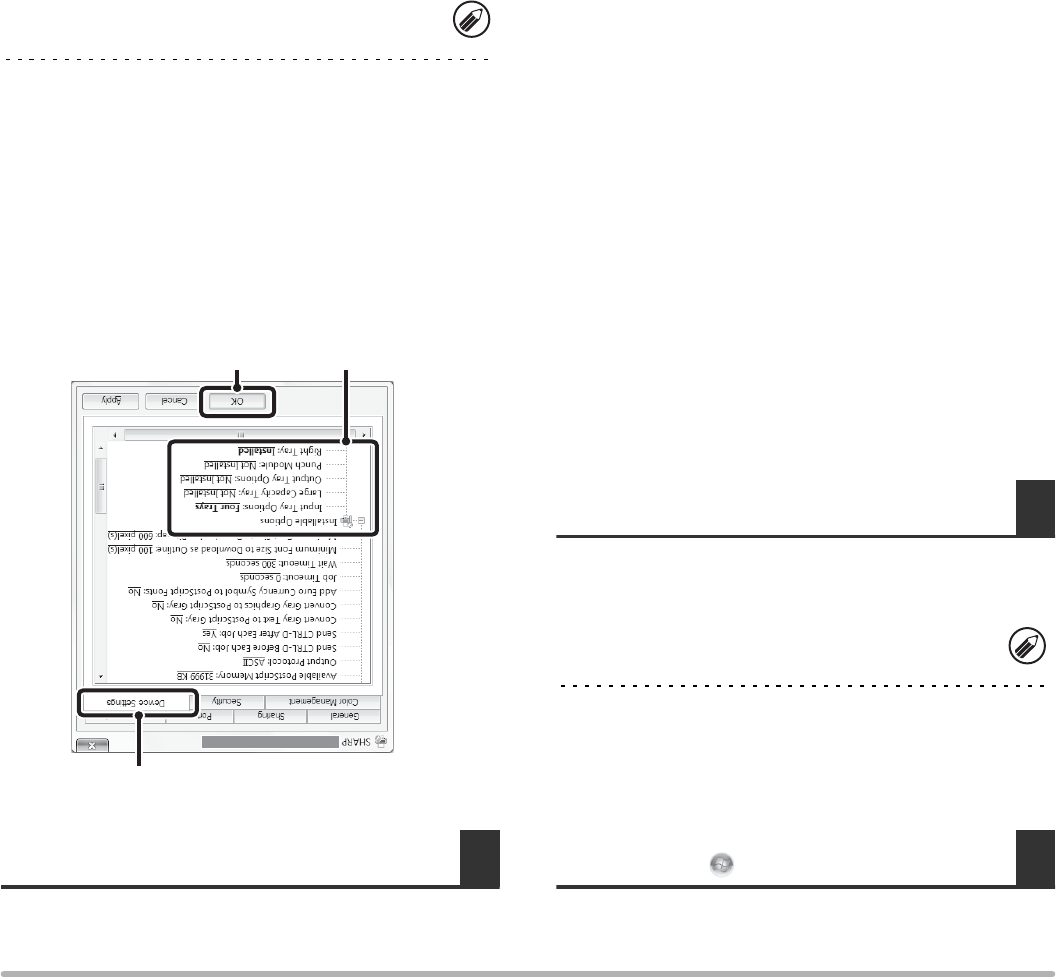
When the PPD driver is installed
1
Click the [Start] button (
), click
[Control Panel], and then click [Printer].
• In Windows XP/Server 2003, click the [start] button
and then click [Printers and Faxes].
• In Windows 98/Me/NT 4.0/2000, click the [Start]
button, select [Settings], and then click [Printers].
2
Open the printer properties window.
(1) Right-click the printer driver icon of the
machine.
(2) Select [Properties].
3
Configure the printer driver for the
options installed on the machine.
(1) Click the [Device Settings] tab.
In Windows 98/Me, click the [Device Options] tab.
(2) Configure each item based on the
machine configuration.
The items and the procedures for configuring the
items vary depending on the operating system
version.
(3) Click the [OK] button.
If [Printers and Faxes] does not appear in the [start]
menu in Windows XP, click the [start] button, click
[Control Panel], click [Printers and Other Hardware],
and then click [Printers and Faxes].
You can check the options that are installed on the
machine by printing out the "All Custom Setting List" in
the system settings. (However, note that "Input Tray
Options" must be set to the number of trays on the
machine.) Follow these steps to print out the "All
Custom Setting List": Press the [SYSTEM SETTINGS]
key, touch the [List Print (User)] key, and then touch
the [Print] key of "All Custom Setting List".
(1)
(2)
(3)
Soubor PDF · ·
Otázky k Sharp MX-4101N
K tomuto návodu zatím nejsou žádné otázky. Položte první.
Související produkty a manuály pro Multifunkční zařízení Sharp MX-4101N
- Multifunkční zařízení Sharp JW-20FLT Uživatelský manuál
 (197 stránek)
- Multifunkční zařízení Sharp MX-C381 Specifikace
(148 stránek)
- Multifunkční zařízení Sharp MX-M260 Uživatelský manuál
 (160 stránek)
- Multifunkční zařízení Sharp MX-4101N Specifikace
(12 stránek)
- Multifunkční zařízení Sharp MX-M564N Uživatelský manuál
(8 stránek)
- Multifunkční zařízení Sharp MX-M564N Uživatelský manuál
(8 stránek)
- Multifunkční zařízení Sharp CPD-3830 Uživatelský manuál
(1 stránka)
- Multifunkční zařízení Sharp MX-2010U Uživatelský manuál
(12 stránek)
- Multifunkční zařízení Sharp MX-B381 Uživatelský manuál
(12 stránek)
- Multifunkční zařízení Sharp MX-7500N Uživatelský manuál
(30 stránek)
- Multifunkční zařízení Sharp AL-2021 Specifikace
(91 stránek)
- Multifunkční zařízení Sharp MX-B402 Uživatelský manuál
(50 stránek)
- Multifunkční zařízení Sharp FO-155 Specifikace

 (165 stránek)
- Multifunkční zařízení Sharp MX-4140N Instalační manuál
(19 stránek)
- Multifunkční zařízení Sharp JW-50FL Uživatelský manuál
(201 stránek)
- Multifunkční zařízení Sharp MX-4140N Uživatelský manuál
(12 stránek)
- Multifunkční zařízení Sharp CPD-3830 Uživatelský manuál
(12 stránek)
- Multifunkční zařízení Sharp CD600 - B/W - Fax Uživatelský manuál
(23 stránek)
- Multifunkční zařízení Sharp AR-810 Manuál s instrukcemi
(178 stránek)
- Multifunkční zařízení Sharp AL-1566 Specifikace
(116 stránek)