Sharp MX-4101N Specifikace Strana 42: Configure the printer driver
 1
 2
 3
 4
 5
 6
 7
 8
 9
 10
 11
 12
 13
 14
 15
 16
 17
 18
 19
 20
 21
 22
 23
 24
 25
 26
 27
 28
 29
 30
 31
 32
 33
 34
 35
 36
 37
 38
 39
 40
 41
 42
 43
 44
 45
 46
 47
 48
 49
 50
 51
 52
 53
 54
 55
 56
 57
 58
 59
 60
 61
 62
 63
 64
 65
 66
 67
 68
 69
 70
 71
 72
 73
 74
 75
 76
33
MAC OS X
+
14
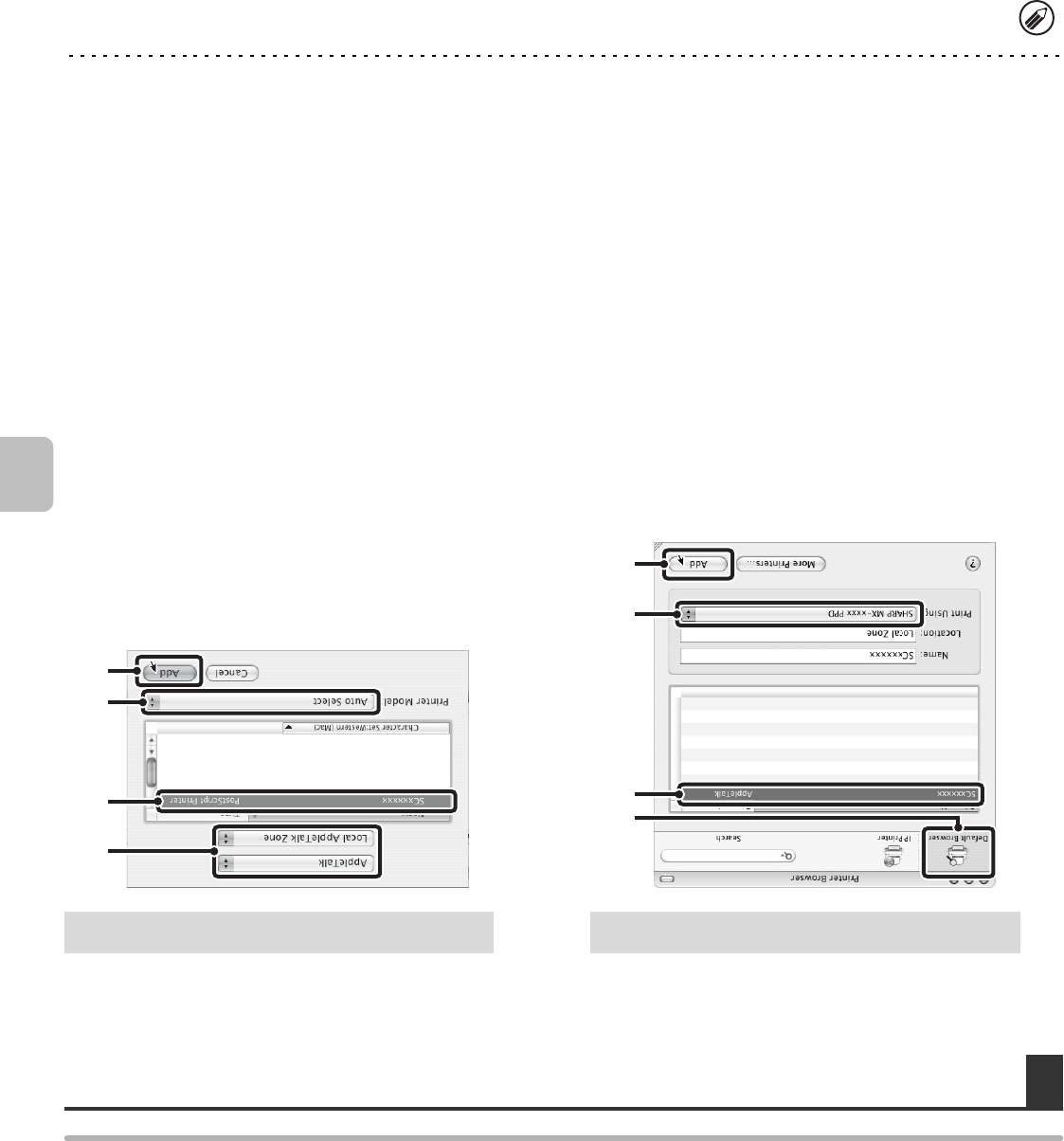
Configure the printer driver.
• The procedure for configuring the printer driver varies depending on the operating system version. The procedure for versions
10.4.11 and 10.5 - 10.5.1 and the procedure for other versions are explained separately below.
• The machine can print using the IPP function. If you wish to use the IPP function, see "Printing using the IPP function"
(page 35) to configure the printer driver settings.
(1) Click the [Default Browser] icon.
• If multiple AppleTalk zones are displayed, select
the zone that includes the printer from the menu.
• If you are using Mac OS X v10.5 to 10.5.1, click
the [Default] icon.
(2) Click the machine's model name.
• The machine's model name usually appears as
[SCxxxxxx]. ("xxxxxx" is a sequence of
characters that varies depending on your model.)
• The PPD file of the machine is automatically
selected.
(3) Make sure that the PPD file of your
model is selected.
(4) Click the [Add] button.
The PPD file of the machine is automatically
selected and the peripheral devices installed on the
machine are detected and automatically configured.
(1) Select [AppleTalk].
If multiple AppleTalk zones are displayed, select the
zone that includes the printer from the menu.
(2) Click the machine's model name.
The machine's model name usually appears as
[SCxxxxxx]. ("xxxxxx" is a sequence of characters
that varies depending on your model.)
(3) Select the PPD file of the machine.
• If you are using Mac OS X v10.3.9, select [Auto
Select].
• If you are using Mac OS X v10.2.8, select [Sharp]
and click the PPD file of your model.
(4) Click the [Add] button.
If you are using Mac OS X v10.3.9, the PPD file of
the machine is automatically selected and the
peripheral devices installed on the machine are
detected and automatically configured.
v10.4.11, v10.5 - 10.5.1
(1)
(2)
(4)
(3)
v10.2.8, v10.3.9
(1)
(2)
(4)
(3)
The PPD file is installed in the following folders on the startup disk.
[Library] - [Printers] - [PPDs] - [Contents] - [Resources] - [en.lproj]
Soubor PDF · ·
Otázky k Sharp MX-4101N
K tomuto návodu zatím nejsou žádné otázky. Položte první.
Související produkty a manuály pro Multifunkční zařízení Sharp MX-4101N
- Multifunkční zařízení Sharp JW-20FLT Uživatelský manuál
 (197 stránek)
- Multifunkční zařízení Sharp MX-C381 Specifikace
(148 stránek)
- Multifunkční zařízení Sharp MX-M260 Uživatelský manuál
 (160 stránek)
- Multifunkční zařízení Sharp MX-4101N Specifikace
(12 stránek)
- Multifunkční zařízení Sharp MX-M564N Uživatelský manuál
(8 stránek)
- Multifunkční zařízení Sharp MX-M564N Uživatelský manuál
(8 stránek)
- Multifunkční zařízení Sharp CPD-3830 Uživatelský manuál
(1 stránka)
- Multifunkční zařízení Sharp MX-2010U Uživatelský manuál
(12 stránek)
- Multifunkční zařízení Sharp MX-B381 Uživatelský manuál
(12 stránek)
- Multifunkční zařízení Sharp MX-7500N Uživatelský manuál
(30 stránek)
- Multifunkční zařízení Sharp AL-2021 Specifikace
(91 stránek)
- Multifunkční zařízení Sharp MX-B402 Uživatelský manuál
(50 stránek)
- Multifunkční zařízení Sharp FO-155 Specifikace

 (165 stránek)
- Multifunkční zařízení Sharp MX-4140N Instalační manuál
(19 stránek)
- Multifunkční zařízení Sharp JW-50FL Uživatelský manuál
(201 stránek)
- Multifunkční zařízení Sharp MX-4140N Uživatelský manuál
(12 stránek)
- Multifunkční zařízení Sharp CPD-3830 Uživatelský manuál
(12 stránek)
- Multifunkční zařízení Sharp CD600 - B/W - Fax Uživatelský manuál
(23 stránek)
- Multifunkční zařízení Sharp AR-810 Manuál s instrukcemi
(178 stránek)
- Multifunkční zařízení Sharp AL-1566 Specifikace
(116 stránek)