Sharp JW-50FL Uživatelský manuál Strana 10

  • Stažení
  • Přidat do mých příruček
  • Tisk
  • Strana
    / 16
  • Tabulka s obsahem
  • KNIHY
  • Hodnocené. / 5. Na základě hodnocení zákazníků
Zobrazit stránku 9
No.10/16
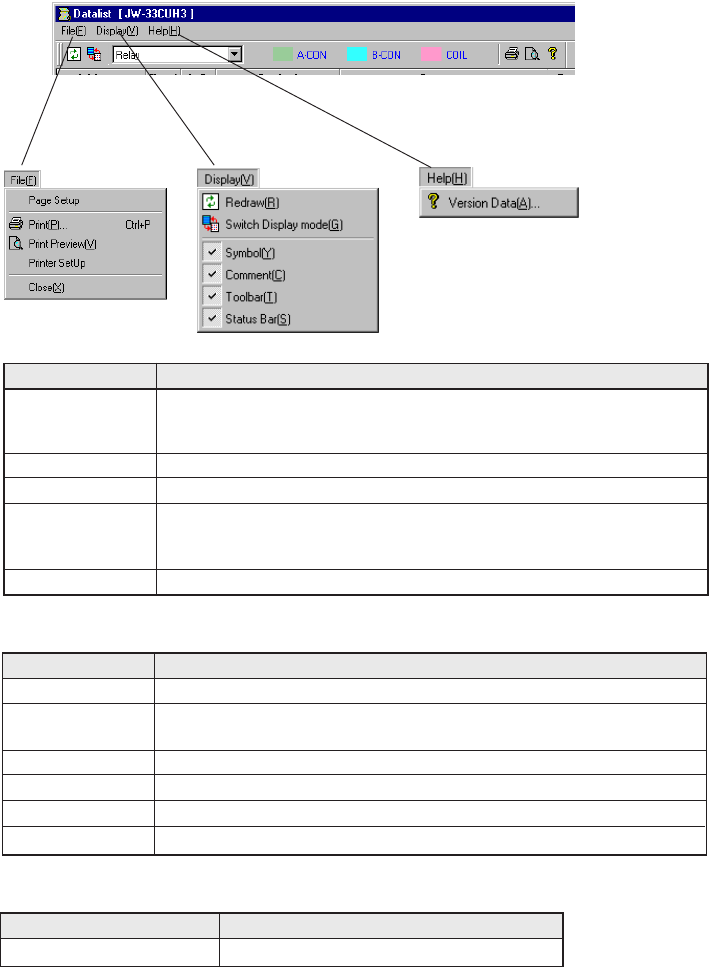
(1) Operation -> See page 5-39, 5-40, 9-18, and 9-22
The menu operation on the [Data List] dialog box is described below.
[File] menu
[Display] menu
[Help] menu
Menu bar operation
Item
Allows you to print data list.
Allows you to show how the data list look like when it is printed.
Item
Re-display
Content
Allows you to reflect the latest program information in the contents of data list.
Allows you to switch [1-line Display] to [Detailed Display] or vice versa
on the [Data List] dialog box.
Allows you to make the symbol column visible or invisible.
Allows you to make the comment column visible or invisible.
Allows you to make the tool bar visible or invisible.
Allows you to make the status bar visible or invisible.
1-line Display <-> De-
tailed Display Selection
Symbol Column
Comment Column
Tool Bar
Status Bar
Item
      Content
Allows you to show the version of a data list.
Data List Version Information
Allows you to set up the print page of data list.
When you click on [Print Setup], The [Print Setup] dialog box ap-
pears. -> See No.12 on page 16.
Content
Allows you to set up printer selection/connection.
When you click on [Printer Setup], the [Printer Setup] dialog box ap-
pears.
Allows you to close the [Data List] dialog box.
Print Setup
Print
Print Preview
Printer Setup
Close
Zobrazit stránku 9
1 2 ... 5 6 7 8 9 10 11 12 13 14 15 16

Komentáře k této Příručce

Žádné komentáře