Sharp FO-885 Specifikace Strana 143
- Strana / 151
- Tabulka s obsahem
- ŘEŠENÍ PROBLÉMŮ
- KNIHY

- FACSIMILE 1
- WARRANTY 2
- Introduction 3
- Important safety information 5
- Table of Contents 10
- 1. Installation 11
- A Look at the Operation Panel 12
- Connections 15
- Power lead 17
- Telephone line cord 18
- Extension phone (optional) 20
- Loading the Imaging Film 21
- Protrusion 23
- Large gear 23
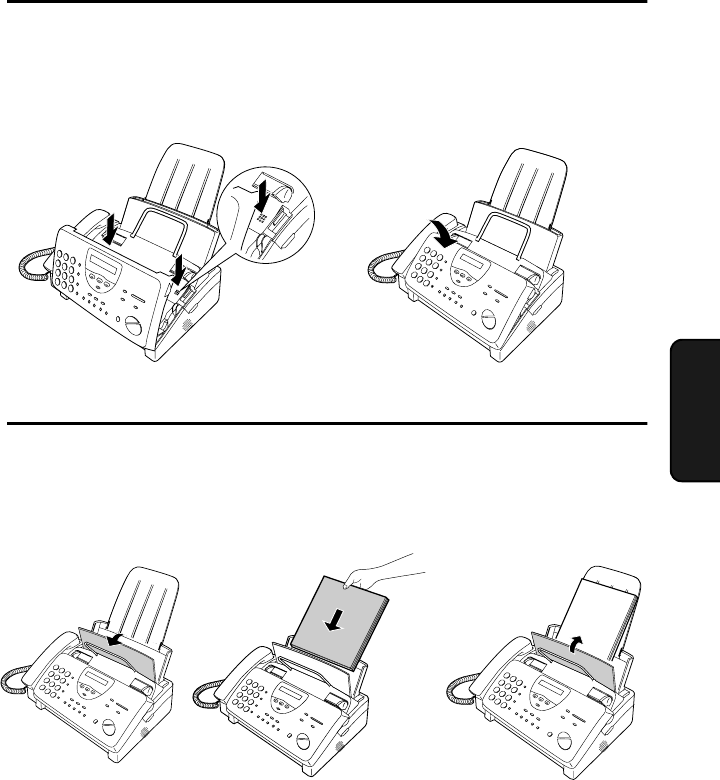
- Loading Printing Paper 26
- Press these keys: 28
- The display will show: 28
- Press the # key twice: 28
- Example: 29
- ENTER YOUR NAME 29
- ENTER FAX # 29
- START/MEMORY 30
- Setting the Date and Time 31
- Example: 9:25 32
- Example: January 32
- Example: the 5th 32
- Example: 2001 32
- 1. Installation 33
- STORE JUNK # 33
- Selecting the Reception Mode 34
- Setting the reception mode 35
- Volume Adjustment 36
- FUNCTION 38
- GENERAL TRANSFER 39
- Recording an Outgoing Message 40
- 2. Answering 41
- PLAY/SKIP 42
- Erasing received messages 43
- Using the REC/MEMO key 43
- Retrieving your messages 55
- Remote Operations 56
- Other remote operations 58
- Recording a "Memo" 60
- OGM only mode 61
- 3. Sending Documents 62
- Other restrictions 63
- RESOLUTION 64
- If you need to remove a 65
- Resolution and Contrast 66
- READY TO SEND 68
- FAX/TEL # MODE 71
- FAX/TEL # SET 71
- ENTER SPEED # 71
- Clearing numbers 73
- Making changes 73
- Rapid Key Dialling 74
- Direct Keypad Dialling 76
- Using the HOLD/SEARCH key 77
- Automatic redialling 78
- 4. Receiving Documents 79
- Using FAX Mode 80
- Using A.M. Mode 81
- Using TEL Mode 82
- Phone goes dead 83
- RECEIVING 83
- 2 in 1 Print 84
- Reception Ratio 85
- Receiving Documents 86
- 5. Making Copies 87
- Making Copies 88
- Copy Cut-off 89
- 6. Making Telephone Calls 90
- Chain Dialling 91
- Making Telephone Calls 92
- 7. Special Functions 93
- How Caller ID operates 94
- Display messages 94
- Viewing the Caller ID list 95
- Priority Call 96
- Blocking voice calls 97
- Distinctive Ring 98
- Press the STOP key 99
- Broadcasting 100
- Cover Sheet 102
- AUTO PRINT OUT 103
- COVER SHEET HEAD 103
- (Example) 104
- Batch Page Numbering 105
- Comments: 106
- SET CLEAR 107
- 32 2 4 5 6 108
- Sending Documents From Memory 109
- If the memory becomes full 110
- Requesting transmission 111
- Polling security 112
- Step 4 or 113
- Timer Operations 114
- To cancel an operation 115
- 8. Option Settings 116
- 8. Option 117
- Settings 117
- ♦ Initial setting: 5 118
- ♦ Initial setting: 1 118
- ♦ Initial setting: 2 120
- Printing a list 123
- Activity Report 123
- RECEIVER 124
- 9. Printing 125
- Passcode List 126
- Option Setting List 126
- Anti Junk Number List 127
- A.M. Program List 127
- Caller ID List 128
- Message List 128
- Print Setup List 129
- Transaction Report 129
- 10. Maintenance 130
- Print head 131
- Maintenance 132
- Scanning glass and rollers 133
- Cleaning the housing 133
- 11. Troubleshooting 134
- Problems and Solutions 135
- General problems 137
- Messages and Signals 138
- Display Messages 139
- Audible signals 140
- Clearing Paper Jams 141
- QUICK REFERENCE GUIDE 144
- SENDING DOCUMENTS 145
- RECEIVING DOCUMENTS 145
- REMOTE OPERATION CARD 149
- REMOTE COMMANDS 150
- A.C.N. 003 039 405 151
- New Zealand 151
Související produkty a manuály pro Faxy Sharp FO-885
 (4 stránky)
(198 stránky)
(107 stránky)
(147 stránky)
(111 stránky)
(14 stránky)
(4 stránky)
(198 stránky)
(107 stránky)
(147 stránky)
(111 stránky)
(14 stránky)
 (84 stránky)
(93 stránky)
(87 stránky)
(103 stránky)
(131 stránky)
(131 stránky)
(115 stránky)
(74 stránky)
(84 stránky)
(93 stránky)
(87 stránky)
(103 stránky)
(131 stránky)
(131 stránky)
(115 stránky)
(74 stránky)
 (166 stránky)
(118 stránky)
(103 stránky)
(123 stránky)
(166 stránky)
(118 stránky)
(103 stránky)
(123 stránky)
© 2020, manymanuals.cz. Všechna práva vyhrazena. | 0.050 s |
 Manymanuals.com
 Manymanuals.de
 Manymanuals.fr
 Manymanuals.it
 Manymanuals.pl
 Manymanuals.cz
 Manymanuals.es
 Manymanuals-pt.com
Komentáře k této Příručce