Sharp VL-E40S Technické informace Strana 83: 1140 Keyboard bezel
 1
 2
 3
 4
 5
 6
 7
 8
 9
 10
 11
 12
 13
 14
 15
 16
 17
 18
 19
 20
 21
 22
 23
 24
 25
 26
 27
 28
 29
 30
 31
 32
 33
 34
 35
 36
 37
 38
 39
 40
 41
 42
 43
 44
 45
 46
 47
 48
 49
 50
 51
 52
 53
 54
 55
 56
 57
 58
 59
 60
 61
 62
 63
 64
 65
 66
 67
 68
 69
 70
 71
 72
 73
 74
 75
 76
 77
 78
 79
 80
 81
 82
 83
 84
 85
 86
 87
 88
 89
 90
 91
 92
 93
 94
 95
 96
 97
 98
 99
 100
 101
 102
 103
 104
 105
 106
 107
 108
 109
 110
 111
 112
 113
 114
 115
 116
 117
 118
 119
 120
 121
 122
 123
 124
 125
 126
 127
 128
 129
 130
 131
 132
 133
 134
 135
 136
 137
 138
 139
 140
 141
 142
 143
 144
 145
 146
 147
 148
 149
 150
 151
 152
 153
 154
 155
 156
 157
 158
6
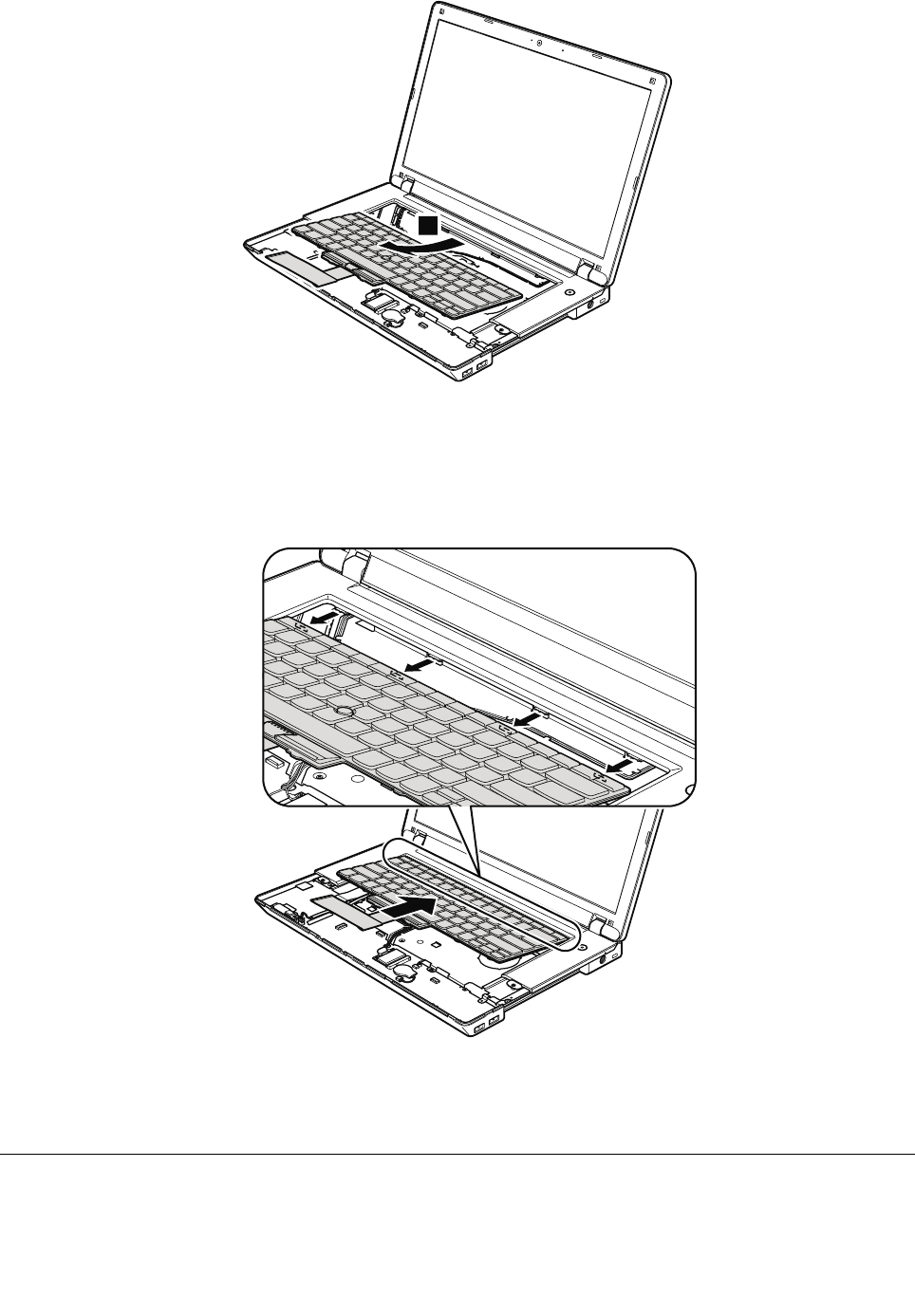
Installation of the keyboard
When installing the keyboard, do as follows:
1. Attach the connectors.
2. Attach the keyboard so that the keyboard edges are under the frame as shown in this figure.
3. To make sure that the front side of the keyboard is housed firmly, gently press the keys with your
thumbs and try to slide the keyboard toward you.
4. Secure the keyboard by tightening the screws from the bottom side of the computer.
1140 Keyboard bezel
For access, remove these FRUs in order:
•
“1010 Battery pack” on page 58
Chapter 8
.
Removing or replacing a FRU
77
Soubor PDF · ·
Otázky k Sharp VL-E40S
K tomuto návodu zatím nejsou žádné otázky. Položte první.
Související produkty a manuály pro Videokamery Sharp VL-E40S
- Videokamery Sharp VL-Z1S Uživatelský manuál
 (88 stránek)
- Videokamery Sharp VL-A10K Technické informace
 (71 stránek)
- Videokamery Sharp VL-NZ50S Uživatelský manuál
 (60 stránek)
- Videokamery Sharp VL-Z3H Specifikace
(120 stránek)
- Videokamery Sharp VL-Z950S-E-T Uživatelský manuál
 (133 stránek)
- Videokamery Sharp VL-Z500H Specifikace
(128 stránek)
- Videokamery Sharp VL-Z100S Uživatelský manuál
(96 stránek)
- Videokamery Sharp VL-Z7S Uživatelský manuál
 (80 stránek)
- Videokamery Sharp VL-Z8H Specifikace
(124 stránek)
- Videokamery Sharp VL-ME100S Uživatelský manuál
 (132 stránek)
- Videokamery Sharp VL-Z100S Specifikace
(96 stránek)
- Videokamery Sharp VL-Z500S Specifikace
(128 stránek)
- Videokamery Sharp VL-A10K Technické informace
(52 stránek)
- Videokamery Sharp VL-NZ50E Specifikace
(73 stránek)
- Videokamery Sharp VL-Z3S Uživatelský manuál
(118 stránek)
- Videokamery Sharp VL-Z1H Specifikace
(88 stránek)
- Videokamery Sharp VL-Z950S Uživatelský manuál
 (77 stránek)
- Videokamery Sharp VL-Z900H-S Uživatelský manuál
 (206 stránek)
- Videokamery Sharp VL-WD450S Specifikace
(112 stránek)
- Videokamery Sharp VL-Z800S-E-S Uživatelský manuál
 (129 stránek)