Sharp VL-E40S Technické informace Strana 42: Checkingthebackupbattery
 1
 2
 3
 4
 5
 6
 7
 8
 9
 10
 11
 12
 13
 14
 15
 16
 17
 18
 19
 20
 21
 22
 23
 24
 25
 26
 27
 28
 29
 30
 31
 32
 33
 34
 35
 36
 37
 38
 39
 40
 41
 42
 43
 44
 45
 46
 47
 48
 49
 50
 51
 52
 53
 54
 55
 56
 57
 58
 59
 60
 61
 62
 63
 64
 65
 66
 67
 68
 69
 70
 71
 72
 73
 74
 75
 76
 77
 78
 79
 80
 81
 82
 83
 84
 85
 86
 87
 88
 89
 90
 91
 92
 93
 94
 95
 96
 97
 98
 99
 100
 101
 102
 103
 104
 105
 106
 107
 108
 109
 110
 111
 112
 113
 114
 115
 116
 117
 118
 119
 120
 121
 122
 123
 124
 125
 126
 127
 128
 129
 130
 131
 132
 133
 134
 135
 136
 137
 138
 139
 140
 141
 142
 143
 144
 145
 146
 147
 148
 149
 150
 151
 152
 153
 154
 155
 156
 157
 158
3. If the indicator still does not turn on, replace the battery pack.
4. If the indicator still does not turn on, replace the system board. Otherwise, refer to “Checking the
backup battery” on page 36.
Checking the battery pack
Battery charging does not start until the Power Manager Battery Gauge shows that less than 96% of the
total power remains; under this condition the battery pack can charge to 100% of its capacity. This protects
the battery pack from being overcharged or from having a shortened life.
To check your battery, move your cursor to the Power Manager Battery Gauge icon in the icon tray of the
Windows taskbar and wait for a moment (but do
not
click), and the percentage of battery power remaining
is displayed. To get detailed information about the battery, double-click the Power Manager Battery
Gauge icon.
Note:
If the battery pack becomes hot, it may not be able to charge. Remove it from the computer and leave
it at room temperature for a while. After it cools down, reinstall and recharge it.
To check the battery pack, do the following:
1. Turn off the computer and disconnect the ac power adapter.
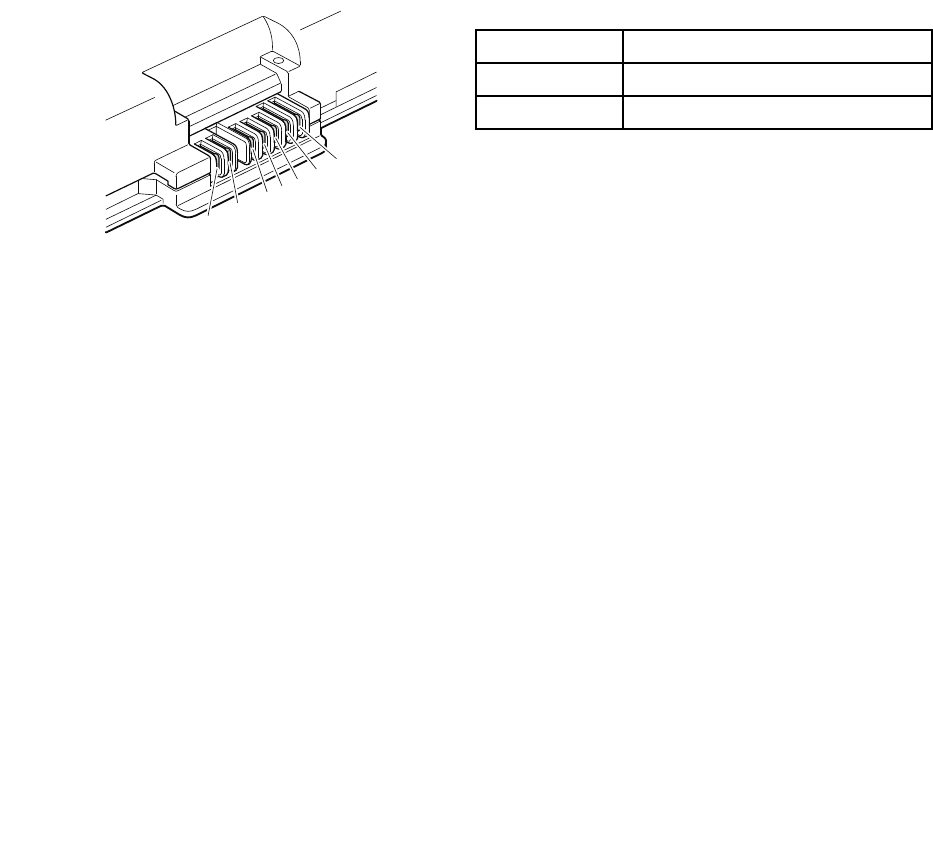
2. Remove the battery pack and measure the voltage between battery terminals 1 (+) and 7 (-). The
following correct voltages are shown in the following table:
Terminal
Voltage (V dc)
1
+ 0 to + 12.6
7
Ground (-)
1(+)
2(+)
3 4 5 6(-)7(-)
3. If the voltage is less than +11.0 V dc, the battery pack has been discharged.
Note:
Recharging will take at least 3 hours, even if the indicator does not turn on.
If the voltage is still less than +11.0 V dc after recharging, replace the battery.
4. If the voltage is more than +11.0 V dc, measure the resistance between battery terminals 5 and 7.
The resistance must be 4 to 30 K Ω. If the resistance is not correct, replace the battery pack. If the
resistance is correct, replace the system board.
Checking the backup battery
Do the following:
1. Power off the computer, and unplug the ac adapter from it.
2. Turn the computer upside down.
3. Remove the battery pack (see “1010 Battery pack” on page 58).
4. Remove the backup battery (see “1110 Backup battery” on page 74).
5. Measure the voltage of the backup battery. See the following figure.
36
Hardware Maintenance Manual
Soubor PDF · ·
Otázky k Sharp VL-E40S
K tomuto návodu zatím nejsou žádné otázky. Položte první.
Související produkty a manuály pro Videokamery Sharp VL-E40S
- Videokamery Sharp VL-Z1S Uživatelský manuál
 (88 stránek)
- Videokamery Sharp VL-A10K Technické informace
 (71 stránek)
- Videokamery Sharp VL-NZ50S Uživatelský manuál
 (60 stránek)
- Videokamery Sharp VL-Z3H Specifikace
(120 stránek)
- Videokamery Sharp VL-Z950S-E-T Uživatelský manuál
 (133 stránek)
- Videokamery Sharp VL-Z500H Specifikace
(128 stránek)
- Videokamery Sharp VL-Z100S Uživatelský manuál
(96 stránek)
- Videokamery Sharp VL-Z7S Uživatelský manuál
 (80 stránek)
- Videokamery Sharp VL-Z8H Specifikace
(124 stránek)
- Videokamery Sharp VL-ME100S Uživatelský manuál
 (132 stránek)
- Videokamery Sharp VL-Z100S Specifikace
(96 stránek)
- Videokamery Sharp VL-Z500S Specifikace
(128 stránek)
- Videokamery Sharp VL-A10K Technické informace
(52 stránek)
- Videokamery Sharp VL-NZ50E Specifikace
(73 stránek)
- Videokamery Sharp VL-Z3S Uživatelský manuál
(118 stránek)
- Videokamery Sharp VL-Z1H Specifikace
(88 stránek)
- Videokamery Sharp VL-Z950S Uživatelský manuál
 (77 stránek)
- Videokamery Sharp VL-Z900H-S Uživatelský manuál
 (206 stránek)
- Videokamery Sharp VL-WD450S Specifikace
(112 stránek)
- Videokamery Sharp VL-Z800S-E-S Uživatelský manuál
 (129 stránek)