Sharp VL-E40S Technické informace Strana 41: Checkingoperationalcharging
 1
 2
 3
 4
 5
 6
 7
 8
 9
 10
 11
 12
 13
 14
 15
 16
 17
 18
 19
 20
 21
 22
 23
 24
 25
 26
 27
 28
 29
 30
 31
 32
 33
 34
 35
 36
 37
 38
 39
 40
 41
 42
 43
 44
 45
 46
 47
 48
 49
 50
 51
 52
 53
 54
 55
 56
 57
 58
 59
 60
 61
 62
 63
 64
 65
 66
 67
 68
 69
 70
 71
 72
 73
 74
 75
 76
 77
 78
 79
 80
 81
 82
 83
 84
 85
 86
 87
 88
 89
 90
 91
 92
 93
 94
 95
 96
 97
 98
 99
 100
 101
 102
 103
 104
 105
 106
 107
 108
 109
 110
 111
 112
 113
 114
 115
 116
 117
 118
 119
 120
 121
 122
 123
 124
 125
 126
 127
 128
 129
 130
 131
 132
 133
 134
 135
 136
 137
 138
 139
 140
 141
 142
 143
 144
 145
 146
 147
 148
 149
 150
 151
 152
 153
 154
 155
 156
 157
 158
Power system checkout
To verify a symptom, do the following:
1. Turn off the computer.
2. Remove the battery pack.
3. Connect the ac adapter.
4. Check that power is supplied when you turn on the computer.
5. Turn off the computer.
6. Disconnect the ac adapter and install the charged battery pack.
7. Check that the battery pack supplies power when you turn on the computer.
If you suspect a power problem, see the appropriate one of the following power supply checkouts:
•
“Checking the ac adapter” on page 35
•
“Checking operational charging” on page 35
•
“Checking the battery pack” on page 36
•
“Checking the backup battery” on page 36
Checking the ac adapter
You are here because the computer fails only when the ac adapter is used.
• If the power-on indicator does not turn on, check the power cord of the ac adapter for correct continuity
and installation.
• If the computer does not charge during operation, go to “Checking operational charging” on page 35
To check the ac adapter, do the following:
1. Unplug the ac adapter cable from the computer.
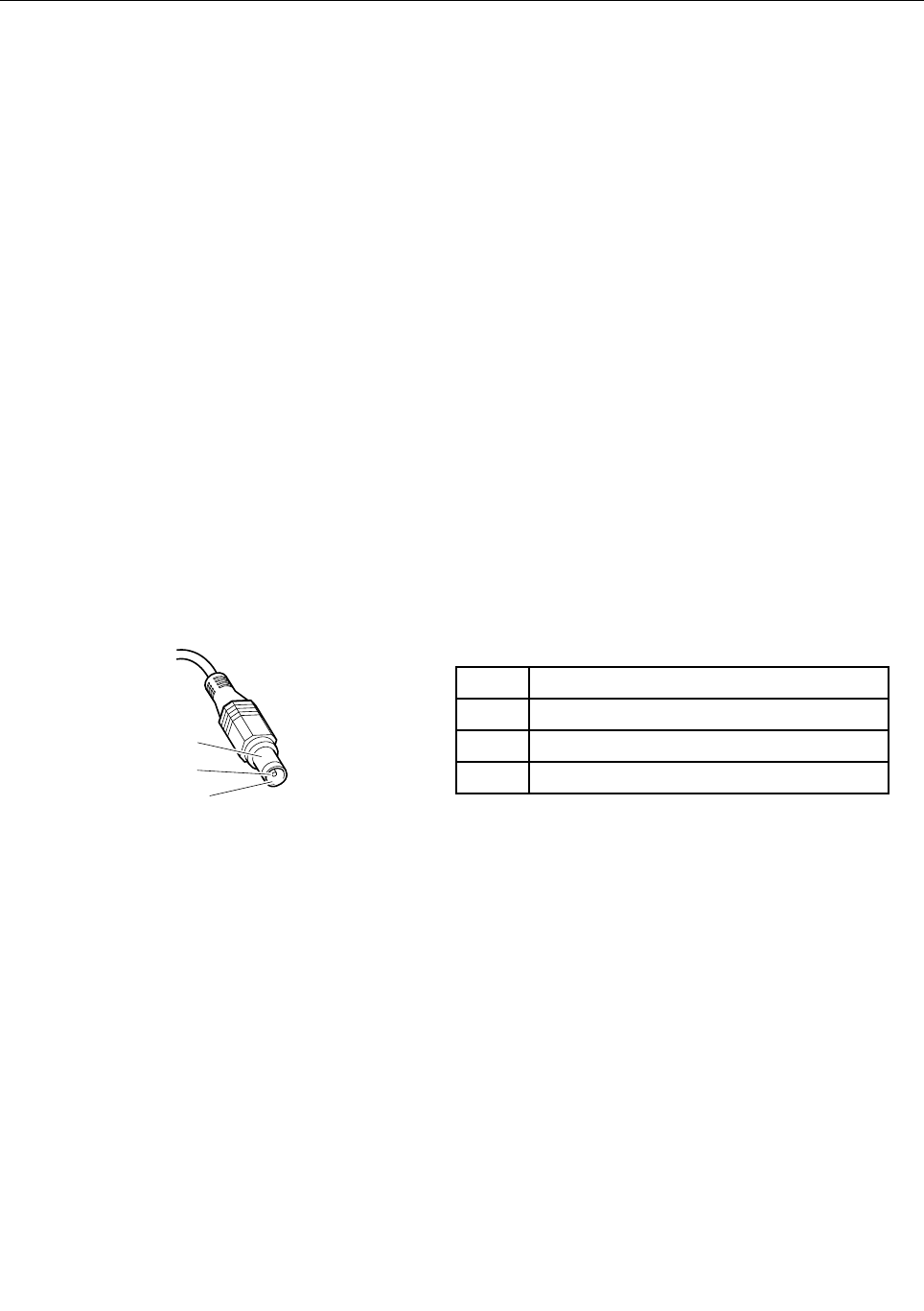
2. Measure the output voltage at the plug of the ac adapter cable. See the following figure:
Pin
Voltage (V dc)
1
+20
2
0
3
Ground
1
2
3
(20V)
Note:
Output voltage of pin no.2 of the ac adapter may different from the one you are servicing.
3. If the voltage is not correct, replace the ac adapter.
4. If the voltage is acceptable, do the following:
• Replace the system board.
• If the problem persists, go to “FRU tests” on page 34.
Note:
Noise from the ac adapter does not always indicate a defect.
Checking operational charging
To check whether the battery charges properly during operation, do the following:
Note:
Before you begin, install a discharged battery pack or battery pack that has less than 50% of the
total power remaining in the computer.
1. If the status indicator does not turn on, remove the battery pack and let it return to room temperature.
2. Reinstall the battery pack.
Chapter 3
.
General checkout
35
Soubor PDF · ·
Otázky k Sharp VL-E40S
K tomuto návodu zatím nejsou žádné otázky. Položte první.
Související produkty a manuály pro Videokamery Sharp VL-E40S
- Videokamery Sharp VL-Z1S Uživatelský manuál
 (88 stránek)
- Videokamery Sharp VL-A10K Technické informace
 (71 stránek)
- Videokamery Sharp VL-NZ50S Uživatelský manuál
 (60 stránek)
- Videokamery Sharp VL-Z3H Specifikace
(120 stránek)
- Videokamery Sharp VL-Z950S-E-T Uživatelský manuál
 (133 stránek)
- Videokamery Sharp VL-Z500H Specifikace
(128 stránek)
- Videokamery Sharp VL-Z100S Uživatelský manuál
(96 stránek)
- Videokamery Sharp VL-Z7S Uživatelský manuál
 (80 stránek)
- Videokamery Sharp VL-Z8H Specifikace
(124 stránek)
- Videokamery Sharp VL-ME100S Uživatelský manuál
 (132 stránek)
- Videokamery Sharp VL-Z100S Specifikace
(96 stránek)
- Videokamery Sharp VL-Z500S Specifikace
(128 stránek)
- Videokamery Sharp VL-A10K Technické informace
(52 stránek)
- Videokamery Sharp VL-NZ50E Specifikace
(73 stránek)
- Videokamery Sharp VL-Z3S Uživatelský manuál
(118 stránek)
- Videokamery Sharp VL-Z1H Specifikace
(88 stránek)
- Videokamery Sharp VL-Z950S Uživatelský manuál
 (77 stránek)
- Videokamery Sharp VL-Z900H-S Uživatelský manuál
 (206 stránek)
- Videokamery Sharp VL-WD450S Specifikace
(112 stránek)
- Videokamery Sharp VL-Z800S-E-S Uživatelský manuál
 (129 stránek)