Sharp MX-M260 Specifikace Strana 78: Booklet Tablet
 1
 2
 3
 4
 5
 6
 7
 8
 9
 10
 11
 12
 13
 14
 15
 16
 17
 18
 19
 20
 21
 22
 23
 24
 25
 26
 27
 28
 29
 30
 31
 32
 33
 34
 35
 36
 37
 38
 39
 40
 41
 42
 43
 44
 45
 46
 47
 48
 49
 50
 51
 52
 53
 54
 55
 56
 57
 58
 59
 60
 61
 62
 63
 64
 65
 66
 67
 68
 69
 70
 71
 72
 73
 74
 75
 76
 77
 78
 79
 80
 81
 82
 83
 84
 85
 86
 87
 88
 89
 90
 91
 92
 93
 94
 95
 96
 97
 98
 99
 100
 101
 102
 103
 104
 105
 106
 107
 108
 109
 110
 111
 112
 113
 114
 115
 116
 117
 118
 119
 120
 121
 122
 123
 124
 125
 126
 127
 128
 129
 130
 131
 132
 133
 134
 135
 136
 137
 138
 139
 140
 141
 142
 143
 144
 145
 146
 147
 148
 149
 150
 151
 152
 153
 154
 155
 156
 157
 158
 159
 160
76
NETWORK SCANNER FUNCTION
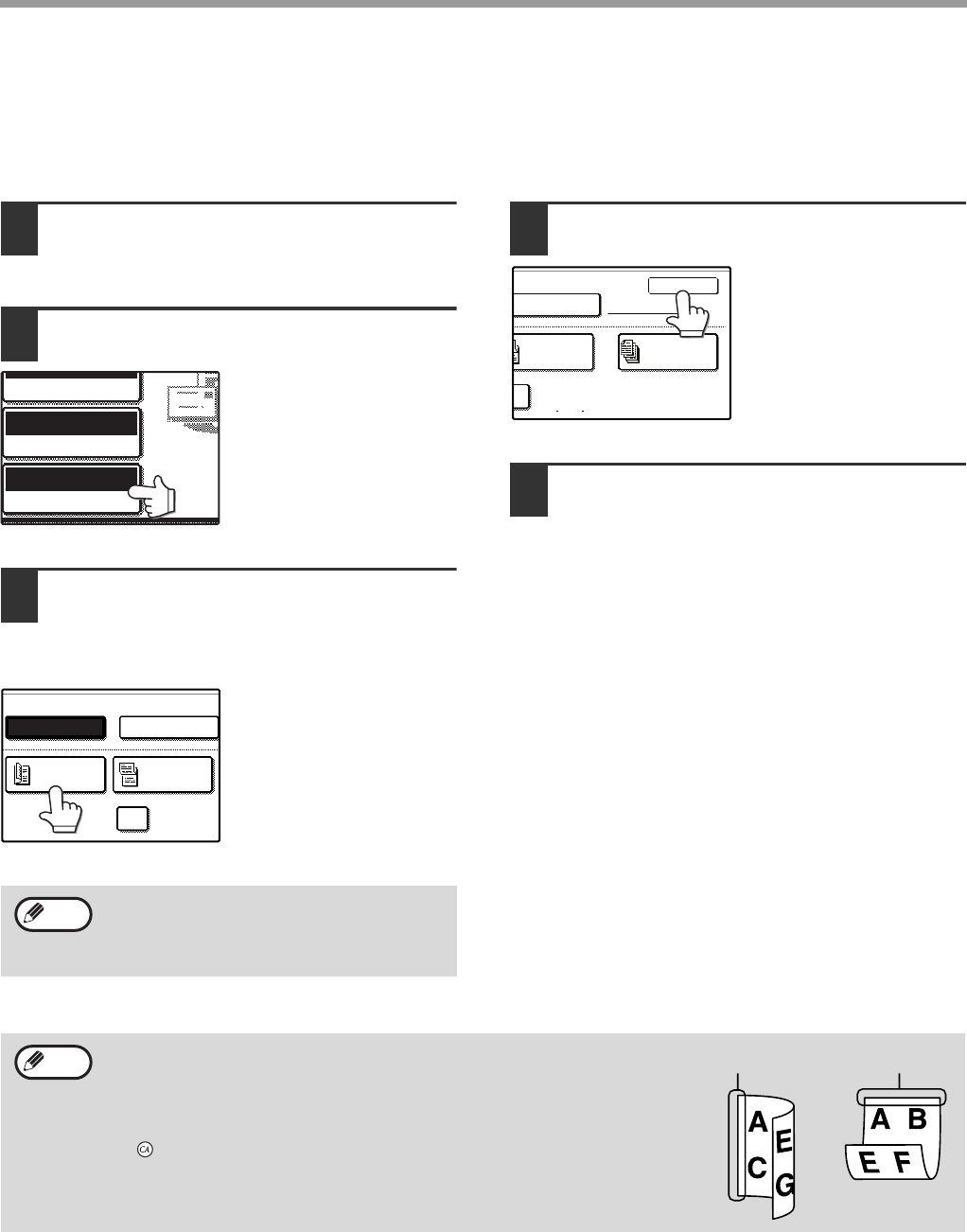
SCANNING AND TRANSMITTING A TWO-SIDED
ORIGINAL (when an RSPF is installed)
Follow these steps to automatically scan a two-sided original.
1
Make sure the machine is in scanner
mode and then load the document in
the RSPF. (p.72)
2
Touch the [ORIGINAL] key.
3
Touch the [2-SIDED BOOKLET] key or
the [2-SIDED TABLET] key as
appropriate for the original you
loaded.
If you wish to rotate the
original 90° when
creating an image file,
touch the [ROTATE THE
IMAGE 90 DEGREES]
checkbox (a checkmark
should appear in the
box).
4
Touch the [OK] key.
You will return to the
initial screen.
5
Continue from step 4 of "BASIC
TRANSMISSION METHOD" (
p.72 to 73
).
If the correct original size does not appear in
the screen of step 2, touch the [MANUAL]
key and specify the correct original size
(p.78).
AUTO
A4
ORIGINAL
300dpi
RESOLUTION
TIFF-G4
FILE FORMAT
MANUAL
ROTATE THE
AUTO
2-SIDED
BOOKLET
2-SIDED
TABLET
ORIGINAL SIZE
Note
MANUAL
ROTATE THE IMAGE 90 DEGREES
OK
2-SIDED
TABLET
JOB
BUILD
INAL SIZE
• Booklets and tablets
Two-sided originals that are bound at the side are booklets, and two-sided
originals that are bound at the top are tablets.
• Two-sided scanning mode turns off after transmission is finished. Two-sided
scanning mode can also be cancelled by pressing the [CLEAR ALL] key
(
).
Note
Booklet
Tablet
Soubor PDF · ·
Otázky k Sharp MX-M260
K tomuto návodu zatím nejsou žádné otázky. Položte první.
Související produkty a manuály pro Multifunkční zařízení Sharp MX-M260
- Multifunkční zařízení Sharp MX-M362N Specifikace
 (56 stránek)
- Multifunkční zařízení Sharp MX-LCX3 Specifikace
(76 stránek)
- Multifunkční zařízení Sharp AR-FR11 Uživatelský manuál
(6 stránek)
- Multifunkční zařízení Sharp MX-M363U Průvodce nastavením
(112 stránek)
- Multifunkční zařízení Sharp DX-C401FX Uživatelský manuál
(12 stránek)
- Multifunkční zařízení Sharp MX-5000N Uživatelský manuál
(2 stránky)
- Multifunkční zařízení Sharp AL-2040CS Uživatelský manuál
 (82 stránek)
- Multifunkční zařízení Sharp AR-C250 Specifikace
(161 stránek)
- Multifunkční zařízení Sharp MX-2301N Specifikace
(116 stránek)
- Multifunkční zařízení Sharp MX-4101N Specifikace
(76 stránek)
- Multifunkční zařízení Sharp JW-20FLT Uživatelský manuál
(197 stránek)
- Multifunkční zařízení Sharp MX-C381 Specifikace
(148 stránek)
- Multifunkční zařízení Sharp MX-M260 Uživatelský manuál
(160 stránek)
- Multifunkční zařízení Sharp MX-4101N Specifikace
(12 stránek)
- Multifunkční zařízení Sharp MX-M564N Uživatelský manuál
(8 stránek)
- Multifunkční zařízení Sharp MX-M564N Uživatelský manuál
(8 stránek)
- Multifunkční zařízení Sharp CPD-3830 Uživatelský manuál
(1 stránka)
- Multifunkční zařízení Sharp MX-2010U Uživatelský manuál
(12 stránek)
- Multifunkční zařízení Sharp MX-B381 Uživatelský manuál
(12 stránek)
- Multifunkční zařízení Sharp MX-7500N Uživatelský manuál
(30 stránek)