Sharp MX-M260 Specifikace Strana 47: PAMPHLET COPY
 1
 2
 3
 4
 5
 6
 7
 8
 9
 10
 11
 12
 13
 14
 15
 16
 17
 18
 19
 20
 21
 22
 23
 24
 25
 26
 27
 28
 29
 30
 31
 32
 33
 34
 35
 36
 37
 38
 39
 40
 41
 42
 43
 44
 45
 46
 47
 48
 49
 50
 51
 52
 53
 54
 55
 56
 57
 58
 59
 60
 61
 62
 63
 64
 65
 66
 67
 68
 69
 70
 71
 72
 73
 74
 75
 76
 77
 78
 79
 80
 81
 82
 83
 84
 85
 86
 87
 88
 89
 90
 91
 92
 93
 94
 95
 96
 97
 98
 99
 100
 101
 102
 103
 104
 105
 106
 107
 108
 109
 110
 111
 112
 113
 114
 115
 116
 117
 118
 119
 120
 121
 122
 123
 124
 125
 126
 127
 128
 129
 130
 131
 132
 133
 134
 135
 136
 137
 138
 139
 140
 141
 142
 143
 144
 145
 146
 147
 148
 149
 150
 151
 152
 153
 154
 155
 156
 157
 158
 159
 160
45
CONVENIENT COPY FUNCTIONS
3
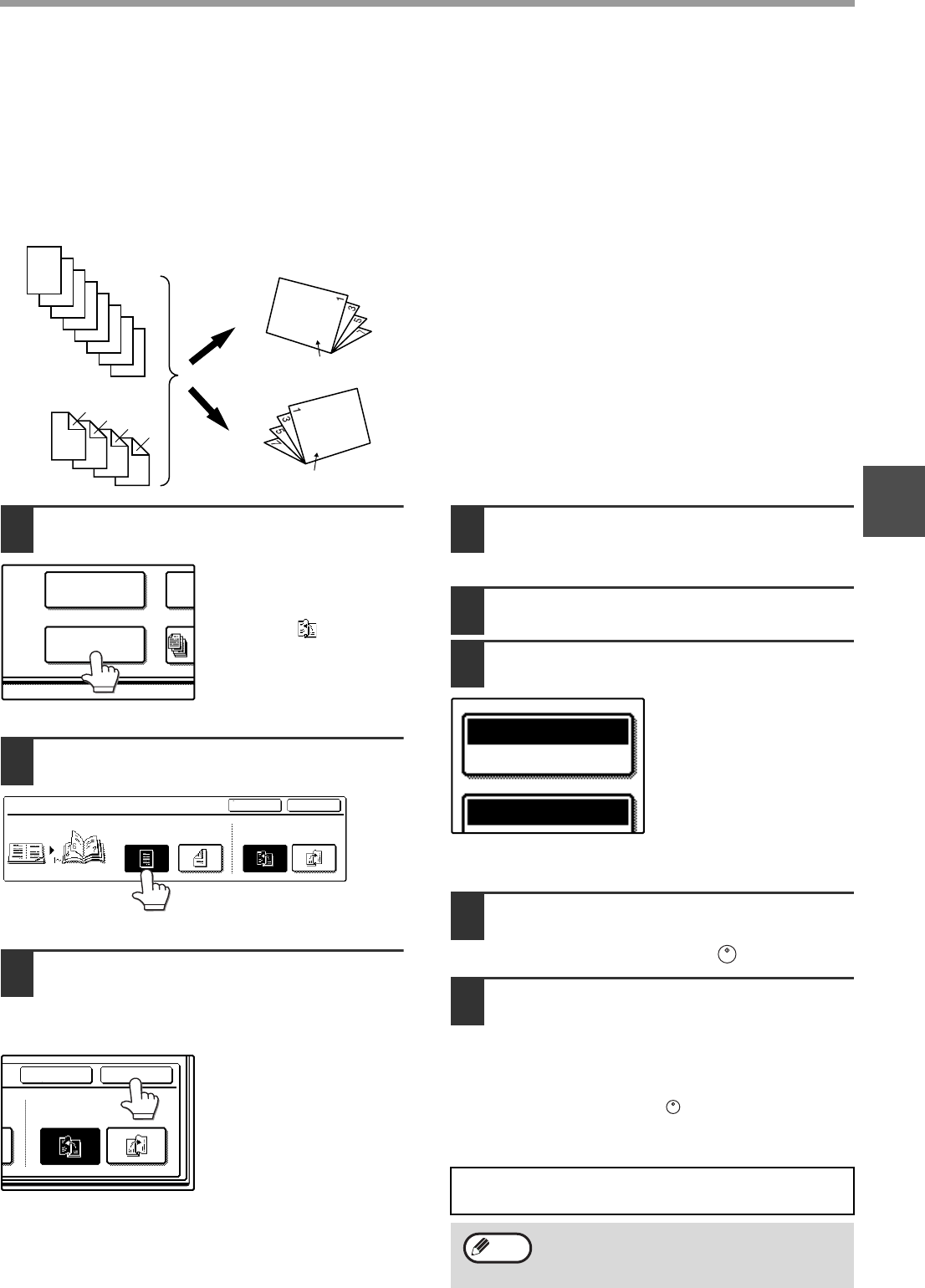
PAMPHLET COPY
The pamphlet copy function is used to arrange copies in the proper order for centre-stapling and folding into a
booklet. Two original pages are copied onto each side of the copy paper, such that a total of four pages are copied
onto each sheet.
This function is convenient for arranging copies into an attractive booklet or pamphlet.
[Example]: Copying 8 originals with pamphlet copy
• Scan the originals in order from the first page to the
last page. The order of copying will be automatically
adjusted by the machine.
• Either left binding (opening from right to left) or right
binding (opening from left to right) can be selected.
• Four originals will be copied onto one sheet. Blank
pages may be automatically added at the end,
depending on the number of the originals.
1
Touch the [PAMPHLET COPY] key in
the special modes menu screen.
The pamphlet copy
setting screen will
appear. The pamphlet
copy icon (
, etc.) will
also appear in the upper
left corner of the screen
to indicate that the
function is enabled.
2
Specify whether 1-sided or 2-sided
originals will be copied.
3
Select the binding position ([LEFT
BINDING] or [RIGHT BINDING]) and
then touch the [OK] key in the
pamphlet copy setting screen.
You will return to the
special modes menu
screen.
4
Touch the [OK] key in the special
modes screen.
You will return to the main screen of copy mode.
5
Place the original(s). (p.23, p.24)
6
Make sure that a suitable paper size
has been automatically selected.
If the desired copy paper
size is not selected, use
the [PAPER SELECT] key
to select the paper size.
After the paper size is
selected, touch the [AUTO
IMAGE] key. A suitable
ratio will be automatically
selected.
7
Select the number of copies and any
other desired copy settings, and then
press the [START] key (
).
8
[When using the RSPF:]
Copying will start after all originals have been
scanned.
9
[When using the document glass:]
Replace the original with the next original and
press the [START] key (
). Repeat this step until
all originals have been scanned, and then touch
the [READ-END] key.
1
2
3
4
5
6
7
8
7
8
5
6
3
4
1
2
Originals (two-sided)
Originals (one-sided)
First page
First page
The finished copies
can be folded.
MARGIN SHIFT
PAMPHLET COPY
CANCEL
OK
PAMPHLET COPY
ORIGINAL
2-SIDED
1-SIDED
RIGHT
BINDING
LEFT
BINDING
CANCEL
OK
D
RIGHT
BINDING
LEFT
BINDING
When the pamphlet copy function is selected,
two-sided copying will be automatically enabled.
To cancel the pamphlet copy function, touch
the [CANCEL] key in the pamphlet copy
setting screen. (See the screen of step 2.)
PAPER SELECT
AUTO
A4
100%
Note
Soubor PDF · ·
Otázky k Sharp MX-M260
K tomuto návodu zatím nejsou žádné otázky. Položte první.
Související produkty a manuály pro Multifunkční zařízení Sharp MX-M260
- Multifunkční zařízení Sharp MX-M362N Specifikace
 (56 stránek)
- Multifunkční zařízení Sharp MX-LCX3 Specifikace
(76 stránek)
- Multifunkční zařízení Sharp AR-FR11 Uživatelský manuál
(6 stránek)
- Multifunkční zařízení Sharp MX-M363U Průvodce nastavením
(112 stránek)
- Multifunkční zařízení Sharp DX-C401FX Uživatelský manuál
(12 stránek)
- Multifunkční zařízení Sharp MX-5000N Uživatelský manuál
(2 stránky)
- Multifunkční zařízení Sharp AL-2040CS Uživatelský manuál
 (82 stránek)
- Multifunkční zařízení Sharp AR-C250 Specifikace
(161 stránek)
- Multifunkční zařízení Sharp MX-2301N Specifikace
(116 stránek)
- Multifunkční zařízení Sharp MX-4101N Specifikace
(76 stránek)
- Multifunkční zařízení Sharp JW-20FLT Uživatelský manuál
(197 stránek)
- Multifunkční zařízení Sharp MX-C381 Specifikace
(148 stránek)
- Multifunkční zařízení Sharp MX-M260 Uživatelský manuál
(160 stránek)
- Multifunkční zařízení Sharp MX-4101N Specifikace
(12 stránek)
- Multifunkční zařízení Sharp MX-M564N Uživatelský manuál
(8 stránek)
- Multifunkční zařízení Sharp MX-M564N Uživatelský manuál
(8 stránek)
- Multifunkční zařízení Sharp CPD-3830 Uživatelský manuál
(1 stránka)
- Multifunkční zařízení Sharp MX-2010U Uživatelský manuál
(12 stránek)
- Multifunkční zařízení Sharp MX-B381 Uživatelský manuál
(12 stránek)
- Multifunkční zařízení Sharp MX-7500N Uživatelský manuál
(30 stránek)