Sharp MX-2301N Specifikace Strana 19: Changing the tray settings
 1
 2
 3
 4
 5
 6
 7
 8
 9
 10
 11
 12
 13
 14
 15
 16
 17
 18
 19
 20
 21
 22
 23
 24
 25
 26
 27
 28
 29
 30
 31
 32
 33
 34
 35
 36
 37
 38
 39
 40
 41
 42
 43
 44
 45
 46
 47
 48
 49
 50
 51
 52
 53
 54
 55
 56
 57
 58
 59
 60
 61
 62
 63
 64
 65
 66
 67
 68
 69
 70
 71
 72
 73
 74
 75
 76
 77
 78
 79
 80
 81
 82
 83
 84
 85
 86
 87
 88
 89
 90
 91
 92
 93
 94
 95
 96
 97
 98
 99
 100
 101
 102
 103
 104
 105
 106
 107
 108
 109
 110
 111
 112
 113
 114
 115
 116
17
Changing the tray settings
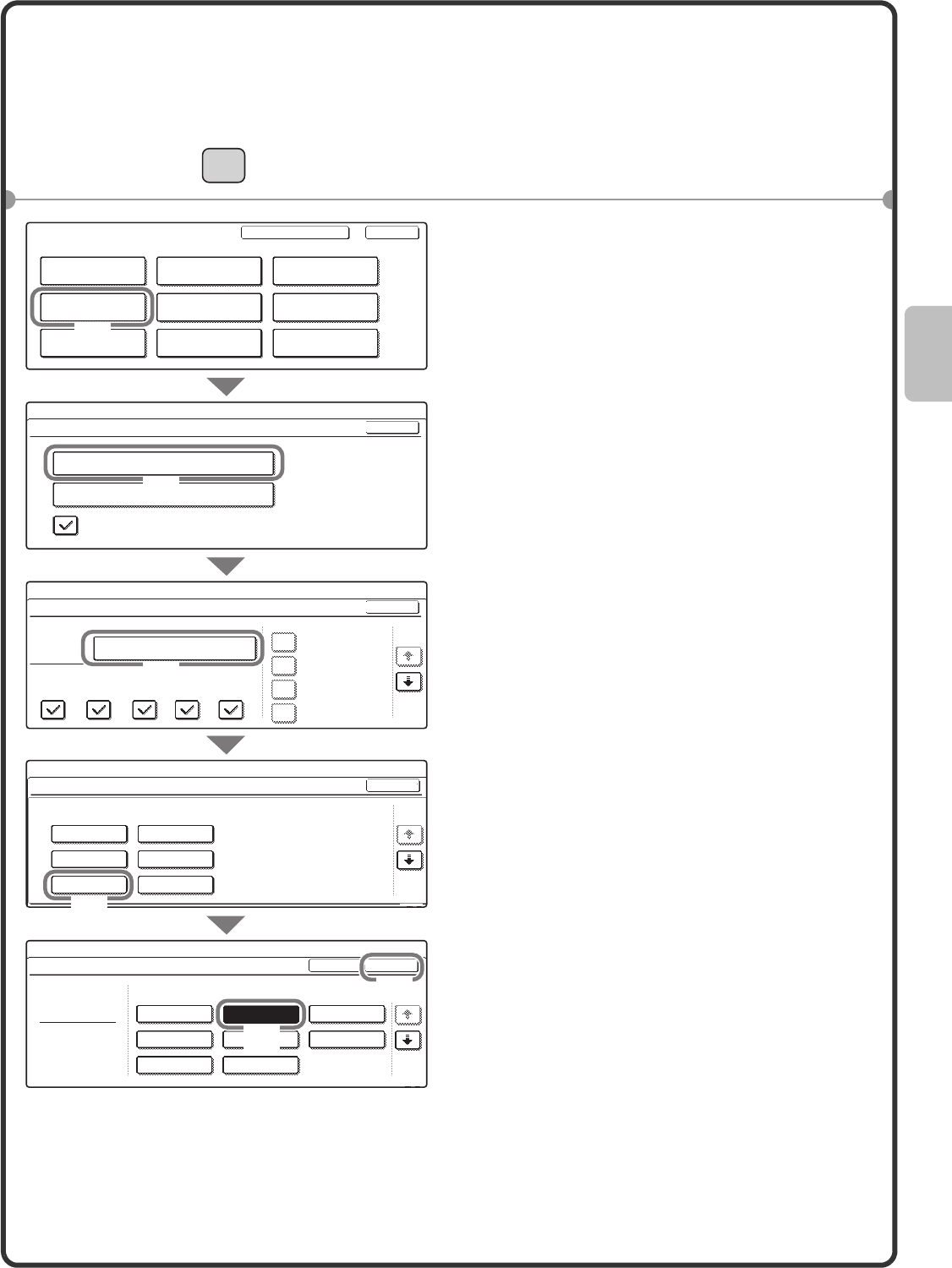
When you change the paper in a tray, the tray settings in the system settings must also be changed.
1
Press the [SYSTEM SETTINGS] key.
2
Configure the tray settings in the
touch panel.
Some of the settings only appear when you
have administrator rights.
(1)
Touch the [Paper Tray Settings]
key.
(2)
Touch the [Tray Settings] key.
(3)
Touch the [Tray 1] key.
(4)
Touch the [Recycled] key.
(5)
Touch the key of desired paper size.
For more information, see "Paper Tray
Settings" in "7. SYSTEM SETTINGS" in
the Operation Guide.
(6)
Touch the [OK] key.
The above steps change the paper
settings for tray 1 to A4(8-1/2" x 11")
recycled paper.
SYSTEM
SETTINGS
System Settings
Total Count
Paper Tray
Settings
Printer Condition
Settings
Default Settings
Address Control
Document Filing
Control
Fax Data
Receive/Forward
List Print
(User)
USB-Device Check
Exit
System Settings
Paper Tray Settings
Auto Tray Switching
Tray Settings
Paper Type Registration
OK
System Settings
Paper Tray Settings
Tray 1
Print
Copy
Fax
I-Fax
Doc.
Filing
Type / Size
Plain / B4
OK
1/6
Fixed Paper Side
Disable Duplex
Disable Staple
Disable Punch
System Settings
Tray 1 Type/Size Setting
Type
Size
Recycled
OK
Type
1/3
2/2
A3
System Settings
Tray 1 Type/Size Setting
Select the paper type.
Plain
Pre-Printed
Recycled
Letter Head
Pre-Punched
Colour
Cancel
1/2
1/2
2/2
A5R
B5R
216x330(8 x13)
A4
A4R
B4
B5
Admin Password
1
/
2
(1)
(2)
(3)
(6)
(4)
(5)
Soubor PDF · ·
Otázky k Sharp MX-2301N
K tomuto návodu zatím nejsou žádné otázky. Položte první.
Související produkty a manuály pro Multifunkční zařízení Sharp MX-2301N
- Multifunkční zařízení Sharp MX-4101N Specifikace
 (76 stránek)
- Multifunkční zařízení Sharp JW-20FLT Uživatelský manuál
(197 stránek)
- Multifunkční zařízení Sharp MX-C381 Specifikace
(148 stránek)
- Multifunkční zařízení Sharp MX-M260 Uživatelský manuál
 (160 stránek)
- Multifunkční zařízení Sharp MX-4101N Specifikace
(12 stránek)
- Multifunkční zařízení Sharp MX-M564N Uživatelský manuál
(8 stránek)
- Multifunkční zařízení Sharp MX-M564N Uživatelský manuál
(8 stránek)
- Multifunkční zařízení Sharp CPD-3830 Uživatelský manuál
(1 stránka)
- Multifunkční zařízení Sharp MX-2010U Uživatelský manuál
(12 stránek)
- Multifunkční zařízení Sharp MX-B381 Uživatelský manuál
(12 stránek)
- Multifunkční zařízení Sharp MX-7500N Uživatelský manuál
(30 stránek)
- Multifunkční zařízení Sharp AL-2021 Specifikace
(91 stránek)
- Multifunkční zařízení Sharp MX-B402 Uživatelský manuál
(50 stránek)
- Multifunkční zařízení Sharp FO-155 Specifikace

 (165 stránek)
- Multifunkční zařízení Sharp MX-4140N Instalační manuál
(19 stránek)
- Multifunkční zařízení Sharp JW-50FL Uživatelský manuál
(201 stránek)
- Multifunkční zařízení Sharp MX-4140N Uživatelský manuál
(12 stránek)
- Multifunkční zařízení Sharp CPD-3830 Uživatelský manuál
(12 stránek)
- Multifunkční zařízení Sharp CD600 - B/W - Fax Uživatelský manuál
(23 stránek)
- Multifunkční zařízení Sharp AR-810 Manuál s instrukcemi
(178 stránek)