Sharp AR-F14 Specifikace Strana 9

  • Stažení
  • Přidat do mých příruček
  • Tisk
  • Strana
    / 18
  • Tabulka s obsahem
  • KNIHY
  • Hodnocené. / 5. Na základě hodnocení zákazníků
Zobrazit stránku 8
7
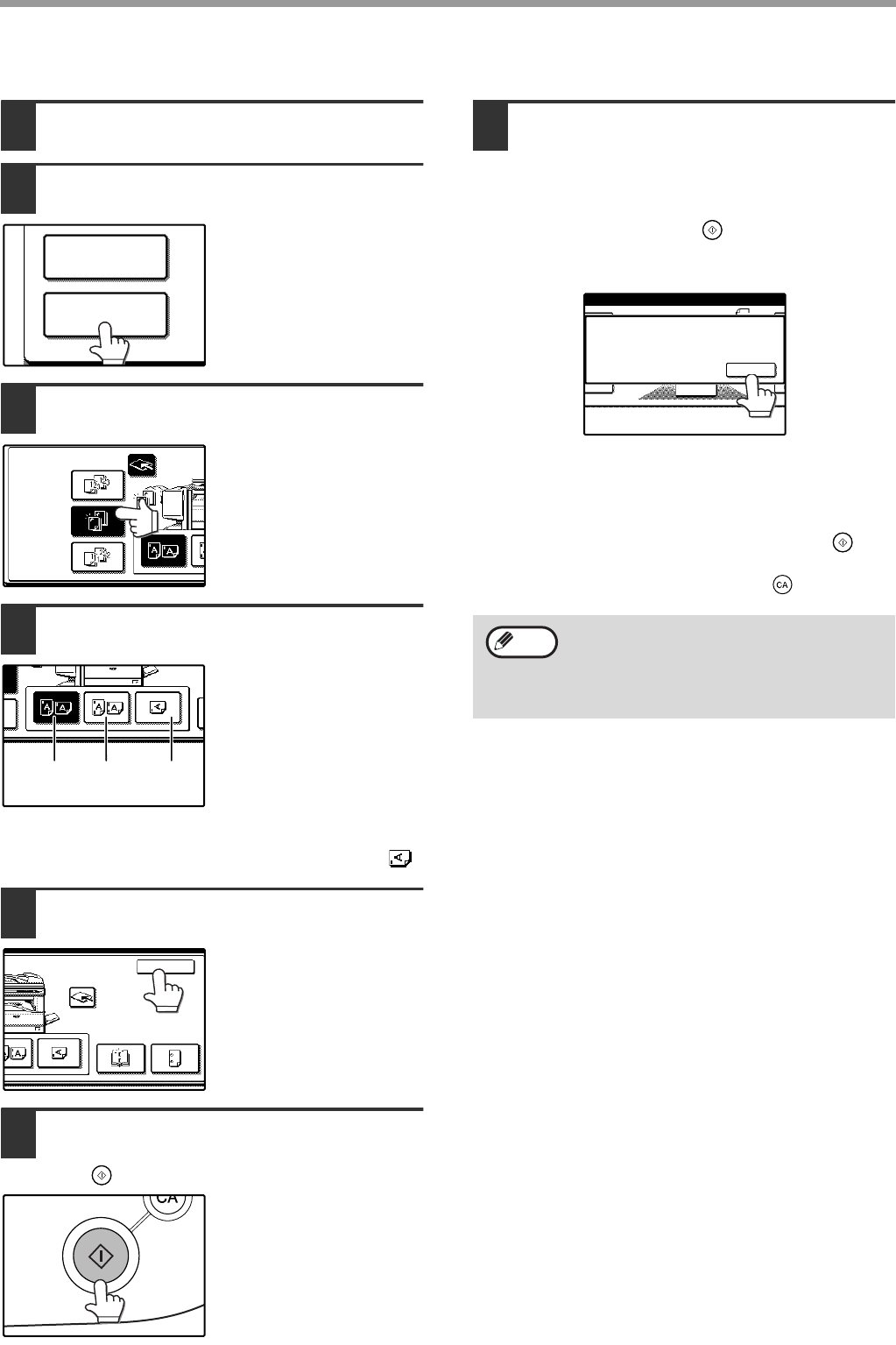
The procedure for using the staple sort function is explained below.
1
Place the original (p.6).
2
Touch the [OUTPUT] key.
3
Touch the [STAPLE SORT] key.
When the [STAPLE
SORT] key is selected,
the offset tray is
automatically selected.
Output to the center tray
is not possible.
4
Select the staple position.
Select top left staple, two
staples, or lower left
staple as appropriate for
the original. For one
upper left staple when
the original is a size such
as 11" x 17" or 8-1/2" x
14" (A3 or B4) in the
portrait orientation, select
the lower left staple ( ).
5
Touch the [OK] key.
6
Select the number of copies and other
copy settings, and touch the [START]
key ( ).
7
Using the RSPF
Copying begins after all pages are scanned.
8
Using the document glass
Place the next page on the document glass and
press the [START] key ( ). Repeat until all
pages have been scanned and then touch the
[READ END] key on the panel.
If the memory becomes full while the pages are being
scanned, "MEMORY IS FULL. PRESS [START] TO
BEGIN COPYING OR [CA] TO CANCEL." will appear
in the display. To copy only the pages that have been
scanned to that point, press the [START] key ( ). To
cancel the job and clear the scanned pages from
memory, press the [CLEAR ALL] key ( ).
2-SIDED COPY
OUTPUT
STAPLE
SORT
OUTPUT
OFFSET
TRAY
GROUP
SORT
top left
staple
two
staples
lower left
staple
CENTER
TRAY
OK
PUNCH
SADDLE
STITCH
To increase the number of pages that can be
scanned into memory, increase the memory
allocation in the key operator programs or
install more memory. (See "Key operator's
guide".)
PLACE NEXT ORIGINAL. PRESS [START].
WHEN FINISHED, PRESS [READ-END].
READ-END
Note
AR-F14.book 7 ページ 2004年1月15日 木曜日 午後6時10分
Zobrazit stránku 8
1 2 3 4 5 6 7 8 9 10 11 12 13 14 ... 17 18

Komentáře k této Příručce

Žádné komentáře

Scosche TA2073B manuály

Uživatelské manuály a uživatelské příručky pro Sady do auta Scosche TA2073B.
Poskytujeme 1 manuály pdf Scosche TA2073B ke stažení zdarma podle typů dokumentů: Uživatelský manuál


Scosche TA2073B Uživatelský manuál (1 strany)


Značka: Scosche | Kategorie: Car kits | Velikost: 0.53 MB |


Tabulka s obsahem


Další produkty a příručky pro Sady do auta Scosche

Modely Typ Dokumentu
TA2087B Uživatelský manuál   Scosche TA2087B car kit, 1 stránky
VO3135B Uživatelský manuál   Scosche VO3135B car kit, 1 stránky
NN1670B Uživatelský manuál   Scosche NN1670B car kit, 1 stránky
TA2076B Uživatelský manuál   Scosche TA2076B car kit, 1 stránky
TA2078B Uživatelský manuál   Scosche TA2078B car kit, 1 stránky
TA2043B Manuál   Scosche TA2043B car kit, 1 stránky
S-31 Manuál s instrukcemi   Scosche S31 car kit, 12 stránky
backSTAGE pro Uživatelský manuál   Scosche backSTAGE pro, 1 stránky
KA2072B Manuál   Scosche KA2072B car kit, 1 stránky
AUXMIC Uživatelský manuál   Scosche auxMIC, 2 stránky
VO4149B Uživatelský manuál   Scosche VO4149B car kit, 1 stránky
BFCL2 Uživatelský manuál   Scosche BFCL2 car kit, 12 stránky
solVUE Uživatelský manuál   Scosche solVUE, 12 stránky
BFTA Uživatelský manuál   Scosche BFTA car kit, 12 stránky
CBHV2 Uživatelský manuál   Scosche CBHV2 car kit, 2 stránky
CBHV5 Uživatelský manuál   Scosche CBHV5 car kit, 8 stránky