Sharp ML-4550 Uživatelský manuál Strana 44
- Strana / 112
- Tabulka s obsahem
- ŘEŠENÍ PROBLÉMŮ
- KNIHY

- CONTENTS 5
- 9. Troubleshooting 6
- 10. Installing accessories 6
- 11. Specifications 6
- Ozone Safety 7
- Approvals and Certifications 8
- Important 9
- OPENSSL LICENSE 10
- ORIGINAL SSLEAY LICENSE 10
- Special features 11
- (I: Installed, O: Option) 12
- Printer overview 13
- Finding more information 14
- Selecting a location 15
- Using control panel menus 16
- Menu overview 17
- 2. Layout menu 18
- 3. Paper menu 19
- Graphic menu 19
- System Setup menu 20
- Emulation menu 21
- Network menu 22
- Printing a demo page 23
- Changing the display language 23
- Using toner save mode 23
- Changing the font setting 23
- Supplied software 24
- Printer driver features 25
- System requirements 25
- 3.3 < 26
- Introduction 27
- Supported operating systems 28
- Configuring TCP/IP 28
- Configuring EtherTalk 28
- Configuring IPX frame types 29
- Setting Ethernet speed 29
- Selecting print media 30
- Supported sizes of paper 31
- Acceptable 32
- Unacceptable 32
- Loading paper 33
- 5.5 < 34
- Using the multi-purpose tray 35
- Using manual feed mode 36
- Selecting an output location 37
- Printing a document 38
- Canceling a print job 38
- Toner cartridges 39
- Accessories 39
- How to purchase 39
- Printing information pages 40
- Cleaning the printer 40
- PTL lens 41
- 8.3 < 42
- Checking the remaining toner 43
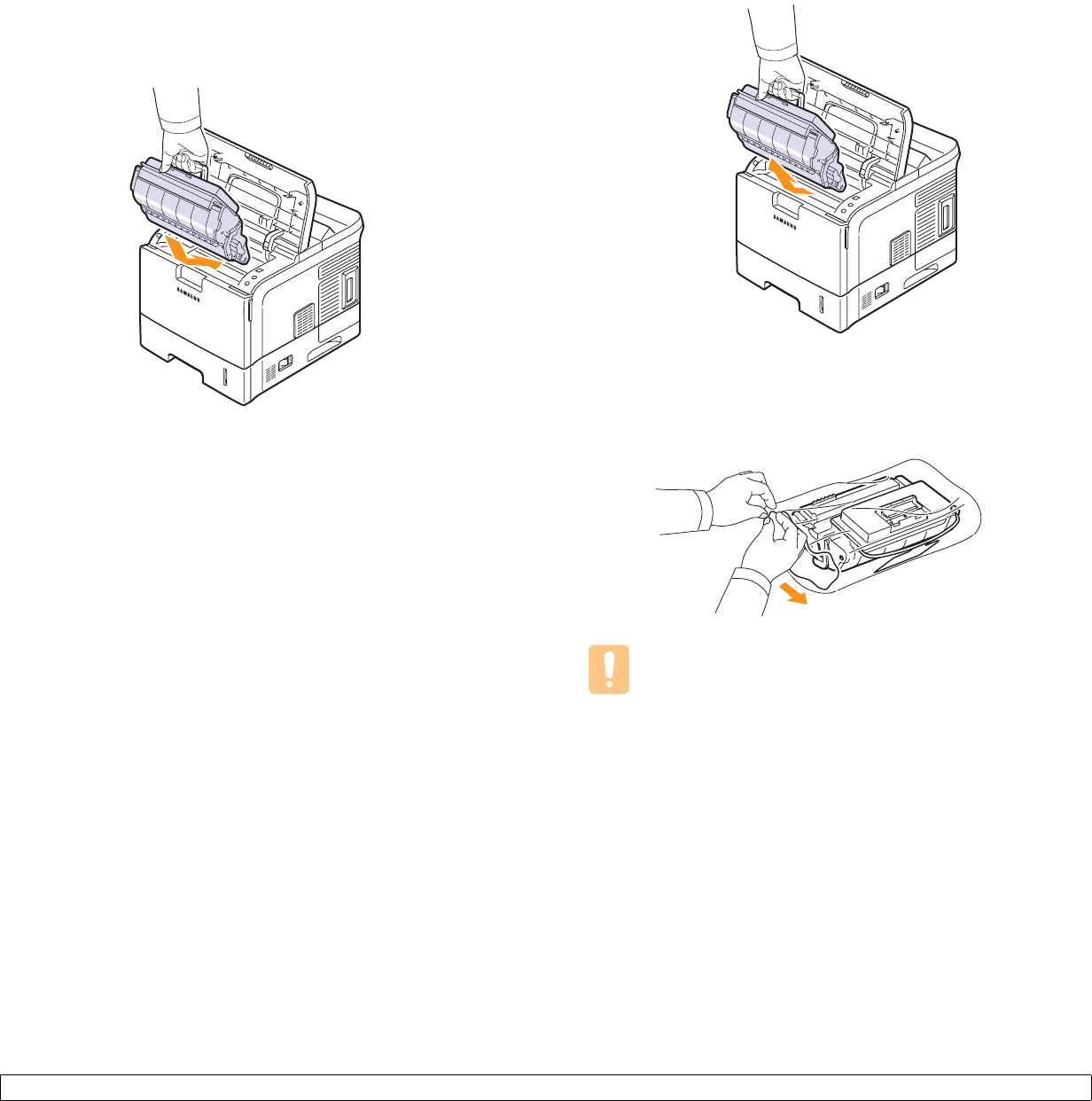
- Replacing the toner cartridge 44
- 8.6 < 45
- Maintenance parts 46
- Clearing paper jams 47
- In the paper feed area 48
- Around the toner cartridge 49
- In the paper exit area 50
- In the duplex unit area 50
- Troubleshooting checklist 51
- Understanding the status LED 52
- 9.7 < 53
- 9.8 < 54
- 9.9 < 55
- 9.10 < 56
- 9.11 < 57
- AaB bC c 58
- Common Windows problems 59
- Common PostScript problems 59
- Common Linux problems 60
- Common Macintosh problems 60
- 10 Installing accessories 61
- 10.2 < 62
- Removing a DIMM 63
- Using the hard disk 64
- 10.5 < 65
- 10.6 < 66
- 10.7 < 67
- Printer specifications 68
- 11.2 < 69
- Software section 72
- USING DIRECT PRINT UTILITY 74
- SHARING THE PRINTER LOCALLY 74
- USING SMART PANEL 74
- USING YOUR PRINTER IN LINUX 75
- 1 Installing Printer 76
- Custom Installation 77
- Changing the Software 82
- Language 82
- Reinstalling Printer Software 82
- Removing Printer Software 83
- 2 Basic Printing 84
- Printer Settings 85
- Paper Tab 86
- Graphics Tab 87
- Extras Tab 88
- About Tab 89
- Printer Tab 89
- Using a Favorite Setting 89
- Using Help 89
- 3 Advanced Printing 90
- Printing Posters 91
- Printing Booklets 91
- Document 92
- Fitting Your Document to a 92
- Selected Paper Size 92
- Using Watermarks 93
- Using Overlays 94
- 4 Using Windows 95
- 5 Using Direct Print Utility 96
- 6 Sharing the Printer 97
- 7 Using Smart Panel 98
- Opening the Troubleshooting 99
- Changing the Smart Panel 99
- Program Settings 99
- 8 Using Your Printer in 100
- Using Your Printer in Linux 101
- Using the Unified Driver 102
- Configurator 102
- Ports Configuration 103
- Printing a Document 104
- 9 Using Your Printer with 105
- Setting Up the Printer 106
- Printing 107
- Printer Features Setting 108
- Reverse Duplex 108
- Fit to Page 108
- Resolution(Quality) 108
- Duplex Printing 109
- SOFTWARE SECTION 110
- GGGGGGGGGGGGGRev. 3.00 112
Související produkty a manuály pro Tiskárny Sharp ML-4550
 (52 stránky)
(11 stránky)
(311 stránky)
(168 stránky)
(310 stránky)
(2 stránky)
(12 stránky)
(118 stránky)
(4 stránky)
(152 stránky)
(128 stránky)
(224 stránky)
(92 stránky)
(81 stránky)
(372 stránky)
(188 stránky)
(52 stránky)
(11 stránky)
(311 stránky)
(168 stránky)
(310 stránky)
(2 stránky)
(12 stránky)
(118 stránky)
(4 stránky)
(152 stránky)
(128 stránky)
(224 stránky)
(92 stránky)
(81 stránky)
(372 stránky)
(188 stránky)

 (172 stránky)
(140 stránky)
(72 stránky)
(710 stránky)
(172 stránky)
(140 stránky)
(72 stránky)
(710 stránky)
© 2020, manymanuals.cz. Všechna práva vyhrazena. | 0.042 s |
 Manymanuals.com
 Manymanuals.de
 Manymanuals.fr
 Manymanuals.it
 Manymanuals.pl
 Manymanuals.cz
 Manymanuals.es
 Manymanuals-pt.com
Komentáře k této Příručce