Fast colour
network
scanning
When
it
comes
to
scanning*
'.
the
MX-M753U
and
MX-M623U
MFPs
are
built for speed, with a
capacity
of
up
to
75
originals
per
minute:
full
colour
or
black
and
white,
single-
or
double-sided.
For
extra
convenience,
a
space-saving
retractable
QWERTY
keyboard
can
be
added,
which
makes
it
easy
to
add
data
to
scanned
documents
and
send
them
to
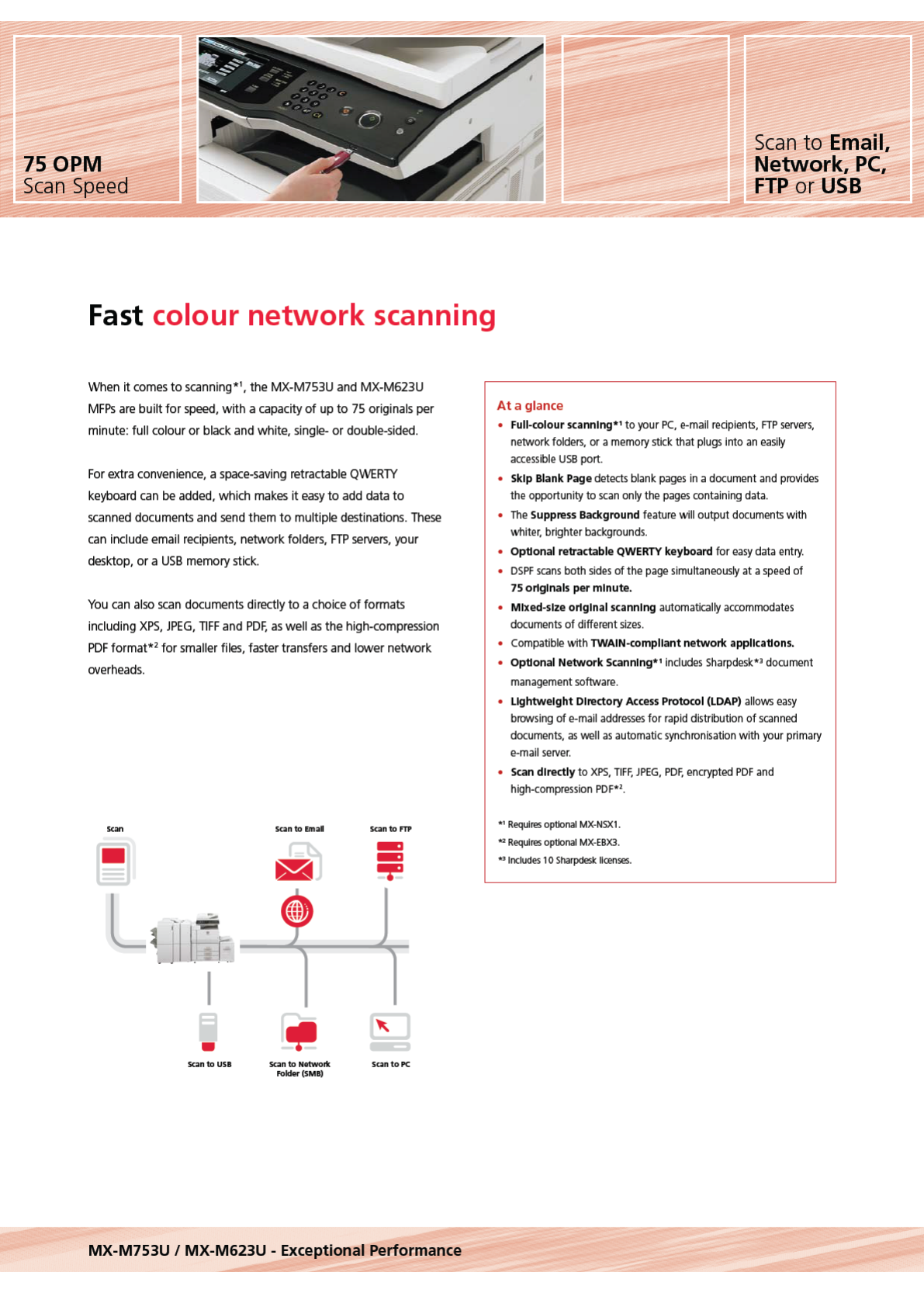
multiple
destinations.
These
can
include
email
recipients.
network
folders,
FTP
servers.
your
clesktop,
or a
USB
memory
stick.
You
can
also
scan
documents
directly
to a
choice
of
formats
including
XPS.
JPEG.
TIFF
and
PDF.
as
well
as
the
high-compression
PDF
format*
2
for
smaller
files,
faster
transfers
and
lower network
overheads.
•
santo
usa
san
to
fmal
san
to
Networtc
Foldor(S
M
B)
santom
sun
to
PC
MX-M753U I MX-M623U - Exceptional Performance
At
a glan
ce
Scan
to Email,
Network,
PC,
FTP
or
USB
•
Full
-co
lour scanning*'
to
yo
ur
PC.
e-mail
re
c
ipi
ents.
FTP
servers.
network
fo
l
ders,
or a m
emory
stick that
plu
gs
in
to
an
easily
a
cc
essible
USB
port
•
Skip
Blank
Page
detects
b
lank
pa
ges
in a d
oc
ument
and
provides
the
opportunity to
sca
n o
nl
y
the
pages
co
ntainin
g
data
.
•
The
Suppress Background
fea
t
ure
will output
documents
w
ith
whiter, brighter
backgro
und
s.
• OpUonal retractable
QWERTY
keyboard for
easy
data
entry
.
•
DS
PF
sca
ns both s
ide
s of the
page
s
imu~an
eo u
s
l
y
at a
speed
of
75
originals per minute.
• Mixed
-s
ize original scanning
aut
o
mati
ca
ll
y
ac
co
mm
o
dates
doc
ument
s of different s
iz
es
.
•
Co
m
pa
tible
wrth
TWAIN
-co
mpliant network
appllcaUons.
• OpUonal Network Scanning*'
in
c
lu
des
S
harpde
s
k*'
document
management
software
.
• Lightweight Directory A
ccess
Protocol (
LDAP)
allows
easy
browsing
of e
-mail
addresses
for
rap
id
distribution of
sca
nne
d
docume
nt
s,
as
we
ll
as
auto
matic
synchro
ni
sa
tion w
ith
yo
ur
primary
e-
ma
il
server.
•
Scan
directly
to
XPS,
T
IF
F,
JPE
G,
PDF,
encrypted
PDF
and
high-compressi
on
PDF*'
.
*'Req
ui
res
optional
MX-NSX
1.
02
Req
ui
res
optional
MX-EBX3
.
*'
In
c
lud
es
1 0 Sh
arpdesk
li
ce
n
ses
.
Komentáře k této Příručce