Sharp LC-40LE540E Specifikace Strana 33

  • Stažení
  • Přidat do mých příruček
  • Tisk
  • Strana
    / 44
  • Tabulka s obsahem
  • KNIHY
  • Hodnocené. / 5. Na základě hodnocení zákazníků
Zobrazit stránku 32
NOTE
If you choose a wired connection to the router, you need
an ETHERNET cable (not included, commercially available).
If you do not have a broadband internet connection, consult
the store where you purchased your TV or ask your internet
service provider or telephone company.
An ETHERNET and wireless connection cannot be used at
the same time. Use only one of the connection types.
A wireless LAN connection and performance cannot be
guaranteed for all residential environments. In the following
cases, the wireless LAN signal may be poor or drop, or the
connection speed may become slower.
- When used in buildings made with concrete, reinforced
steel, or metal.
- When placed near objects that obstruct the signal.
- When used with other wireless devices that emit the same
frequency.
- When used in the vicinity of microwave ovens and other
devices that emit a magnetic fi eld, electrostatic charge, or
electromagnetic interference.
A stable connection speed is required to play back streaming
content. Use an ETHERNET connection if the wireless LAN
speed is unstable.
Use an ETHERNET cable to connect the ETHERNET
terminal on the TV to your broadcast router as shown
below. This is recommended when enjoying services
which require stable connection speeds, such as
streaming media.
Network Setup
Network Setup
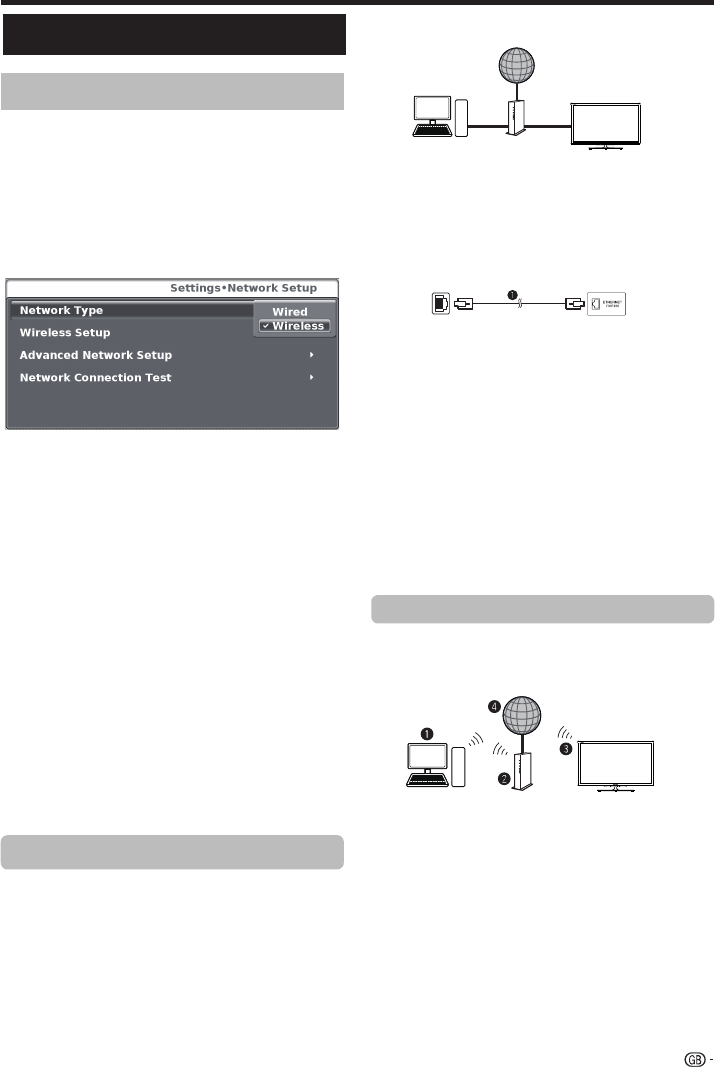
Wired connection overview
PC (Home Media Server)
Router (commercially available)
ETHERNET cable (commercially available)
Network (Internet)
How to connect

ETHERNET cable
1 Switch on the router (commercially available). Refer to
the router’s operation manual for switching on.
2 Connect the ETHERNET terminal on the TV to the
router (commercially available) with an ETHERNET
cable (commercially available).
3 Go to SETTINGS >”Network settings”> “Network
type”.
4 Press OK and / to select “Wired”, and then
press OK. The wired connection will be automatically
established.
To change the settings manually go to “Advanced
Network Setup”> IP Adress Setup> Off, now you
can introduce the settings manually.
Use the SHARP (AN-WUD630) USB adapter (sold
separately) with the TV.
Wireless connection overview
PC (Home Media Server)
Wireless LAN router/access point
Wireless
AN-WUD630
LAN USB adapter (sold separately)
Network (Internet)
NOTE
When using the SHARP wireless LAN adapter (sold
separately), try to provide as much free space around the
device for best performance.
Make sure the firewalls in your network allows access to the
TV wireless connection.
Operations cannot be guaranteed when used with access
points that do not have Wi-Fi® certification.
A wireless LAN access point is required to connect the TV to
the Internet using a wireless LAN. See the operation manual
of your access point for setup.
Wired installation
Connecting to the network
To enjoy internet services, you need to connect the TV
to a router with a high speed connection to the internet.
You can also connect the TV to your Home network
server through a router or access point (see page 34).
The TV connection to the router can either be wired or
wireless.
To access to the TV internet confi guration go to
SettingsNetwork setup. The next screen is shown:
Wireless installation
31
lanimret TENREHTEretuoR
LAN
Zobrazit stránku 32
1 2 ... 28 29 30 31 32 33 34 35 36 37 38 ... 43 44

Komentáře k této Příručce

Žádné komentáře

Grizzly G8183 manuales

Manuales del propietario y guías del usuario para Herramientas Grizzly G8183.
Ofrecemos 1 manuales en pdf Grizzly G8183 para descargar gratis por tipos de documentos: Manual de usuario


Más productos y manuales para Herramientas Grizzly

Modelos Tipo de documento
G1852 Manual de usuario   Grizzly G1852 User Manual, 27 paginas
G8143 Manual de usuario   Grizzly G8143 User Manual, 16 paginas
G1067Z Manual de usuario   Grizzly G1067Z User Manual, 28 paginas
H8230 Manual de usuario   Grizzly H8230 User Manual, 20 paginas
Paint Tank H8225 Manual de usuario   Grizzly Paint Tank H8225 User Manual, 2 paginas
H8232 Manual de usuario   Grizzly H8232 User Manual, 5 paginas
G6048 Manual de usuario   Grizzly G6048 User Manual, 17 paginas
Power Feeder G4176 Manual de usuario   Grizzly Power Feeder G4176 User Manual, 3 paginas
G8598 Manual de usuario   Grizzly G8598 User Manual, 17 paginas
Power Feeder G7873 Manual de usuario   Grizzly Power Feeder G7873 User Manual, 32 paginas
H8203 Manual de usuario   Grizzly H8203 User Manual, 2 paginas
H7666 Manual de usuario   Grizzly H7666 User Manual, 24 paginas
4" Manual de usuario   Grizzly 4" User Manual, 24 paginas
STILE AND RAIL SETS C1393-96 Manual de usuario   Grizzly STILE AND RAIL SETS C1393-96 User Manual, 2 paginas
G0453PX Manual de usuario   Grizzly G0453PX User Manual, 72 paginas
H7951 Manual de usuario   Grizzly H7951 User Manual, 28 paginas
G7946 Manual de usuario   Grizzly G7946 User Manual, 28 paginas
H6238 Manual de usuario   Grizzly H6238 User Manual, 3 paginas
Wood Copy Attachment G2891 Manual de usuario   Grizzly Wood Copy Attachment G2891 User Manual, 28 paginas
G7298 Manual de usuario   Grizzly G7298 User Manual, 28 paginas