Sharp FO-785 Specifikace Strana 109
- Strana / 127
- Tabulka s obsahem
- ŘEŠENÍ PROBLÉMŮ
- KNIHY

- FACSIMILE 1
- WARRANTY 2
- Introduction 3
- Horizontal: 3
- Vertical: 3
- Automatic feeding: 4
- Manual feeding: 4
- Important safety information 5
- Table of Contents 9
- Installation 11
- A Look at the Operation Panel 12
- 1. Installation 13
- Connections 14
- Telephone line cord 17
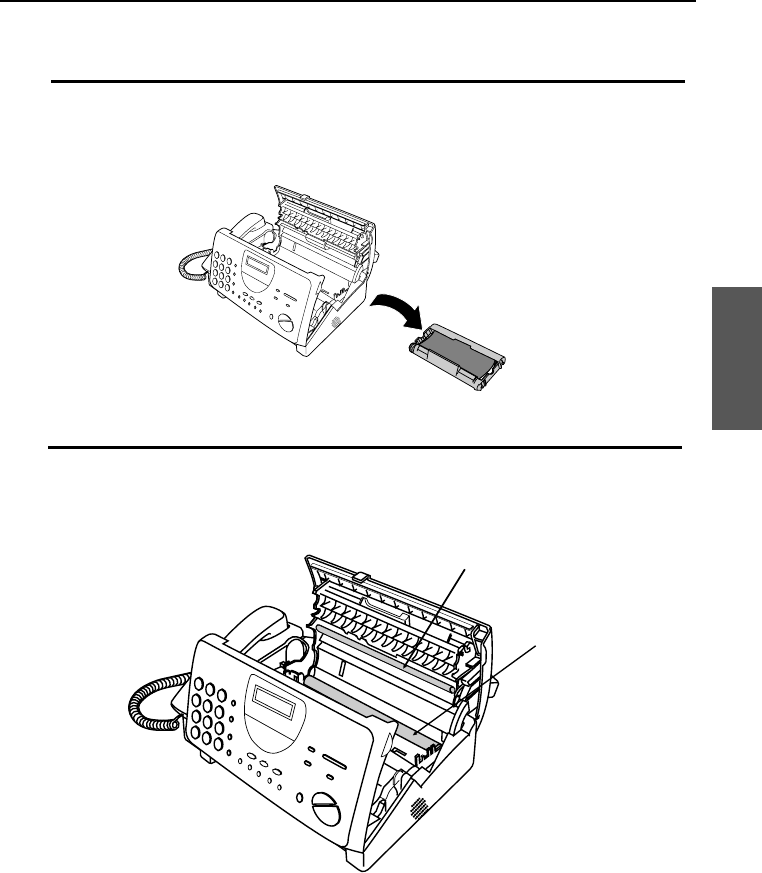
- Loading the Imaging Film 20
- Sharp FO-3CR Imaging Film 24
- Loading Printing Paper 25
- Press these keys: 27
- The display will show: 27
- Press the # key twice: 27
- START/MEMORY 28
- Setting the Date and Time 30
- Selecting the Reception Mode 33
- RECEPTION MODE key 34
- Volume Adjustment 35
- Documents 37
- Loading the Document 39
- Resolution and Contrast 41
- RESOLUTION 42
- 2. Sending 43
- SPEED DIAL 45
- SPEED DIAL key 45
- Rapid keys 45
- Step 3 or 47
- 01 02 03 49
- 04 05 06 49
- Receiving 54
- Using FAX Mode 55
- Using A.M. Mode 56
- RECEPTION MODE 56
- Using TEL Mode 57
- 3. Receiving 59
- COPY/HELP 62
- 4. Making 63
- Telephone Calls 65
- Making Telephone Calls 67
- Answering 68
- Machine Connection 68
- 6. Answering 69
- RECEPTION 70
- MODE 70
- Functions 71
- Australia 72
- New Zealand 72
- 7. Special 73
- Distinctive Ring 76
- Press the STOP key 77
- Broadcasting 78
- Sending Documents From Memory 87
- (Example) 88
- Step 4 or 91
- Timer Operations 92
- FUNCTION 100
- 8. Option 101
- Settings 101
- Printing 102
- Reports and Lists 102
- Timer List 104
- Telephone Number List 104
- Printing Reports and Lists 105
- <P=004> 105
- <P=005> 106
- <P=006> 107
- Maintenance 108
- <P=003> 110
- Caution: 111
- Troubleshooting 112
- Line error 113
- General problems 116
- Messages and Signals 117
- <P=002> 118
- Display Messages 118
- Audible signals 119
- Clearing Paper Jams 120
- INSTALLATION 123
- ENTERING YOUR NAME AND 123
- SETTING THE DATE AND TIME 124
- STORING AND CLEARING 124
- NUMBERS FOR AUTO DIALING 124
- SENDING DOCUMENTS 124
- RECEIVING DOCUMENTS 124
- FO785A-ININ 125
- SHARP CORPORATION 127
Související produkty a manuály pro Faxy Sharp FO-785
 (108 stránky)
(183 stránky)
(178 stránky)
(96 stránky)
(83 stránky)
(8 stránky)
(151 stránky)
(4 stránky)
(198 stránky)
(107 stránky)
(147 stránky)
(111 stránky)
(14 stránky)
(108 stránky)
(183 stránky)
(178 stránky)
(96 stránky)
(83 stránky)
(8 stránky)
(151 stránky)
(4 stránky)
(198 stránky)
(107 stránky)
(147 stránky)
(111 stránky)
(14 stránky)
 (84 stránky)
(93 stránky)
(87 stránky)
(103 stránky)
(131 stránky)
(131 stránky)
(84 stránky)
(93 stránky)
(87 stránky)
(103 stránky)
(131 stránky)
(131 stránky)
© 2020, manymanuals.cz. Všechna práva vyhrazena. | 0.058 s |
 Manymanuals.com
 Manymanuals.de
 Manymanuals.fr
 Manymanuals.it
 Manymanuals.pl
 Manymanuals.cz
 Manymanuals.es
 Manymanuals-pt.com
Komentáře k této Příručce