Scan Fax
Fax
Fax
Fax
Scan
Fax
Scan
Fax
Fax
d0bN%
=5!”//?
hj5&4
mk9#¥
MX-M503N/M453N/
M363N/M283N
encrpyts the scanned data
Requests password entry
for viewing the file
*****
User authentication
Output settings for received faxes
A A AB
DesktopSuper G3 fax
Client PCs
Internet
Network folderUSB memory
E-mail
Internet fax
FTP server
Scan to
Scan
Document
Confidential document
with copy prevention data
Unauthorised attempt
to make a copy
Results in a blank page
ABC
Example: Unauthorised copying
Prevents data leak
Data Security SystemIP/MAC Address Filtering
Unknown IP or MAC
addresses will be
denied access
NO!
OK
Copy DataPrint Data
Scan DataFax Data
TOP SECRET
Data Encryption Data Erase
d0bN%
=5!”//?
hj5&4
mk9#¥
The data generated
for each job is
automatically erased
once that job is
finished
IMAGE SENDING
5 6
A3 Colour Network Scanning
The MX-M503N/M453N/M363N/M283N works as a full-colour
network scanner that can be used with any Windows PC on the
network. Converting any type of paper-based document, up to A3
(11" x 17") in size, into an editable digital file is as easy as making
a copy. The MX-M503N/M453N/M363N/M283N supports TIFF,
PDF, encrypted PDF, high-compression PDF*, JPEG, and the new
XPS (XML Paper Specification) file formats.
* Requires optional MX-EBX3.
Multiple Distribution of Scanned Files
With the touch of a few buttons, you can choose different ways to
distribute your scanned documents. Scan to E-mail sends
documents as an e-mail attachment. Scan to FTP Server scans
documents directly to an FTP server for storage. Scan to Desktop
sends scanned documents directly to your PC desktop. Scan to
Network Folder (SMB) sends files to a shared folder on a
networked Windows PC. Scan to USB Memory scans documents
directly to USB memory devices. And Scan to Fax enables
conventional faxing or Internet faxing.
LDAP Support
Built-in LDAP (lightweight directory access protocol) support
eliminates the need to enter or register full addresses. By entering
the first few letters of the recipient’s name, the MX-M503N/
M453N/M363N/M283N displays a
list of possible matches from your
company’s LDAP server. Selected
addresses can be stored to the MX-
M503N/M453N/M363N/M283N’s
address book.
High-Speed Faxing
The optional MX-FXX2 Fax Expansion Kit turns the MX-M503N/
M453N/M363N/M283N into a 33.6 Kbps Super G3 fax. Using
JBIG compression technology, the MX-M503N/M453N/M363N/
M283N can send an A4 (8
1
/2" x 11") size page in under 3
seconds*. Use the 100-sheet DSPF/RSPF to further boost faxing
efficiency. And, because Quick On-Line Transmission can start
dialling and transmitting as soon as the first page is scanned into
memory, you can send documents in much less time.
* Based on Sharp’s standard chart with approximately 700 characters (A4 or
8
1
/2" x 11" long-edge feeding) at standard resolution.
Automated Fax Finishing
The MX-M503N/M453N/M363N/M283N eliminates the need to
copy and staple received faxes by hand. Simply use the Fax Output
setting on the LCD control panel to designate the number of
copies. With finishing
options installed, the MX-
M503N/M453N/M363N/
M283N will even
automatically staple these
documents for you.
PC-Fax/PC-Internet Fax
Directly send a document created on your PC to a recipient’s fax
machine via a phone line or the Internet without printing to paper.
Save time and paper costs while retaining original document
quality.
Note: PC-Internet Fax requires optional MX-FWX1; PC-Fax requires MX-FXX2.
Internet Fax
Economically send and receive faxes to and from other ITU-T T-37-
compliant Internet fax machines via the Internet. The MX-M503N/
M453N/M363N/M283N supports Direct SMTP; outgoing Internet
faxes do not go through your mail server, making transmission
faster and cheaper.
Note: Requires optional MX-FWX1.
Paperless Faxing with Inbound Routing
Paperless faxing with inbound routing lets you check incoming
faxes via e-mail before printing. It can also forward incoming faxes
to an FTP server, a network folder (SMB), or a PC desktop. Files
can be saved in either PDF or TIFF (single/multi).
Note: Requires optional MX-FXX2 or MX-FWX1.
Other Key Features
Scan & Fax
• One-touch auto dial keys register up to 1,000 numbers for
frequently used destinations
• Broadcast transmission to up to 500 destinations
• Programme keys (up to 48 keys) are available to set up
frequently used transmissions for instant recall
• Easy text entry* lets you enter addresses, file names, subject
titles or messages from the LCD control panel
* Only addresses can be entered for faxing.
• Mixed size original scanning automatically distinguishes
documents of mixed sizes fed through the DSPF/RSPF
Fax
• Duplex transmission/reception sends and prints out two-
sided documents
• Flash memory backup ensures documents remain safely
backed up in memory, even in the event of a power failure
• Rotation transmission/reception rotates incoming and
outgoing faxes to match the direction of the printing paper
• Fax destination confirmation allows users to reconfirm fax
numbers before sending to prevent transmission errors
SECURITY
Industry-Leading Multi-Layered Security
With multiple levels of network and data security to cover a wide range of security needs, Sharp’s industry-leading
security solutions protect your business assets and bring peace of mind. The MX-M503N/M453N/M363N/M283N safeguards
sensitive data with powerful, enhanced security functions that eliminate the worry of unauthorised use and guarantee
greater protection for your confidential information.
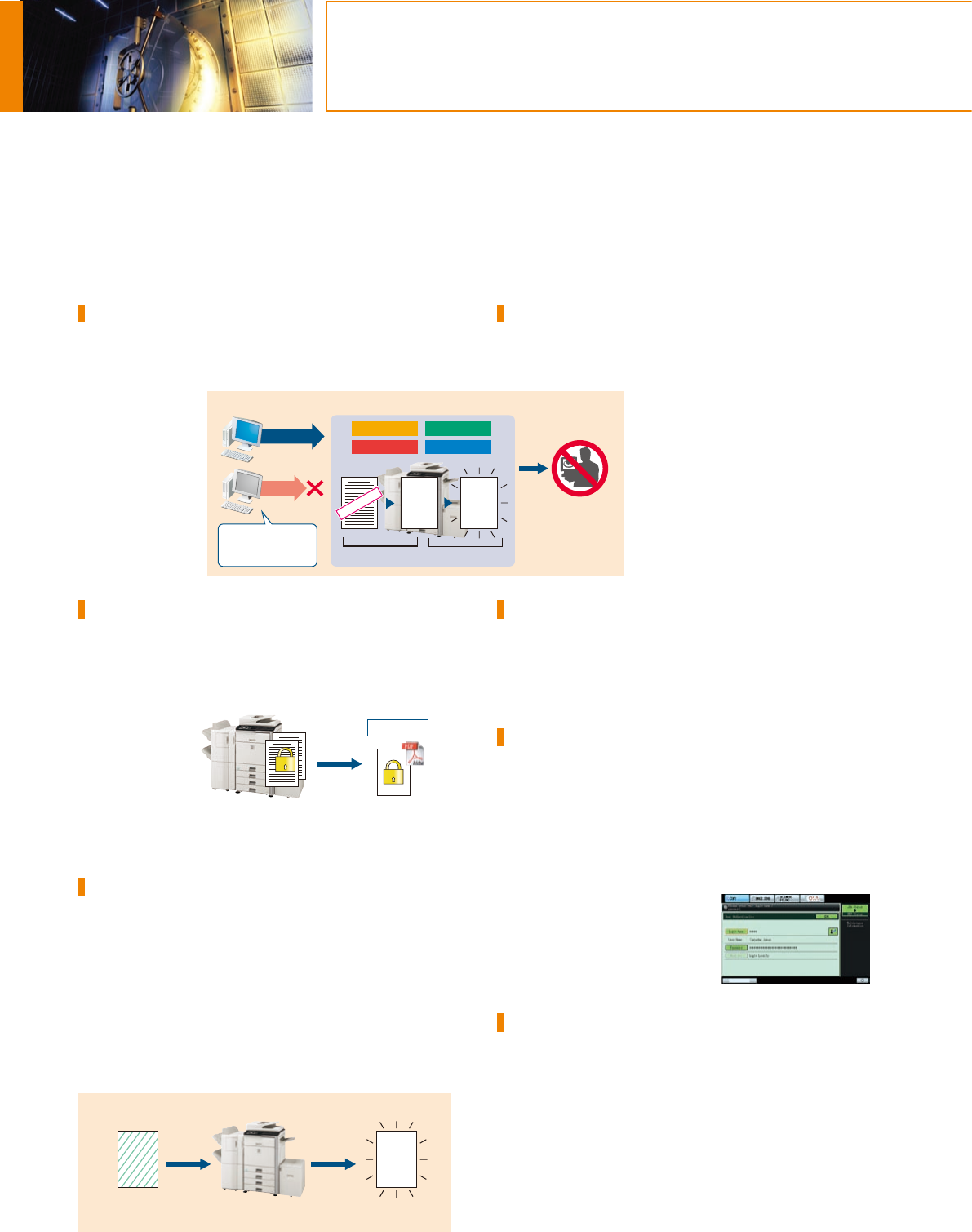
Data Security Kit
Digital copier/printers or MFPs can retain hundreds of pages of
confidential information from previous jobs on their hard disks or
internal memory. To safeguard this information from unauthorised
access, the optional
Data Security Kit
automatically
encrypts and
erases the data after
each job is complete
as well as data
stored both on the
hard disk and in the
address book.
Encrypted PDF with Password Protection
To prevent unauthorised viewing of confidential image data, the
MX-M503N/M453N/M363N/M283N enables users to password
protect and encrypt PDF data. By setting a password when
scanning, users can transmit a PDF over the network in encrypted
format. Then,
after transmission,
viewers will only
gain access to the
encrypted PDF
after successfully
re-entering the
chosen password.
Document Control Function
Document Control prevents unauthorised copying, scanning,
faxing, and filing of confidential documents. This is how it works:
the MX-M503N/M453N/M363N/M283N embeds copy prevention
data onto a document when it is first copied or printed. It will then
detect this data the next time someone tries to make a copy of the
document. Any unauthorised attempts to copy a Document
Controlled-document will simply be cancelled or result in the
output of a blank page.
Note: Requires optional Data Security Kit. May not work for certain types of
documents or paper.
Secure Network Access
The MX-M503N/M453N/M363N/M283N’s IP/MAC address
filtering function provides highly secure operation by restricting
access to these MFPs on your office network. Only PCs that have
either their IP address or MAC (media
access control) address registered are
allowed to use the MX-M503N/M453N/
M363N/M283N. Attempted access from
an unknown IP or MAC address will be
denied, preventing unauthorised use.
These MFPs also support the IEEE 802.1X
standard for port-based network access
control, which blocks all access from
unauthorised devices.
Secure Sockets Layer
SSL (secure sockets layer) enables the encryption of data
communications to prevent data leakage through the network
when printing via IPP, browsing secure Web pages (HTTPS), or
communicating via e-mail (SMTP and POP3) or FTP (FTPS).
User Authentication
The MX-M503N/M453N/M363N/M283N prevents unauthorised
use by requiring passwords for machine access. This safeguarded
solution can register up to 1,000 users in three access levels as
Administrator, User, or Guest and can designate to which function
user authentication applies. The MX-M503N/M453N/M363N/
M283N can, for example, be set to allow copying by all users
while restricting scanning to designated users. And the MX-
M503N/M453N/M363N/M283N
works with an external Active
Directory server to extend user
authentication to multiple MFPs and
a greater number of users.
IPv6 and IPsec Support
The MX-M503N/M453N/M363N/M283N supports IPv6, the next-
generation Internet protocol. An obligatory part of IPv6 is IPsec (IP
Security), a set of protocols for securing Internet protocol (IP)
communications. IPsec encrypts and authenticates traffic between
specified parties, giving IPsec-compatible products an extremely
high level of network security.

 (12 stránky)
 Manymanuals.com
 Manymanuals.de
 Manymanuals.fr
 Manymanuals.it
 Manymanuals.pl
 Manymanuals.cz
 Manymanuals.es
 Manymanuals-pt.com
Komentáře k této Příručce