Sharp XE-A303 Uživatelský manuál
Procházejte online nebo si stáhněte Uživatelský manuál pro Pokladny Sharp XE-A303. XEA303Frequently asked questions. Uživatelská příručka
- Strana / 16
- Tabulka s obsahem
- KNIHY

Shrnutí obsahu
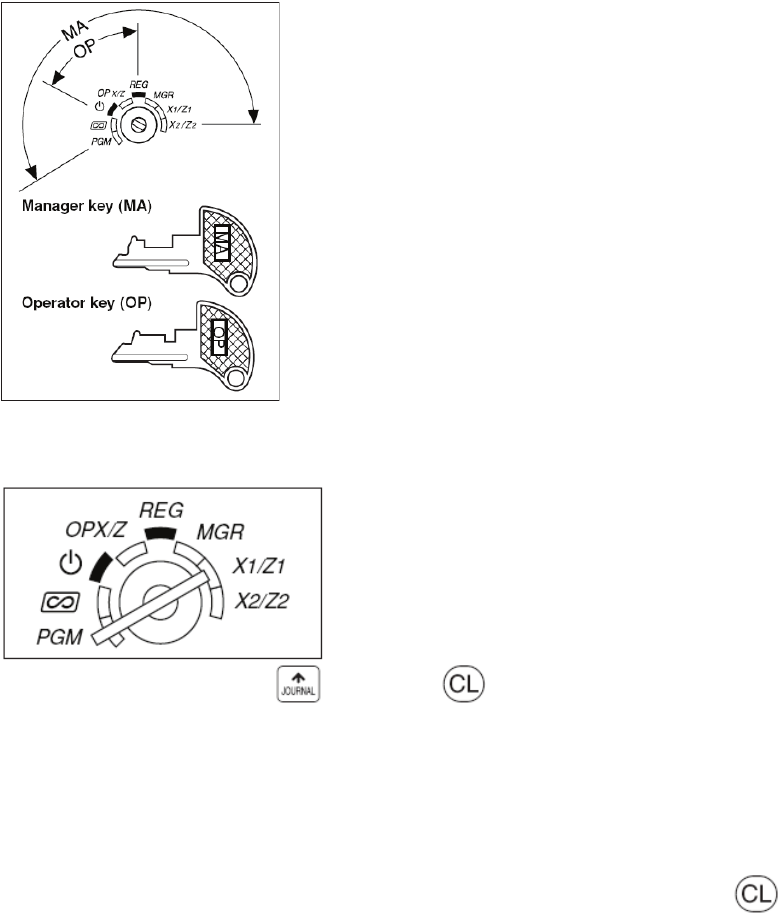
XE-A303 Frequently Asked Questions Page 1 of 16 XEA303Frequently asked questions. How do I prepare my XEA303 for set-up? Take the XEA303 out of it
XE-A303 Frequently Asked Questions Page 10 of 16 How do I get my business name and ABN to print on the receipt? 1. Set the mode key to the PGM pos
XE-A303 Frequently Asked Questions Page 11 of 16 9. Enter the sixth (last) line do the following: #/TM/ST 4 _●_ 6 __ use the keyboar
XE-A303 Frequently Asked Questions Page 12 of 16 How do I limit the information printing on the journal to save paper? The XEA303’s journal printer
XE-A303 Frequently Asked Questions Page 13 of 16 How do I make the decimal point key work; so I can sell other than full units. For: example 2.5 me
XE-A303 Frequently Asked Questions Page 14 of 16 The XEA303 display shows “NOT ASSIGNED” and I cannot make a sale. How to I fix this? You must sig
XE-A303 Frequently Asked Questions Page 15 of 16 How do I produce sales reports? There are two type types of reports: X or e(X)amine reports
XE-A303 Frequently Asked Questions Page 16 of 16 To produce a daily Z report, do the following: 3. Turn the mode key to X1/Z1 position 4. Press
XE-A303 Frequently Asked Questions Page 2 of 16 How do I ensure the XEA303 will retain its programming? The XEA303 has a built-in memory protection
XE-A303 Frequently Asked Questions Page 3 of 16 3. Lift up the receipt side print roller release lever (indicated with “PULL” on it). This will unl
XE-A303 Frequently Asked Questions Page 4 of 16 6. While holding down the paper, slowly close the print roller arm of the receipt side, and push do
XE-A303 Frequently Asked Questions Page 5 of 16 8. Lift up the journal side print roller release lever (indicated with “PULL” on it). This will unl
XE-A303 Frequently Asked Questions Page 6 of 16 11. Insert the end of the paper into the slot in the spool. Press the key to feed more paper if re
XE-A303 Frequently Asked Questions Page 7 of 16 How do I set a 10% GST rate? 1. Set the mode key to the PGM position 2. Enter: #/TM/ST 9
XE-A303 Frequently Asked Questions Page 8 of 16 How do I set the letters GST to print on the receipt? 1. Set the mode key to the PGM position 2.
XE-A303 Frequently Asked Questions Page 9 of 16 How do I give a department a descriptive name? 1. Set the mode key to the PGM position 2. Press
Další dokumenty pro Pokladny Sharp XE-A303


Související produkty a manuály pro Pokladny Sharp XE-A303

 (116 stránky)
(54 stránky)
(42 stránky)
(6 stránky)
(2 stránky)
(16 stránky)
(116 stránky)
(54 stránky)
(42 stránky)
(6 stránky)
(2 stránky)
(16 stránky)


 (140 stránky)
(75 stránky)
(2 stránky)
(25 stránky)
(2 stránky)
(140 stránky)
(75 stránky)
(2 stránky)
(25 stránky)
(2 stránky)
 (39 stránky)
(67 stránky)
(30 stránky)
(21 stránky)
(39 stránky)
(67 stránky)
(30 stránky)
(21 stránky)
© 2020, manymanuals.cz. Všechna práva vyhrazena. | 0.049 s |
 Manymanuals.com
 Manymanuals.de
 Manymanuals.fr
 Manymanuals.it
 Manymanuals.pl
 Manymanuals.cz
 Manymanuals.es
 Manymanuals-pt.com
Komentáře k této Příručce