Sharp LC-30AA1H Uživatelský manuál Strana 27

  • Stažení
  • Přidat do mých příruček
  • Tisk
  • Strana
    / 29
  • Tabulka s obsahem
  • KNIHY
  • Hodnocené. / 5. Na základě hodnocení zákazníků
Zobrazit stránku 26
Installing
the
wall-mount
bracket
(For
Model
30
inch
Integrated
Type)
(Continued)
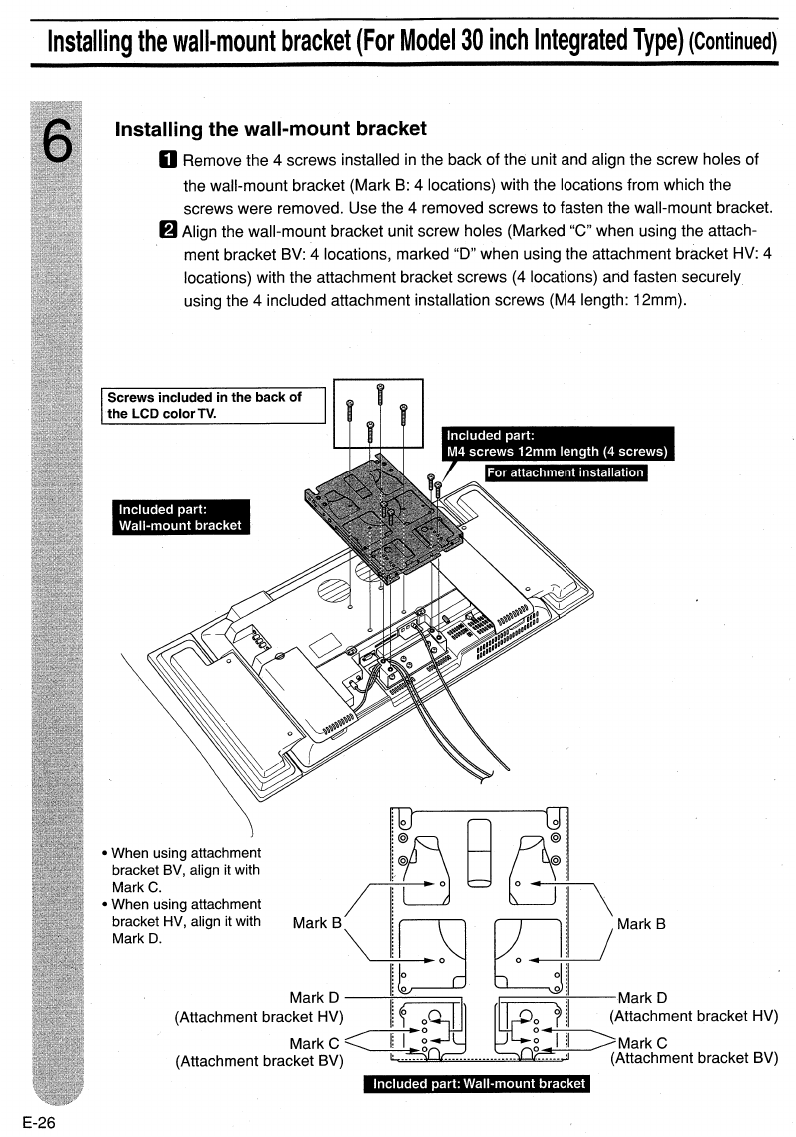
Included part: Wall-mount bracket
\
/Mark
B
;~B~;
@ @
0 0
..
/
MarkB\
~
rT}
Mark D 0
O~_O--;';;-I
--Mark
0
(Attachment bracket HV)
~
o~
~
i (Attachment bracket HV)
MarkC~~~
~~MarkC
(Attachment bracket BV)
o.
(Attachment bracket BV)
Included part:
Wall-mount bracket
Installing the wall-mount bracket
o Remove the 4 screws installed
in
the back of the unit and align the screw holes of
the wall-mount bracket (Mark
B:
4 locations) with the locations from which the
screws were removed. Use the 4 removed screws to fasten the wall-mount bracket.
6 Align the wall-mount bracket unit screw holes (Marked
"e"
when using the attach-
ment bracket BV: 4 locations, marked "D" when using the attachment bracket HV: 4
locations) with the attachment bracket screws
(4
locations) arid fasten securely
using the 4 included attachment installation screws (M4 length: 12mm).
Screws included in
the
back
of
the
LCD
color
TV.
When using attachment
bracket BV, align it with
Mark
C.
When using attachment
bracket HV, align it with
MarkO.
E-26
Zobrazit stránku 26
1 2 ... 22 23 24 25 26 27 28 29

Komentáře k této Příručce

Žádné komentáře