Sharp AR-5316 Specifikace Strana 47: 2.Download procedure
 1
 2
 3
 4
 5
 6
 7
 8
 9
 10
 11
 12
 13
 14
 15
 16
 17
 18
 19
 20
 21
 22
 23
 24
 25
 26
 27
 28
 29
 30
 31
 32
 33
 34
 35
 36
 37
 38
 39
 40
 41
 42
 43
 44
 45
 46
 47
 48
 49
 50
 51
 52
 53
 54
 55
 56
AR-5316 FLASH ROM VERSION UP PROCEDURE 12-1
[12]FLASH ROM VERSION UP PROCEDURE
1.Preparation
Write the download data (the file with the extension dwl) to the main body
of AR-5316.
Necessary files for download
• Maintenance.exe (Maintenance software)
• ProcPegasus.mdl
• ProcPegasus.ini
• ProcPegasus.fmt
• Pegasus.inf
• Usbscan.sys
• Download file:***.dwl
<Note>
•The Download file(***.dwl ) and the like that are to be downloaded
should be copied, in advance, into folders that have a maintenance
program.
•When creating a folder for a maintenance tool in the PC, be sure that no
lengthy folder name is included in the path.
(Example)
Incorrect c:\Maintenance Download Tool
Correct
c:\Maintenance\Downtool
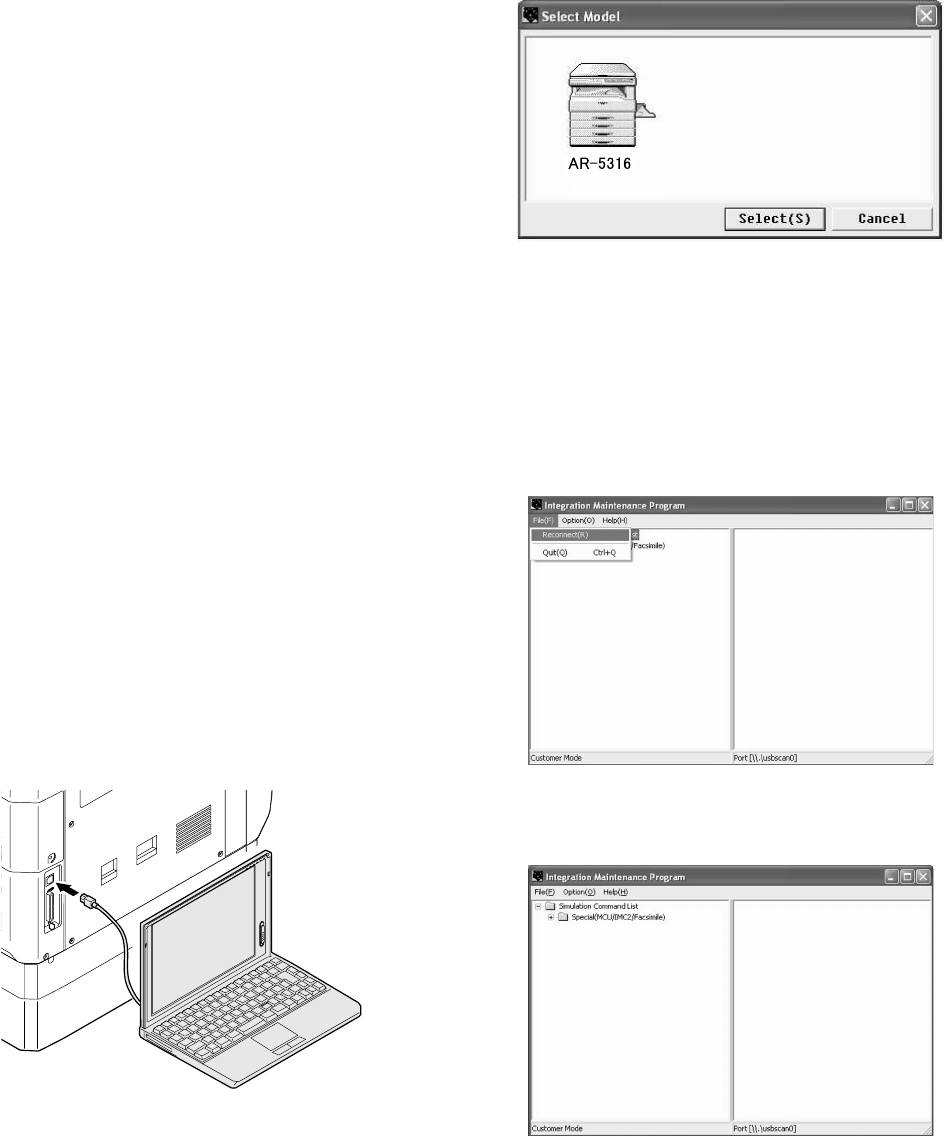
2.Download procedure
1)
Main body side:
Executable by performing the Service Simulation No. 49-01 (Flash
Rom program-writing mode).
(A word "d" appears on the operation panel to denote the download
mode status. )
2)
Connect the PC and the main body with the download cable
(USB cable).
(Be sure to use a USB cable for connection. USB2.0 of the AR-EB7
is not applicable.)
3)
PC side:
Boot the maintenance program. Select the model icon.
<Sample display>
4)
PC side:
Confirm that the "Simulation Command List" tree is displayed on the
maintenance program.
5)
PC side:
When the message "the main body has not got started running" is
displayed on the lowest area of the figure below after the
"maintenance program" is started up, select the "File" and then
"Reconnect" in the menu bar.
6)
PC side:
Confirm a tree is displayed under the "Special (MCU/IMC2/FAX)" on
the maintenance program". (If no tree is displayed, confirm that the
USB is connected and select the "Reconnect" (the above 5) again.)
Soubor PDF · ·
Otázky k Sharp AR-5316
K tomuto návodu zatím nejsou žádné otázky. Položte první.
Související produkty a manuály pro Tiskárny Sharp AR-5316
- Tiskárny Sharp MX-3110N Uživatelský manuál
 (14 stránek)
- Tiskárny Sharp AR-M700N Uživatelský manuál
(172 stránek)
- Tiskárny Sharp AR-M205 Uživatelský manuál
 (96 stránek)
- Tiskárny Sharp Digital Laser Copier/Printer AR-5127 Uživatelský manuál
(94 stránek)
- Tiskárny Sharp UX-460 Uživatelský manuál
(152 stránek)
- Tiskárny Sharp UX-A255 Uživatelský manuál
(112 stránek)
- Tiskárny Sharp UX-5000 Uživatelský manuál
(116 stránek)
- Tiskárny Sharp AR-M236 Uživatelský manuál
(100 stránek)
- Tiskárny Sharp FODC525 Uživatelský manuál
(248 stránek)
- Tiskárny Sharp DIGITAL LASER COPIER/PRINTER AR-153E Uživatelský manuál
(121 stránek)
- Tiskárny Sharp AR-M208N Uživatelský manuál
(2 stránky)
- Tiskárny Sharp MX-M450 Uživatelský manuál
(12 stránek)
- Tiskárny Sharp AR-FX9 Uživatelský manuál
(104 stránek)
- Tiskárny Sharp DX-C401 Uživatelský manuál
(148 stránek)
- Tiskárny Sharp AR-157E Uživatelský manuál
(84 stránek)
- Tiskárny Sharp AJ-1800 Uživatelský manuál
(56 stránek)
- Tiskárny Sharp AR-5316 Uživatelský manuál
(80 stránek)
- Tiskárny Sharp ML-4550 Uživatelský manuál
(112 stránek)
- Tiskárny Sharp TINSE4633FCZZ Uživatelský manuál
(52 stránek)
- Tiskárny Sharp R-208S Uživatelský manuál
(311 stránek)