Sharp AM-300 Specifikace Strana 50
- Strana / 167
- Tabulka s obsahem
- ŘEŠENÍ PROBLÉMŮ
- KNIHY

- AM-300/AM-400 1
- (EU Only) 3
- (U.K. Only) 6
- (Russian Only) 7
- Внимание! 7
- Introduction 8
- Scanning specifications 9
- General specifications 10
- Important safety information 11
- Trademark information 12
- Table of Contents 13
- 1 932 4 5 6 7 8 15
- 10 11 13 14 1512 16 18
- 32 4 5 6 7 18
- 1. Installation 20
- Installation 21
- Releasing the scanner 22
- Connecting the power cord 23
- 4 Select the dial mode: 25
- Cartridge 28
- ➊ and then the side cover ➋ 30
- Resetting the drum counter 31
- 4 Press repeatedly to exit 32
- Loading Paper 33
- 4 Replace the output tray 34
- Installing the Software 35
- Installing the software 36
- Sharpdesk online guide 41
- Removing the software 41
- 1. Installation 42
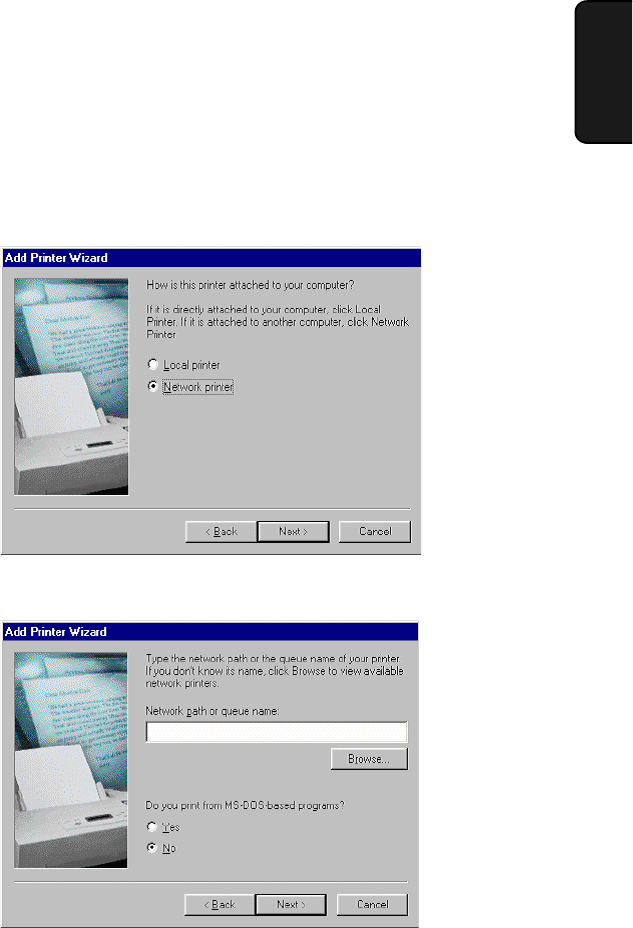
- 7. Click Finish 49
- 7. Click Browse 51
- 400 only) 53
- 7 Press 54
- 8 Press repeatedly to exit 54
- 8 Press to start the clock 56
- 9 Press repeatedly to exit 56
- General Machine Settings 57
- 1 Press (or ) and then 59
- 2. Copying 62
- Making a Copy 63
- If MEMORY IS FULL appears 65
- Enlarge/reduce 65
- CONTRAST CONTRAST 66
- Duplex Scan 67
- 3 Press to select ON 68
- DUPLEX SCAN 68
- Permanent Copy Settings 69
- Default copy contrast setting 71
- 2. Copying 72
- Other restrictions 73
- Loading the Document 73
- 100% A4 01 74
- ∗∗ COPY ∗∗ 74
- 5 Press 76
- Sending a Fax 77
- Using the REDIAL key 81
- If the memory becomes full 81
- 3. Sending 82
- 8 Press 83
- 1: SPEED DIAL 85
- FAX SETTING 85
- 1: NEW, 2: CHANGE 85
- 1: EDIT, 2: CLEAR 85
- 10 Press 86
- CONTRAST 87
- 1: YES, 2: NO 89
- 3 Press 3 times 90
- Display: 91
- The display briefly shows 91
- 5 Press 92
- 2 Press twice 95
- Destinations) 97
- Storing numbers in a Group 99
- Deleting a Group 100
- Timer Transmission 101
- 6 Press to select SET 102
- 9 Press 102
- Cancelling a timer job 104
- Selecting the Reception Mode 105
- Using FAX ONLY Mode 106
- Using EXT. TEL Mode 107
- 2 Press 108
- 3 Press 108
- 5 Press repeatedly to exit 108
- Being Polled (Memory Polling) 111
- 6. Printing 113
- Selecting Print Settings 114
- Page Setup tab 115
- Advanced tab 116
- 6. Printing 118
- 7. Scanning 120
- 7. Scanning 122
- XP/Me only) 124
- (Windows XP/Me only) 127
- 6. Click the Apply button 132
- SCAN : SC1 133
- ∗∗ SCAN ∗∗ 133
- 4 Press 134
- 1 Press and then or 139
- 4 Press once 139
- Telephone Number List 140
- Group List 140
- Setup List 140
- Timer List 140
- Help List 140
- Transaction Report 141
- 9. Maintenance 144
- Cleaning the document glass 145
- Cleaning the print rollers 146
- Cleaning the housing 146
- Maintenance 147
- Replacing the Toner Cartridge 148
- Replacing the Drum Cartridge 149
- Replacing the drum cartridge 150
- 10. Troubleshooting 152
- Problems and Solutions 153
- Copying problems 155
- General problems 156
- Messages and Signals 157
- Audible signals (AM-400 only) 159
- Clearing Paper Jams 160
- Clearing jammed paper 162
- ➋ in the 163
- ➊ (if you opened 163
- LASER PRODUCT 166
- LASER KLASSE 1 166
- SHARP CORPORATION 167
Související produkty a manuály pro Multifunkční zařízení Sharp AM-300
 (112 stránky)
(116 stránky)
(32 stránky)
(112 stránky)
(116 stránky)
(32 stránky)
 (108 stránky)
(139 stránky)
(108 stránky)
(139 stránky)
 (48 stránky) (161 stránky)
(120 stránky)
(96 stránky)
(48 stránky) (161 stránky)
(120 stránky)
(96 stránky)
© 2020, manymanuals.cz. Všechna práva vyhrazena. | 0.049 s |
 Manymanuals.com
 Manymanuals.de
 Manymanuals.fr
 Manymanuals.it
 Manymanuals.pl
 Manymanuals.cz
 Manymanuals.es
 Manymanuals-pt.com
Komentáře k této Příručce