Sharp DK-CL8PH(BK) Specifikace
Procházejte online nebo si stáhněte Specifikace pro Dokovací stanice mobilních zařízení Sharp DK-CL8PH(BK). Sharp DK-CL8PH(BK) Specifications Uživatelská příručka
- Strana / 24
- Tabulka s obsahem
- ŘEŠENÍ PROBLÉMŮ
- KNIHY

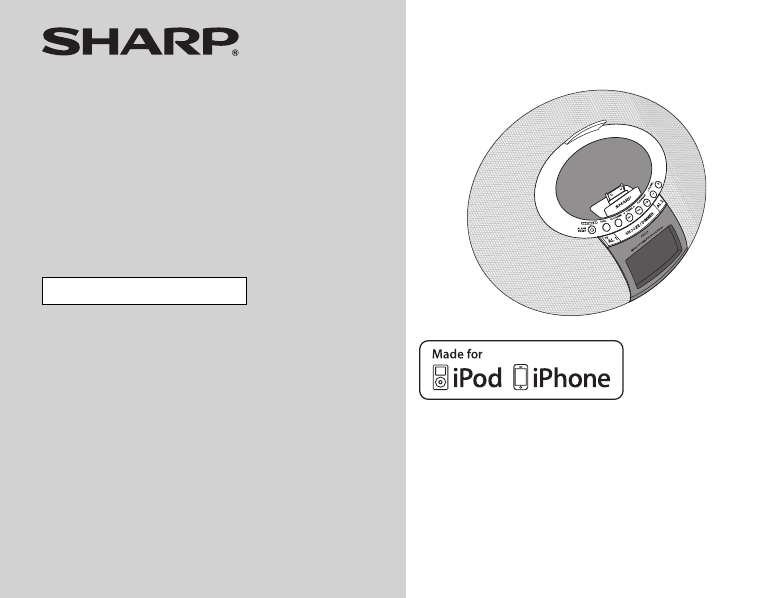
- DK-CL8PH(BK) 1
- DK-CL8PH(GR) 1
- DK-CL8PH(PK) 1
- Special notes 2
- Accessories 3
- Contents 3
- Precautions 4
- Controls and indicators 5
- General Information 6
- TUOOEDIV 7
- Preparation for Use 8
- ON/STAND-BY 9
- Setting the time and date 10
- 2011 October 4 11
- DK-CL8PH ENAUS_A6_p01-p20.fm 11
- ■ iPod adjuster 11
- ■ How to use iPod adjuster 11
- ■ iPod or iPhone playback 12
- Listening to the radio 13
- Alarm operation 14
- Advanced Features 15
- Enhancing your system 16
- Troubleshooting chart 17
- References 18
- Maintenance 19
- Specifications 19
- Specifications (continued) 20
- 1300 135 022 23
- WARRANTY 24
Shrnutí obsahu
Thank you for purchasing this SHARP product.To obtain the best performance from this product, please readthis manual carefully. It will guide you in o
102011 October 4 DK-CL8PH ENAUS_A6_p01-p20.fmDK-CL8PH(BK)DK-CL8PH(GR)DK-CL8PH(PK)Basic OperationSetting the time and dateIn this example, the clock is
112011 October 4 DK-CL8PH ENAUS_A6_p01-p20.fmDK-CL8PH(BK)DK-CL8PH(GR)DK-CL8PH(PK)iPod and iPhoneListening to the iPod or iPhoneiPod and iPhone operati
122011 October 4 DK-CL8PH ENAUS_A6_p01-p20.fmDK-CL8PH(BK)DK-CL8PH(GR)DK-CL8PH(PK)iPod and iPhoneListening to the iPod or iPhone (continued) iPod or i
132011 October 4 DK-CL8PH ENAUS_A6_p01-p20.fmDK-CL8PH(BK)DK-CL8PH(GR)DK-CL8PH(PK)RadioListening to the radio TuningNotes:●When radio interference occ
142011 October 4 DK-CL8PH ENAUS_A6_p01-p20.fmDK-CL8PH(BK)DK-CL8PH(GR)DK-CL8PH(PK)Radio / Advanced FeaturesListening to the radio (continued)Note:The b
152011 October 4 DK-CL8PH ENAUS_A6_p01-p20.fmDK-CL8PH(BK)DK-CL8PH(GR)DK-CL8PH(PK)Advanced FeaturesNote:If wake up source is set to iPod, and iPod is n
162011 October 4 DK-CL8PH ENAUS_A6_p01-p20.fmDK-CL8PH(BK)DK-CL8PH(GR)DK-CL8PH(PK)Advanced FeaturesEnhancing your systemThe auxiliary cable is not incl
172011 October 4 DK-CL8PH ENAUS_A6_p01-p20.fmDK-CL8PH(BK)DK-CL8PH(GR)DK-CL8PH(PK)ReferencesTroubleshooting chartMany potential problems can be resolve
182011 October 4 DK-CL8PH ENAUS_A6_p01-p20.fmDK-CL8PH(BK)DK-CL8PH(GR)DK-CL8PH(PK)ReferencesTroubleshooting chart (continued) CondensationSudden tempe
192011 October 4 DK-CL8PH ENAUS_A6_p01-p20.fmDK-CL8PH(BK)DK-CL8PH(GR)DK-CL8PH(PK)ReferencesMaintenance Cleaning the unitPeriodically wipe the unit wi
22011 October 4 DK-CL8PH ENAUS_A6_p01-p20.fmDK-CL8PH(BK)DK-CL8PH(GR)DK-CL8PH(PK)Special notesWarning:● When the ON/STAND-BY button is set at STAND-BYp
202011 October 4 DK-CL8PH ENAUS_A6_p01-p20.fmDK-CL8PH(BK)DK-CL8PH(GR)DK-CL8PH(PK)ReferencesSpecifications (continued) TunerInput terminals Auxiliary
FOR LOCATION ENQUIRIES WITHINNEW ZEALANDREGARDING YOUR LOCALSHARP CORPORATION OF NEW ZEALAND LIMITEDVISIT OUR WEBSITE ATSHARP CUSTOMER SERVICESTELEPHO
Congratulations on Your Purchase!This Sharp product is warranted against faults in material and manufacture for theperiod as stated in the table below
32011 October 4 DK-CL8PH ENAUS_A6_p01-p20.fmDK-CL8PH(BK)DK-CL8PH(GR)DK-CL8PH(PK)General InformationAccessoriesPlease confirm that only the following a
42011 October 4 DK-CL8PH ENAUS_A6_p01-p20.fmDK-CL8PH(BK)DK-CL8PH(GR)DK-CL8PH(PK)General InformationPrecautions General● Do not place anything on top
52011 October 4 DK-CL8PH ENAUS_A6_p01-p20.fmDK-CL8PH(BK)DK-CL8PH(GR)DK-CL8PH(PK)General InformationControls and indicators Top panelReference page1.
62011 October 4 DK-CL8PH ENAUS_A6_p01-p20.fmDK-CL8PH(BK)DK-CL8PH(GR)DK-CL8PH(PK)General InformationControls and indicators (continued) Bottom viewRef
72011 October 4 DK-CL8PH ENAUS_A6_p01-p20.fmDK-CL8PH(BK)DK-CL8PH(GR)DK-CL8PH(PK)Preparation for UseSystem connections Connecting iPod or iPhone to TV
82011 October 4 DK-CL8PH ENAUS_A6_p01-p20.fmDK-CL8PH(BK)DK-CL8PH(GR)DK-CL8PH(PK)Preparation for UseSystem connections (continued) Install/Replace bat
92011 October 4 DK-CL8PH ENAUS_A6_p01-p20.fmDK-CL8PH(BK)DK-CL8PH(GR)DK-CL8PH(PK)Basic OperationGeneral control To turn the power onPress the ON/STAND
Další dokumenty pro Dokovací stanice mobilních zařízení Sharp DK-CL8PH(BK)

Související produkty a manuály pro Dokovací stanice mobilních zařízení Sharp DK-CL8PH(BK)
 (28 stránky)


 (27 stránky)
© 2020, manymanuals.cz. Všechna práva vyhrazena. | 0.033 s |
 Manymanuals.com
 Manymanuals.de
 Manymanuals.fr
 Manymanuals.it
 Manymanuals.pl
 Manymanuals.cz
 Manymanuals.es
 Manymanuals-pt.com
Komentáře k této Příručce