Sharp AL-1661CS Specifikace Strana 91
- Strana / 100
- Tabulka s obsahem
- KNIHY

- AL-1661CS 1
- For users in the USA 2
- WARNING: 2
- INTRODUCTION 3
- TYPE OF SERVICE 3
- Important safety information 3
- FCC Notice to users: 4
- TABLE OF CONTENTS 5
- SPECIAL FUNCTIONS 6
- TROUBLESHOOTING 6
- APPENDIX 6
- QUICK REFERENCE GUIDE 7
- Sending a fax 8
- Receiving a fax 9
- LIST OF FAX FUNCTIONS 10
- INSTALLATION 15
- FINAL PREPARATIONS 16
- Comments: 16
- PART NAMES 17
- 272624 2523 19
- USING THE ARROW KEYS 20
- ADJUSTING THE BEEP VOLUME 20
- ADJUSTING THE RINGING VOLUME 21
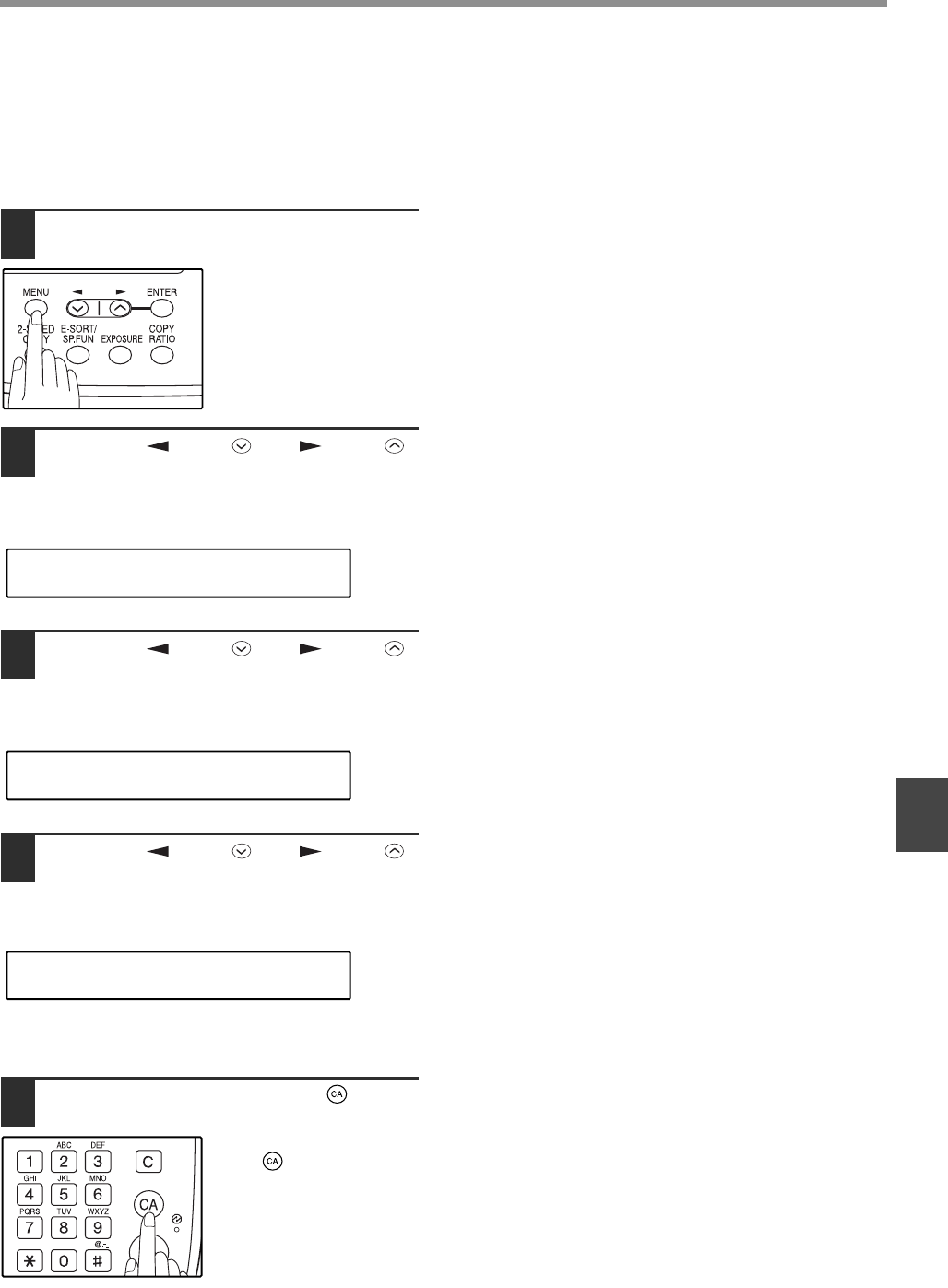
- "4:USER PROGRAM" 22
- "17:BEEP LENGTH" 22
- "19:BEEPER VOLUME" 23
- FAX SETUP 24
- "2:ENTRY MODE" 25
- "1:SET" 25
- SETTING THE DATE AND TIME 26
- "1:TIME FORMAT" 27
- "2:DATE FORMAT" 28
- Daylight Saving Time Setting 29
- MEMORY indicator 30
- SELECTING THE RECEPTION MODE 31
- SETTING THE DIAL MODE 34
- When the line is busy 35
- SETTING THE RECALL INTERVAL 37
- SETTING THE INDEX FUNCTION 39
- SETTING RESOLUTION PRIORITY 40
- "15:FAX SIGNAL RCV" 41
- DISTINCTIVE RINGING 44
- Storing numbers 45
- "1:FAX NUMBER" 47
- "2:CLEAR" 47
- "3:GROUP KEY" 48
- Press the [ENTER] key 49
- USING THE MACHINE WITH AN 51
- ANSWERING MACHINE 51
- ANSWERING MACHINE BACKUP 52
- ORIGINALS SUITABLE FOR FAXING 53
- UNSUITABLE ORIGINALS 54
- HOW TO USE THE FAX FUNCTION 55
- ORIGINAL SIZE 56
- OPTIONAL TRANSMISSION 57
- SETTINGS 57
- RESOLUTION 58
- CONTRAST 58
- COVER SHEET 59
- MESSAGE FUNCTION 60
- Original face up 61
- DIALING AND TRANSMITTING 62
- CHAIN DIALING 63
- USING THE SEARCH KEY 64
- REDIALING 64
- IF THE MEMORY BECOMES FULL 65
- WHILE SCANNING AN ORIGINAL 65
- CANCELING (DELETING) A 65
- STORED FAX JOB 65
- RECEIVING FAXES 66
- OPTIONAL RECEPTION SETTINGS 67
- RECEIVE REDUCE 68
- WHEN USING MANUAL SENDING 69
- AND RECEIVING 69
- DATA TRANSFER 71
- "1:DATA TRANSFER" 72
- "1:YES" 72
- TRANSMISSION RESERVATION 73
- BROADCASTING 74
- "8:POLLING MODE" 76
- SERIAL POLLING 77
- Selection 78
- "1:ON" 80
- "4:PASSCODE # MODE" 81
- TIMER OPERATIONS 82
- ANTI JUNK FAX 84
- "5:ANTI JUNK FAX" 85
- "2:JUNK FAX #" 85
- OPERATION IN COPY, PRINTER 87
- SCANNER, AND FAX MODES 87
- 5. PASSCODE LIST: 89
- 6. JUNK FAX # LIST: 89
- 7. USER PROGRAM LIST: 90
- ACTIVITY REPORT AUTO LISTING 91
- PRINTING TRANSACTION REPORTS 92
- MESSAGES AND SIGNALS 94
- SPECIFICATIONS 95
- Special functions 98
- Storing/settings 98
- INDEX BY PURPOSE 98
- Fax setup 98
- Faxes, sending and receiving 98
- NOTICE FOR USERS IN 99
- AVIS POUR NOS 99
- UTILISATEURS AU CANADA 99
Související produkty a manuály pro Faxy Sharp AL-1661CS
 (11 stránky)
(98 stránky)
(155 stránky)
(166 stránky)
(114 stránky)
(124 stránky)
(143 stránky)
(152 stránky)
(92 stránky)
(116 stránky)
(16 stránky)
(152 stránky)
(11 stránky)
(98 stránky)
(155 stránky)
(166 stránky)
(114 stránky)
(124 stránky)
(143 stránky)
(152 stránky)
(92 stránky)
(116 stránky)
(16 stránky)
(152 stránky)
 (8 stránky)
(1 stránky)
(137 stránky)
(4 stránky)
(156 stránky)
(36 stránky)
(8 stránky)
(1 stránky)
(137 stránky)
(4 stránky)
(156 stránky)
(36 stránky)
© 2020, manymanuals.cz. Všechna práva vyhrazena. | 0.098 s |
 Manymanuals.com
 Manymanuals.de
 Manymanuals.fr
 Manymanuals.it
 Manymanuals.pl
 Manymanuals.cz
 Manymanuals.es
 Manymanuals-pt.com
Komentáře k této Příručce