Back
Front
CARD
CARD
23
CPM
MX-M232D
20
CPM
MX-M202D
18
CPM
MX-M182D
MX-M182
23
PPM
MX-M232D
20
PPM
MX-M202D
18
PPM
MX-M182D
MX-M182
Sharpdesk screen
(MX-M232D/M202D/M182D shown with fax option)
NO!
Macintosh
Scan paper
document
Unknown IP or MAC
addresses will be
denied access
Scan
Print
Ethernet
(10Base-T/100Base-TX)
Windows
®
and
Windows Server
®
Desktop
Client PCs
E-mail
FTP server
Scan to
Scan
Document
Internet
USB
Built-in Duplex Module* and Optional RSPF
The MX-M232D/M202D/M182D can automatically produce duplex
copies from one- or two-sided originals. This reduces paper costs
and helps save filing space. Duplex copying is even more productive
when the duplex module is used together with the optional RSPF
(reversing single pass feeder), which efficiently feeds in up to 40
pages of either one- or
two-sided originals. A
40-sheet SPF (single pass
feeder) is also available for
feeding in one-sided originals.
* Available on
MX-M232D/M202D/M182D.
ID Card Copy
This function enables easy copying of
both sides of a card (ID cards, credit
cards, etc.) onto a single page.
Versatile Editing Functions
A variety of image editing functions, such as margin shift, 2-in-1,
4-in-1, and edge/centre erase, make copying more convenient.
Other Key Features
• Wide zoom range from 25% to 400% with 10 preset ratios
• Cost-efficient Toner Save mode
• Pre-Heat and Auto Power Shut-Off modes
• Copy/print/scan user control (50 accounts total)
• Automatic paper/magnification selection
• Highly reliable paper feed system minimises paper jams
• Fast warm-up time of 25 seconds saves valuable time
• Energy-efficient; compliant with ENERGY STAR
®
Full-Colour A3 Scanning
The MX-M232D/M202D/M182D/M182 lets you easily scan colour
originals up to A3 (11" x 17") in size in 600 x 600 dpi resolution
and use them to create vivid, impressive colour documents or
presentation materials. The optional RSPF* or SPF gives efficient
multi-page document scanning.
* Available on MX-M232D/M202D/M182D.
Push and Pull Scanning
Operation is quick and easy—simply press the Scan button, select
an application, and press Start (push scan). Up to six pre-registered
applications are available, including Sharpdesk, e-mail, Microsoft
®
Word, OCR, and fax. Button Manager allows you to
change/assign these destination applications and scan settings.
With support for the TWAIN standard, the MX-M232D/M202D/
M182D/M182 lets you import scanned images to a commercially
available TWAIN-compliant application (pull scan).
Sharpdesk
Sharpdesk is an original Sharp application that provides integrated
desktop management of documents in over 200 file formats.
Once you scan documents and images, or drag-and-drop existing
files on your PC into
Sharpdesk, you can view
their thumbnail images and
organise, edit, and share
your documents right on
your PC desktop. And
Sharpdesk Composer
combines different types of
files into a single document.
High-Speed Operation
The MX-FX13 Fax Expansion Kit turns the
MX-M232D/M202D/M182D/M182 into a 33.6 Kbps Super G3 fax
machine. Using JBIG compression technology, the MFP can send an
A4 (8
1
/2" x 11") size page in under 3 seconds. Use the optional
RSPF to further boost faxing efficiency. And because Quick
On-Line Transmission can start dialling and transmitting as soon
as the first page is scanned into memory, you can send documents
in much less time.
Inbound Routing for Transfer to E-Mail
This function allows you to check incoming faxes before printing
them out by transferring them (as PDF attachments) to a
designated e-mail address.
Duplex Transmission and Reception*
With the optional RSPF, the MX-M232D/M202D/M182D scans both
pages of two-sided documents and sorts them in memory. The
pages are then transmitted in the proper order. Thanks to the
built-in duplex module, the MX-M232D/M202D/M182D can also
print incoming faxes onto both sides of paper, thus saving you
paper costs
* Available on MX-M232D/M202D/M182D.
Other Key Features
• Memory transmission/reception
• Rapid and group dials (50 in total), 300 one-touch dials
• Long originals up to 800 mm can be sent using RSPF
(Note: Duplex transmission not possible)
Speedy Printing with Sharp Technology
The MX-M232D/M202D/M182D/M182 is a high-performance
printer incorporating Sharp Printer Language with Compression
(SPLC) technology. SPLC effectively reduces the data size of print
jobs, speeding up the data transfer time and printing process while
improving overall throughput. Also, the RIP Once/Print Many
(ROPM) function saves print data in the MFP’s internal memory
and transfers it to output at a
quick rate of 23/20/18/18 ppm
in 600-dpi resolution.
Print Status Display
A Print Status Window allows you to monitor important printer
information on your PC, including on-line/off-line status, name of the
active print job, and machine conditions such as amount of paper or
toner. Adding the optional MX-NB12 Network Expansion Kit makes
an upgraded, enhanced Printer Status Monitor available.
Other Key Features
• USB 2.0 port
• Duplex printing saves paper and filing space
(available on MX-M232D/M202D/M182D)
• N-up (2/4/6)*, Fit to Page, Watermarks
* N-up (2/4/6/8/9/16) with optional MX-NB12
• Job Separator (requires optional MX-TR10)
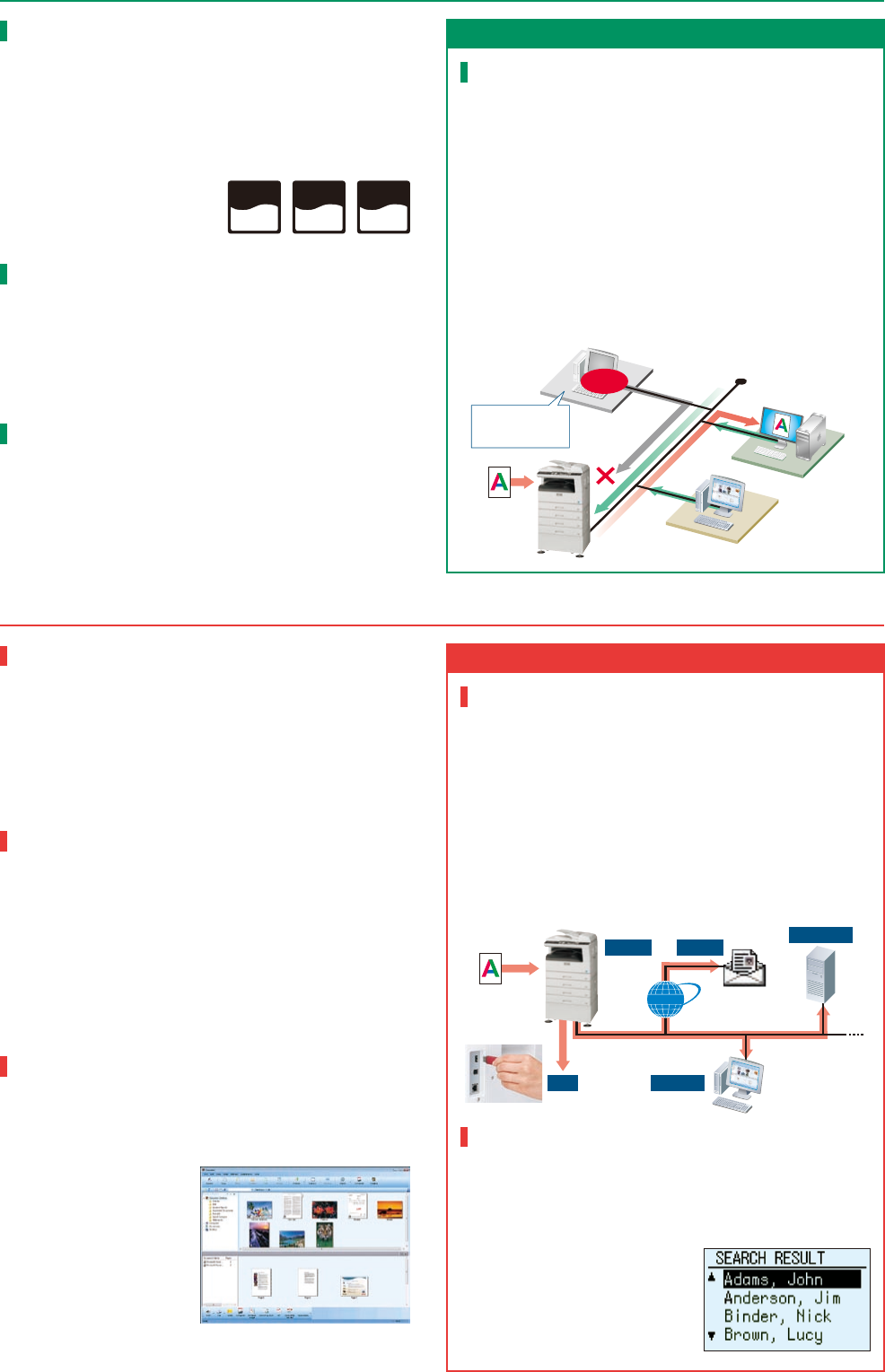
Secure Network Printing
Through its support of the TCP/IP network protocol, the optional
MX-NB12 Network Expansion Kit turns the MX-M232D/M202D/
M182D/M182 into a powerful network printer. With its IP/MAC
address filtering function, only PCs that have either their IP
address or MAC (media access control) address registered are
allowed to use the MFP. And SSL (secure sockets layer) encryption
prevents data leakage through the network when printing,
browsing secure Web pages (HTTPS), or communicating via e-mail
(SMTP and POP3), LDAP server (LDAPS), or FTP (FTPS). The
MX-NB12 also supports PCL and PostScript* page description
languages.
* Optional MX-PK10 PS3 Expansion Kit required.
Multiple Distribution of Scanned Files
The optional MX-NB12 Network Expansion Kit turns the
MX-M232D/M202D/M182D/M182 into a convenient full-colour
network scanner. With the touch of a few buttons, you can choose
different ways to distribute your scanned documents. Scan to
E-mail sends documents as an e-mail attachment. Scan to FTP
Server scans documents directly to an FTP server for storage. Scan
to Desktop sends scanned documents directly to your PC
desktop*. And Scan to USB Memory scans documents directly to
USB memory devices.
* Sharpdesk must be installed on the PC.
LDAP Support
The MX-NB12 provides the MX-M232D/M202D/M182D/M182 with
LDAP (lightweight directory access protocol) support, which
eliminates the need to enter or register an entire e-mail address.
Simply select Global Address from the LCD control panel, enter the
first few letters of the recipient’s name,
and the MFP displays a list of possible
matches from names and e-mail
addresses on your company’s LDAP
server. After searching, addresses can
be stored on the MFP for easy access.
COPYING
FAXING (option)
PRINTING
COLOUR SCANNING
Speedy Copying and Quick First Copy Time
The MX-M232D has a quick first copy time of 5.9 seconds (7.2
seconds for the MX-M202D/M182D/M182) to save valuable time
when performing multiple short-run jobs. And with a continuous
copy rate of 23/20/18/18 cpm,
you can do more copy jobs in
less time.
Electronic Sorting and Offset Stacking
The MX-M232D/M202D/M182D/M182’s Scan Once/Print Many
(SOPM) function does one scan of multiple-page documents and
stores them in memory for making up to 999 copies of each page.
The Electronic Sorting function then automatically collates
multiple sets of copies in page order without the aid of a sorter. The
MFP also stacks each set slightly shifted apart from the previous
(offset stacking) for easy retrieval. All this adds up to speedy
copying that boosts productivity even for large-volume documents.
Large Paper Capacity
The MX-M232D/M202D comes standard
with two 250-sheet paper trays (one
250-sheet tray for the M182D/M182)
and a 100-sheet multi-bypass feeder.
Two types of extra paper drawers are
available for a total paper capacity
of up to 1,100 sheets.
Superb Image Quality
600-dpi resolution and 256-level greyscale ensure finely detailed
reproduction, while Digital Auto Exposure Control provides
optimum copy contrast. For the best results, users can select Text
mode for text-only originals or Photo mode that gives detailed,
high-quality reproduction of photos and delicate halftone images.



 (20 stránky)
 (57 stránky)
 Manymanuals.com
 Manymanuals.de
 Manymanuals.fr
 Manymanuals.it
 Manymanuals.pl
 Manymanuals.cz
 Manymanuals.es
 Manymanuals-pt.com
Komentáře k této Příručce