65
PRODUCTIVE PERFORMANCE
MULTI-LAYERED SECURITY
PRODUCTIVE PERFORMANCE / MULTI-LAYERED SECURITY
PRODUCTIVE PERFORMANCE / MULTI-LAYERED SECURITY
Data Security Kit
Digital copier/printers or MFDs can retain hundreds of pages of
confidential information from previous jobs on their hard disks or
internal memory. To safeguard this information from unauthorised
access, the optional Data Security Kit automatically encrypts
and erases the data after each job is complete as well as data
stored on the hard disk.
Secure Network Access
The MX-C381/C311/C380/C310’s IP/MAC address filtering
function provides highly secure operation by restricting access to
the MX-C381/C311/C380/C310 on your office network. Only PCs
that have either their IP address or MAC (media access control)
address registered are allowed to use the MX-C381/C311/C380/
C310. Attempted access from an unknown IP or MAC address will
be denied, preventing unauthorised use. The MX-C381/C311/
C380/C310 also supports the IEEE 802.1X standard for
port-based network access control, which blocks all access from
unauthorised devices.
Encrypted PDF with Password Protection
To prevent unauthorised viewing of confidential image data, the
MX-C381/C311/C380/C310 enables users to password protect
and encrypt PDF data. By setting a password when scanning, users
can transmit a PDF over the network in encrypted format. Then,
after transmission, viewers will only gain access to the encrypted
PDF after successfully re-entering the chosen password.
Prevents data leak
The data generated for
each job is automatically
erased once that job
is finished
Data Security SystemIP/MAC Address Filtering
Unknown IP or MAC
addresses will be
denied access
NO!
OK
Copy Data Print Data
Scan Data Fax Data
d0bN%
=5!”//?
hj5&4
mk9#¥
TOP SECRET
Data Encryption Data Erase
Document Control Function
Document Control prevents unauthorised copying, scanning,
faxing, and filing of confidential documents. This is how it works:
the MX-C381/C311/C380/C310 embeds copy prevention data
onto a document when it is first copied or printed. It will then
detect this data the next time someone tries to make a copy of the
document. Any unauthorised attempts to copy a Document
Controlled-document will simply be cancelled or result in the
output of a blank page.
Note: Requires optional Data Security Kit. May not work for certain types of documents
or paper.
Print Hold and Confidential Print
To keep others from seeing confidential documents as they are
being printed out, the MX-C381/C311/C380/C310’s Print Hold
function stores print data on its hard disk and withholds output
until the user executes a print command from the control panel.
For added security, the Confidential Print function requires the
user to enter in a PIN (personal identification number) at the
machine before printing can begin.
Sharp OSA (Open Systems Architecture)
The MX-C381/C311/C380/C310 supports the Sharp OSA 3.0*
development platform. This innovative, third-generation
technology allows users to interact with critical business and
network applications and/or external account software right from
the LCD control panel, offering a new realm of control and
convenience. Since Sharp OSA 3.0 utilises industry-standard
network protocols, such as XML and SOAP, the MX-C381/C311/
C380/C310 can easily integrate with document management
systems, enterprise resource planning software, workflow
applications, and more.
* Requires optional MX-AMX2 and/or MX-AMX3
Quick Scanning and RSPF
With a scanning speed of 33 opm*
1
(A4 size) or 35 opm*
1
(letter size)—the fastest scan speed in the A4 MFD
category*
2
—the MX-C381/C311/C380/C310 can complete
large scan jobs with ease and efficiency. The standard-equipped
50-sheet RSPF (reversing single pass feeder), which smoothly
feeds in both one- and two-sided originals, brings added
efficiency.
*1: Single-side feeding. opm: originals per minute
*2: As of September 2008
Colour Network Scanning
s4HE-8####WORKSASAFULLCOLOURNETWORK
scanner that can be used with any Windows PC on the network.
It supports TIFF, PDF, encrypted PDF, JPEG, and the new XPS
(XML Paper Specification) file formats. The Auto Colour
Selection chooses the right mode for scanning originals
containing both colour and B/W pages (see page 3).
s7ITHTHETOUCHOFAFEWBUTTONSYOUCANCHOOSEDIFFERENTWAYS
to distribute your scanned documents. Scan to E-mail sends
documents as an e-mail attachment. Scan to FTP Server scans
documents directly to an FTP server for storage. Scan to
Desktop sends scanned documents directly to your PC desktop.
Scan to Network Folder (SMB) sends files to a shared folder
on a networked Windows PC. Scan to USB Memory scans
documents directly to USB memory devices. Scan to Fax
enables conventional faxing or Internet faxing.
Note: The screen shown to the left is just a sample.
Screen layouts and user interfaces can be
specifically designed to accommodate customised
application programs.
High-Speed Faxing
The optional MX-FXX3 Fax Expansion Kit turns the MX-C381/
C311/C380/C310 into a 33.6 Kbps Super G3 fax. Using JBIG
compression technology, the MX-C381/C311/C380/C310 can send
an A4 size page in under 3 seconds*. Use the 50-sheet RSPF to
further boost faxing efficiency. Additionally, Quick On-Line
Transmission can start dialling and transmitting as soon as the
first page is scanned into memory, allowing you to send
documents in even less time.
* Based on Sharp’s standard chart with approximately 700 characters (A4 long edge
feeding) at standard resolution.
Built-in Stackless Duplex Module
The built-in stackless duplex module on the MX-C381/C311/C380/
C310—particularly effective when used with RSPF—reduces paper
costs and saves filing space by making two-sided copies and
printouts.
Secure Sockets Layer
SSL (secure sockets layer) enables the encryption of data
communications to prevent data leakage through the network
when printing via IPP, browsing secure Web pages (HTTPS), or
communicating via e-mail (SMTP and POP3) or FTP (FTPS).
User Authentication
The MX-C381/C311/C380/C310 prevents unauthorised use by
requiring passwords for machine access. The MX-C381/C311/
C380/C310 can register up to 1,000 users in three access levels
as Administrator, User, and Guest. It can also designate to which
function user authentication applies. For example, the
MX-C381/C311/C380/C310 can be set to allow B/W copying by
all users while restricting colour copying to designated users.
IPv6 and IPsec Support
The MX-C381/C311/C380/C310 supports IPv6, the
next-generation Internet protocol. An obligatory part of IPv6 is
IPsec (IP Security), a set of protocols for securing Internet
protocol (IP) communications. IPsec encrypts and authenticates
traffic between specified parties, giving IPsec-compatible
products an extremely high level of network security.
Supports Most Office Environments
The MX-C381/C311/C380/C310 works as a network printer with
the latest and most commonly used operating systems and
network protocols, including IPv6, and even in mixed OS
environments. With a 64-bit, 800 MHz CPU, you get fast,
powerful network printing via the 1000Base-T Gigabit Ethernet
standard.
Macintosh
Ethernet
(10Base-T/100Base-TX/1000Base-T)
Print
Windows®
Windows Server®
SYSTEM CONFIGURATION & OPTIONS
BASE UNIT
MX-FN12
Finisher
MX-BTX1*
Business Card Feeder
MX-FXX3
Fax Expansion Kit
MX-CSX1
MX-CSX2
MX-CSX2
MX-CSX1
500-Sheet Paper
Feed Unit
MX-CSX2
500-Sheet Paper
Feed Unit
MX-CSX1
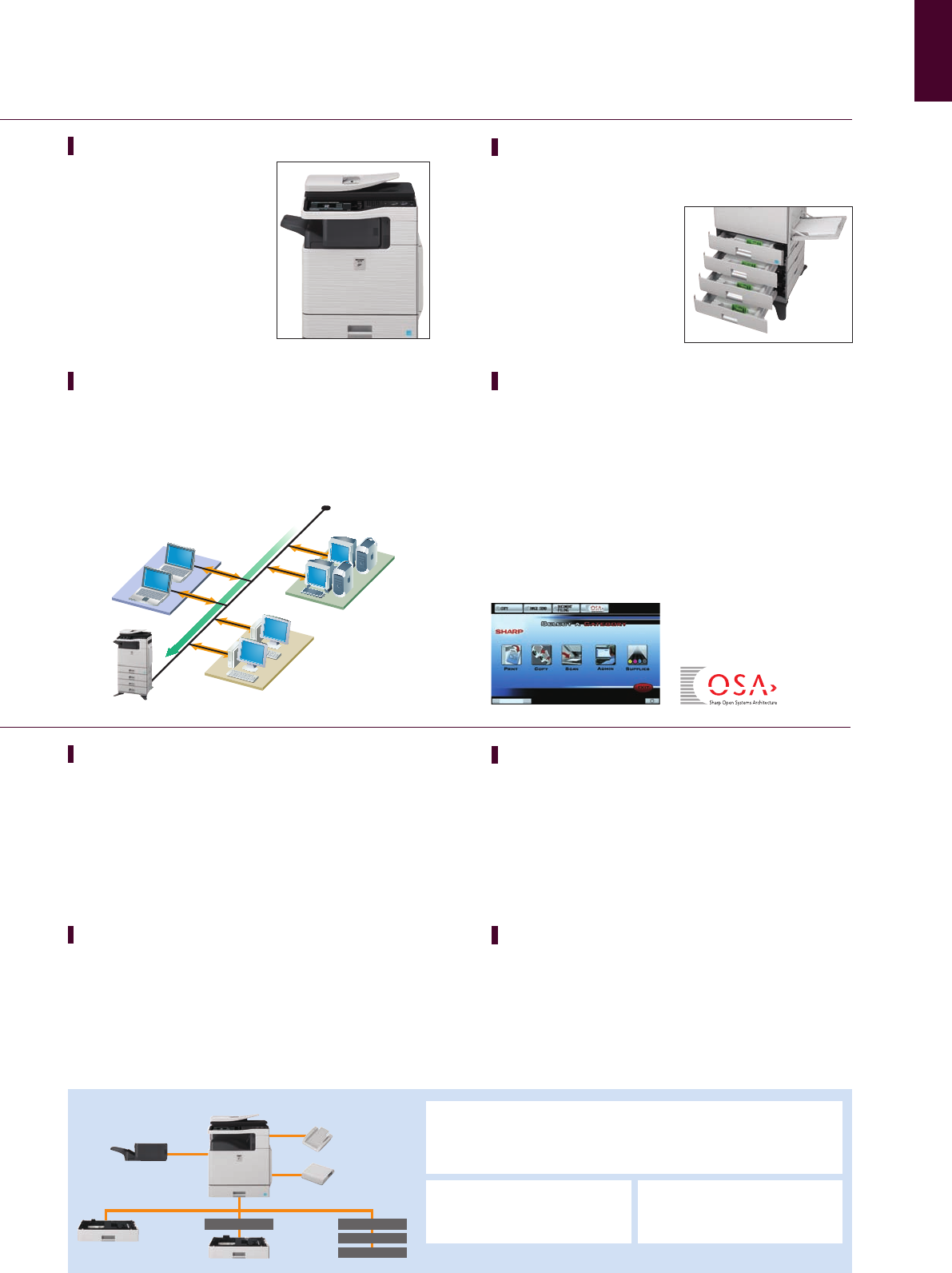
Space-Efficient Inner Finisher
The MX-C381/C311/C380/C310’s
optional inner finisher can be added
on without taking up much space.
It automates time-consuming tasks,
such as sorting and stapling*
documents of up to 30 pages, and
stacks each job slightly apart from
the previous one (offset stacking)
for easy retrieval.
* For one-corner stapling only
Large Paper Capacity
The MX-C381/C311/C380/C310 comes standard with a 500-sheet
paper tray and a 100-sheet multi-bypass feeder. Two types of extra
paper drawers are available for a
total paper capacity of up to
2,100 sheets. When a tray runs
out of paper, the Auto Tray
Switching function
automatically switches to another
paper tray filled with the same
size paper.
AR-PF1
Barcode Font Kit
MX-PUX1
XPS Expansion Kit
(requires MX-ARSMX3)
MX-ARSMX3
Expansion Memory Board
MX-FWX1
Internet Fax Expansion Kit
MX-USX1/X5
Sharpdesk 1/5-License Kit
MX-US10/50/A0
Sharpdesk
10/50/100-License Kit
MX-AMX1
Application Integration
Module
MX-AMX2
Application
Communication Module
MX-AMX3
External Account Module
Options for MX-C381/C311
MX-FR13U*
Data Security Kit
MX-FR13*
Data Security Kit
(Common Criteria validated)
Options for MX-C380/C310
MX-PKX5
PS3 Expansion Kit
MX-FR12U*
Data Security Kit
MX-FR12*
Data Security Kit
(Common Criteria validated)
Note: Certain options may not be available in some areas. The base unit can be attached to locally available cabinets either on its own or
along with optional paper feed unit(s). Consult your local dealer for details. * Available at a later date.
d0bN%
=5!”//?
hj5&4
mk9#¥
Scanned data is encrypted Requests password entry
for viewing the file
*****

 (8 stránky)


 (20 stránky)
 Manymanuals.com
 Manymanuals.de
 Manymanuals.fr
 Manymanuals.it
 Manymanuals.pl
 Manymanuals.cz
 Manymanuals.es
 Manymanuals-pt.com
Komentáře k této Příručce