Sharp AR-M200 Průvodce nastavením Strana 9

  • Stažení
  • Přidat do mých příruček
  • Tisk
  • Strana
    / 40
  • Tabulka s obsahem
  • ŘEŠENÍ PROBLÉMŮ
  • KNIHY
  • Hodnocené. / 5. Na základě hodnocení zákazníků
Zobrazit stránku 8
7
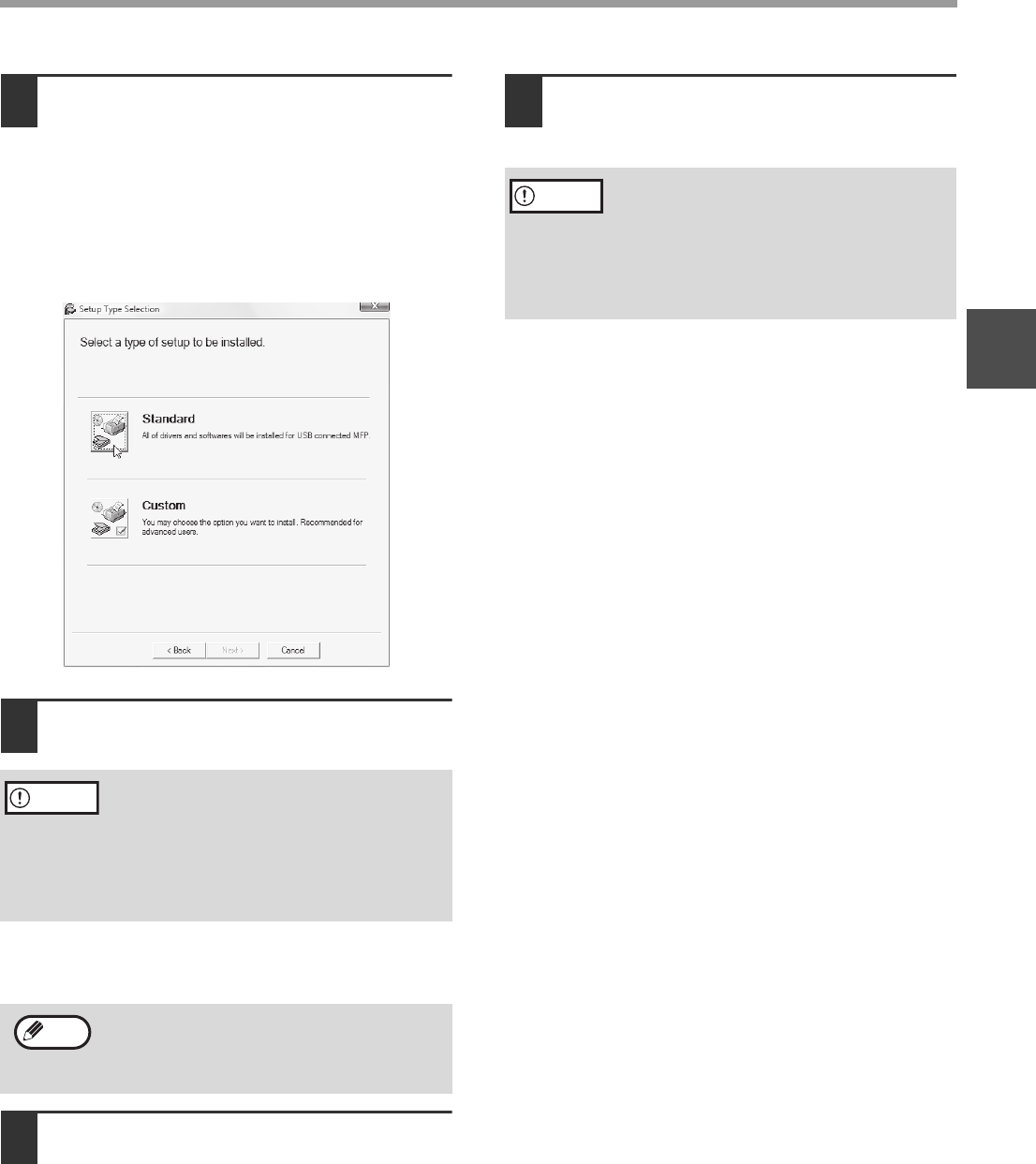
INSTALLING THE SOFTWARE (THAT ACCOMPANIES THE MACHINE)
1
7
Click the [Standard] button.
After the "Integrated Installer is preparing..."
message appears, the software components
below will be automatically installed. Follow the
on-screen instructions.
•MFP Driver
Button Manager
Sharpdesk
8
When installing is finished, click the
"Close" button.
A message will appear instructing you to connect
the machine to your computer. Click the "OK"
button.
9
Make sure that the power of the
machine is turned on, and then
connect the USB cable (p.37).
Windows will detect the machine and a Plug and
Play window will appear.
10
Follow the instructions in the Plug
and Play window to install the driver.
Follow the on-screen instructions.
This completes the installation.
After installing the MFP Driver, see "CONFIGURING
THE PRINTER DRIVER (Windows environment)"
(page 33) to configure the printer driver settings.
After installing Button Manager, see "SETTING UP
BUTTON MANAGER" (page 11) to set up Button
Manager.
If you are using Windows Vista and a
security warning window appears, be sure
to click "Install this driver software anyway".
If you are running Windows 2000/XP and a
warning message appears regarding the
Windows logo test or digital signature, be
sure to click "Continue Anyway" or "Yes".
After the installation, a message prompting
you to restart your computer may appear. In
this case, click the "Yes" button to restart your
computer.
Caution
Note
If you are using Windows Vista and a
security warning window appears, be sure
to click "Install this driver software anyway".
If you are running Windows 2000/XP and a
warning message appears regarding the
Windows logo test or digital signature, be
sure to click "Continue Anyway" or "Yes".
Caution
Zobrazit stránku 8
1 2 3 4 5 6 7 8 9 10 11 12 13 14 ... 39 40

Komentáře k této Příručce

Žádné komentáře

Grizzly G8183 manuales

Manuales del propietario y guías del usuario para Herramientas Grizzly G8183.
Ofrecemos 1 manuales en pdf Grizzly G8183 para descargar gratis por tipos de documentos: Manual de usuario


Más productos y manuales para Herramientas Grizzly

Modelos Tipo de documento
G1852 Manual de usuario   Grizzly G1852 User Manual, 27 paginas
G8143 Manual de usuario   Grizzly G8143 User Manual, 16 paginas
G1067Z Manual de usuario   Grizzly G1067Z User Manual, 28 paginas
H8230 Manual de usuario   Grizzly H8230 User Manual, 20 paginas
Paint Tank H8225 Manual de usuario   Grizzly Paint Tank H8225 User Manual, 2 paginas
H8232 Manual de usuario   Grizzly H8232 User Manual, 5 paginas
G6048 Manual de usuario   Grizzly G6048 User Manual, 17 paginas
Power Feeder G4176 Manual de usuario   Grizzly Power Feeder G4176 User Manual, 3 paginas
G8598 Manual de usuario   Grizzly G8598 User Manual, 17 paginas
Power Feeder G7873 Manual de usuario   Grizzly Power Feeder G7873 User Manual, 32 paginas
H8203 Manual de usuario   Grizzly H8203 User Manual, 2 paginas
H7666 Manual de usuario   Grizzly H7666 User Manual, 24 paginas
4" Manual de usuario   Grizzly 4" User Manual, 24 paginas
STILE AND RAIL SETS C1393-96 Manual de usuario   Grizzly STILE AND RAIL SETS C1393-96 User Manual, 2 paginas
G0453PX Manual de usuario   Grizzly G0453PX User Manual, 72 paginas
H7951 Manual de usuario   Grizzly H7951 User Manual, 28 paginas
G7946 Manual de usuario   Grizzly G7946 User Manual, 28 paginas
H6238 Manual de usuario   Grizzly H6238 User Manual, 3 paginas
Wood Copy Attachment G2891 Manual de usuario   Grizzly Wood Copy Attachment G2891 User Manual, 28 paginas
G7298 Manual de usuario   Grizzly G7298 User Manual, 28 paginas